mirror of
https://github.com/kamranahmedse/developer-roadmap.git
synced 2026-03-13 10:11:55 +08:00
Compare commits
79 Commits
fix/count
...
feat/proje
| Author | SHA1 | Date | |
|---|---|---|---|

|
6a7fc4ca76 | ||

|
56e7aa5687 | ||
|
|
b92abb127d | ||

|
a9b9077d07 | ||

|
65f51d9243 | ||

|
824c796029 | ||

|
e58c30f74f | ||

|
36a66fa901 | ||

|
fbf124aedf | ||
|
|
7e100434f7 | ||
|
|
7adbdc3fb1 | ||
|
|
e79bfca074 | ||
|
|
989f7ad5c1 | ||
|
|
dd5232f2f8 | ||
|
|
851a0381b6 | ||
|
|
88d783680b | ||
|
|
a1aba2e026 | ||
|
|
01eb7b2f0f | ||
|
|
94ce774586 | ||
|
|
bbcd7e18e5 | ||
|
|
298b137a7d | ||

|
ae58fa2a2a | ||
|
|
bcc85dcebe | ||
|
|
44a7a01e3c | ||
|
|
e3b6bacbc4 | ||
|
|
8c615084d3 | ||
|
|
9f446764bc | ||
|
|
bf80d3f052 | ||
|
|
09b63442dc | ||
|
|
af4b04a510 | ||

|
839d92db29 | ||

|
2193565071 | ||

|
1121993c15 | ||
|
|
973d4dc73a | ||
|
|
a913da47a7 | ||
|
|
2959ea3fda | ||
|
|
cf5301030f | ||

|
537bbc2ceb | ||
|
|
c9f34087c4 | ||
|
|
c1e733d640 | ||

|
ceb4baefa1 | ||
|
|
c387a6b843 | ||

|
909b0fa81a | ||
|
|
dae737fa02 | ||
|
|
f81783ff9d | ||
|
|
52d0fffaab | ||
|
|
8bad7f4de1 | ||
|
|
c3ff9efb73 | ||

|
53b5d7c953 | ||
|
|
c3421b4c1a | ||

|
6c3f8cb0e2 | ||

|
e99c88aae5 | ||
|
|
d3c259e79f | ||
|
|
03f6a58110 | ||

|
59c8a8184d | ||

|
9b5199d829 | ||

|
c123abdc23 | ||
|
|
ee143d8b6c | ||
|
|
7cf4618634 | ||

|
762444725a | ||

|
df4d083c01 | ||
|
|
e78bf8d7f7 | ||
|
|
dcb5538b12 | ||

|
fc3acb9702 | ||
|
|
6133c10beb | ||
|
|
29c8c3e76f | ||
|
|
48e3832dbd | ||

|
db2973f27e | ||

|
2b03fe1554 | ||
|
|
01f5e57ef4 | ||

|
4ac9e7b12c | ||

|
c2c122e4dc | ||
|
|
1e6fa6d8c6 | ||

|
a3422cd772 | ||
|
|
992d817d1a | ||
|
|
4ac4fcfba0 | ||
|
|
a92ea779b8 | ||
|
|
29fa5397f3 | ||
|
|
1c3d86f085 |
@@ -3,6 +3,6 @@
|
||||
"enabled": false
|
||||
},
|
||||
"_variables": {
|
||||
"lastUpdateCheck": 1724925726721
|
||||
"lastUpdateCheck": 1725962974592
|
||||
}
|
||||
}
|
||||
206
package-lock.json
generated
206
package-lock.json
generated
@@ -18,7 +18,7 @@
|
||||
"@resvg/resvg-js": "^2.6.2",
|
||||
"@types/react": "^18.3.3",
|
||||
"@types/react-dom": "^18.3.0",
|
||||
"astro": "^4.14.6",
|
||||
"astro": "^4.15.4",
|
||||
"clsx": "^2.1.1",
|
||||
"dayjs": "^1.11.12",
|
||||
"dom-to-image": "^2.6.0",
|
||||
@@ -506,9 +506,9 @@
|
||||
}
|
||||
},
|
||||
"node_modules/@babel/types": {
|
||||
"version": "7.25.4",
|
||||
"resolved": "https://registry.npmjs.org/@babel/types/-/types-7.25.4.tgz",
|
||||
"integrity": "sha512-zQ1ijeeCXVEh+aNL0RlmkPkG8HUiDcU2pzQQFjtbntgAczRASFzj4H+6+bV+dy1ntKR14I/DypeuRG1uma98iQ==",
|
||||
"version": "7.25.6",
|
||||
"resolved": "https://registry.npmjs.org/@babel/types/-/types-7.25.6.tgz",
|
||||
"integrity": "sha512-/l42B1qxpG6RdfYf343Uw1vmDjeNhneUXtzhojE7pDgfpEypmRhI6j1kr17XCVv4Cgl9HdAiQY2x0GwKm7rWCw==",
|
||||
"dependencies": {
|
||||
"@babel/helper-string-parser": "^7.24.8",
|
||||
"@babel/helper-validator-identifier": "^7.24.7",
|
||||
@@ -2266,13 +2266,21 @@
|
||||
]
|
||||
},
|
||||
"node_modules/@shikijs/core": {
|
||||
"version": "1.14.1",
|
||||
"resolved": "https://registry.npmjs.org/@shikijs/core/-/core-1.14.1.tgz",
|
||||
"integrity": "sha512-KyHIIpKNaT20FtFPFjCQB5WVSTpLR/n+jQXhWHWVUMm9MaOaG9BGOG0MSyt7yA4+Lm+4c9rTc03tt3nYzeYSfw==",
|
||||
"version": "1.16.3",
|
||||
"resolved": "https://registry.npmjs.org/@shikijs/core/-/core-1.16.3.tgz",
|
||||
"integrity": "sha512-yETIvrETCeC39gSPIiSADmjri9FwKmxz0QvONMtTIUYlKZe90CJkvcjPksayC2VQOtzOJonEiULUa8v8crUQvA==",
|
||||
"dependencies": {
|
||||
"@types/hast": "^3.0.4"
|
||||
"@shikijs/vscode-textmate": "^9.2.0",
|
||||
"@types/hast": "^3.0.4",
|
||||
"oniguruma-to-js": "0.3.3",
|
||||
"regex": "4.3.2"
|
||||
}
|
||||
},
|
||||
"node_modules/@shikijs/vscode-textmate": {
|
||||
"version": "9.2.2",
|
||||
"resolved": "https://registry.npmjs.org/@shikijs/vscode-textmate/-/vscode-textmate-9.2.2.tgz",
|
||||
"integrity": "sha512-TMp15K+GGYrWlZM8+Lnj9EaHEFmOen0WJBrfa17hF7taDOYthuPPV0GWzfd/9iMij0akS/8Yw2ikquH7uVi/fg=="
|
||||
},
|
||||
"node_modules/@shuding/opentype.js": {
|
||||
"version": "1.4.0-beta.0",
|
||||
"resolved": "https://registry.npmjs.org/@shuding/opentype.js/-/opentype.js-1.4.0-beta.0.tgz",
|
||||
@@ -2900,20 +2908,17 @@
|
||||
}
|
||||
},
|
||||
"node_modules/astro": {
|
||||
"version": "4.14.6",
|
||||
"resolved": "https://registry.npmjs.org/astro/-/astro-4.14.6.tgz",
|
||||
"integrity": "sha512-MIDyNhtu3L4uakHvlTprh21eQPehYOtZSuSLtd+r6xZcl3lB+mlBz/hs1W3iHEQAORyJnKArWSY/aVOBKUyflA==",
|
||||
"version": "4.15.4",
|
||||
"resolved": "https://registry.npmjs.org/astro/-/astro-4.15.4.tgz",
|
||||
"integrity": "sha512-wqy+m3qygt9DmCSqMsckxyK4ccCUFtti2d/WlLkEpAlqHgyDIg20zRTLHO2v/H4YeSlJ8sAcN0RW2FhOeYbINg==",
|
||||
"dependencies": {
|
||||
"@astrojs/compiler": "^2.10.3",
|
||||
"@astrojs/internal-helpers": "0.4.1",
|
||||
"@astrojs/markdown-remark": "5.2.0",
|
||||
"@astrojs/telemetry": "3.1.0",
|
||||
"@babel/core": "^7.25.2",
|
||||
"@babel/generator": "^7.25.5",
|
||||
"@babel/parser": "^7.25.4",
|
||||
"@babel/plugin-transform-react-jsx": "^7.25.2",
|
||||
"@babel/traverse": "^7.25.4",
|
||||
"@babel/types": "^7.25.4",
|
||||
"@babel/types": "^7.25.6",
|
||||
"@oslojs/encoding": "^0.4.1",
|
||||
"@rollup/pluginutils": "^5.1.0",
|
||||
"@types/babel__core": "^7.20.5",
|
||||
@@ -2936,8 +2941,8 @@
|
||||
"es-module-lexer": "^1.5.4",
|
||||
"esbuild": "^0.21.5",
|
||||
"estree-walker": "^3.0.3",
|
||||
"execa": "^8.0.1",
|
||||
"fast-glob": "^3.3.2",
|
||||
"fastq": "^1.17.1",
|
||||
"flattie": "^1.1.1",
|
||||
"github-slugger": "^2.0.0",
|
||||
"gray-matter": "^4.0.3",
|
||||
@@ -2946,6 +2951,7 @@
|
||||
"js-yaml": "^4.1.0",
|
||||
"kleur": "^4.1.5",
|
||||
"magic-string": "^0.30.11",
|
||||
"magicast": "^0.3.5",
|
||||
"micromatch": "^4.0.8",
|
||||
"mrmime": "^2.0.0",
|
||||
"neotraverse": "^0.6.18",
|
||||
@@ -2957,14 +2963,15 @@
|
||||
"prompts": "^2.4.2",
|
||||
"rehype": "^13.0.1",
|
||||
"semver": "^7.6.3",
|
||||
"shiki": "^1.14.1",
|
||||
"shiki": "^1.16.1",
|
||||
"string-width": "^7.2.0",
|
||||
"strip-ansi": "^7.1.0",
|
||||
"tsconfck": "^3.1.1",
|
||||
"tinyexec": "^0.3.0",
|
||||
"tsconfck": "^3.1.3",
|
||||
"unist-util-visit": "^5.0.0",
|
||||
"vfile": "^6.0.3",
|
||||
"vite": "^5.4.2",
|
||||
"vitefu": "^0.2.5",
|
||||
"vitefu": "^1.0.2",
|
||||
"which-pm": "^3.0.0",
|
||||
"xxhash-wasm": "^1.0.2",
|
||||
"yargs-parser": "^21.1.1",
|
||||
@@ -4040,28 +4047,6 @@
|
||||
"resolved": "https://registry.npmjs.org/eventemitter3/-/eventemitter3-5.0.1.tgz",
|
||||
"integrity": "sha512-GWkBvjiSZK87ELrYOSESUYeVIc9mvLLf/nXalMOS5dYrgZq9o5OVkbZAVM06CVxYsCwH9BDZFPlQTlPA1j4ahA=="
|
||||
},
|
||||
"node_modules/execa": {
|
||||
"version": "8.0.1",
|
||||
"resolved": "https://registry.npmjs.org/execa/-/execa-8.0.1.tgz",
|
||||
"integrity": "sha512-VyhnebXciFV2DESc+p6B+y0LjSm0krU4OgJN44qFAhBY0TJ+1V61tYD2+wHusZ6F9n5K+vl8k0sTy7PEfV4qpg==",
|
||||
"dependencies": {
|
||||
"cross-spawn": "^7.0.3",
|
||||
"get-stream": "^8.0.1",
|
||||
"human-signals": "^5.0.0",
|
||||
"is-stream": "^3.0.0",
|
||||
"merge-stream": "^2.0.0",
|
||||
"npm-run-path": "^5.1.0",
|
||||
"onetime": "^6.0.0",
|
||||
"signal-exit": "^4.1.0",
|
||||
"strip-final-newline": "^3.0.0"
|
||||
},
|
||||
"engines": {
|
||||
"node": ">=16.17"
|
||||
},
|
||||
"funding": {
|
||||
"url": "https://github.com/sindresorhus/execa?sponsor=1"
|
||||
}
|
||||
},
|
||||
"node_modules/extend": {
|
||||
"version": "3.0.2",
|
||||
"resolved": "https://registry.npmjs.org/extend/-/extend-3.0.2.tgz",
|
||||
@@ -4325,17 +4310,6 @@
|
||||
"url": "https://github.com/sponsors/sindresorhus"
|
||||
}
|
||||
},
|
||||
"node_modules/get-stream": {
|
||||
"version": "8.0.1",
|
||||
"resolved": "https://registry.npmjs.org/get-stream/-/get-stream-8.0.1.tgz",
|
||||
"integrity": "sha512-VaUJspBffn/LMCJVoMvSAdmscJyS1auj5Zulnn5UoYcY531UWmdwhRWkcGKnGU93m5HSXP9LP2usOryrBtQowA==",
|
||||
"engines": {
|
||||
"node": ">=16"
|
||||
},
|
||||
"funding": {
|
||||
"url": "https://github.com/sponsors/sindresorhus"
|
||||
}
|
||||
},
|
||||
"node_modules/get-tsconfig": {
|
||||
"version": "4.7.6",
|
||||
"resolved": "https://registry.npmjs.org/get-tsconfig/-/get-tsconfig-4.7.6.tgz",
|
||||
@@ -4720,14 +4694,6 @@
|
||||
"node": ">= 0.8"
|
||||
}
|
||||
},
|
||||
"node_modules/human-signals": {
|
||||
"version": "5.0.0",
|
||||
"resolved": "https://registry.npmjs.org/human-signals/-/human-signals-5.0.0.tgz",
|
||||
"integrity": "sha512-AXcZb6vzzrFAUE61HnN4mpLqd/cSIwNQjtNWR0euPm6y0iqx3G4gOXaIDdtdDwZmhwe82LA6+zinmW4UBWVePQ==",
|
||||
"engines": {
|
||||
"node": ">=16.17.0"
|
||||
}
|
||||
},
|
||||
"node_modules/humanize-ms": {
|
||||
"version": "1.2.1",
|
||||
"resolved": "https://registry.npmjs.org/humanize-ms/-/humanize-ms-1.2.1.tgz",
|
||||
@@ -4927,17 +4893,6 @@
|
||||
"url": "https://github.com/sponsors/sindresorhus"
|
||||
}
|
||||
},
|
||||
"node_modules/is-stream": {
|
||||
"version": "3.0.0",
|
||||
"resolved": "https://registry.npmjs.org/is-stream/-/is-stream-3.0.0.tgz",
|
||||
"integrity": "sha512-LnQR4bZ9IADDRSkvpqMGvt/tEJWclzklNgSw48V5EAaAeDd6qGvN8ei6k5p0tvxSR171VmGyHuTiAOfxAbr8kA==",
|
||||
"engines": {
|
||||
"node": "^12.20.0 || ^14.13.1 || >=16.0.0"
|
||||
},
|
||||
"funding": {
|
||||
"url": "https://github.com/sponsors/sindresorhus"
|
||||
}
|
||||
},
|
||||
"node_modules/is-unicode-supported": {
|
||||
"version": "2.0.0",
|
||||
"resolved": "https://registry.npmjs.org/is-unicode-supported/-/is-unicode-supported-2.0.0.tgz",
|
||||
@@ -5252,6 +5207,16 @@
|
||||
"@jridgewell/sourcemap-codec": "^1.5.0"
|
||||
}
|
||||
},
|
||||
"node_modules/magicast": {
|
||||
"version": "0.3.5",
|
||||
"resolved": "https://registry.npmjs.org/magicast/-/magicast-0.3.5.tgz",
|
||||
"integrity": "sha512-L0WhttDl+2BOsybvEOLK7fW3UA0OQ0IQ2d6Zl2x/a6vVRs3bAY0ECOSHHeL5jD+SbOpOCUEi0y1DgHEn9Qn1AQ==",
|
||||
"dependencies": {
|
||||
"@babel/parser": "^7.25.4",
|
||||
"@babel/types": "^7.25.4",
|
||||
"source-map-js": "^1.2.0"
|
||||
}
|
||||
},
|
||||
"node_modules/make-dir": {
|
||||
"version": "3.1.0",
|
||||
"resolved": "https://registry.npmjs.org/make-dir/-/make-dir-3.1.0.tgz",
|
||||
@@ -5526,11 +5491,6 @@
|
||||
"resolved": "https://registry.npmjs.org/memoize-one/-/memoize-one-5.2.1.tgz",
|
||||
"integrity": "sha512-zYiwtZUcYyXKo/np96AGZAckk+FWWsUdJ3cHGGmld7+AhvcWmQyGCYUh1hc4Q/pkOhb65dQR/pqCyK0cOaHz4Q=="
|
||||
},
|
||||
"node_modules/merge-stream": {
|
||||
"version": "2.0.0",
|
||||
"resolved": "https://registry.npmjs.org/merge-stream/-/merge-stream-2.0.0.tgz",
|
||||
"integrity": "sha512-abv/qOcuPfk3URPfDzmZU1LKmuw8kT+0nIHvKrKgFrwifol/doWcdA4ZqsWQ8ENrFKkd67Mfpo/LovbIUsbt3w=="
|
||||
},
|
||||
"node_modules/merge2": {
|
||||
"version": "1.4.1",
|
||||
"resolved": "https://registry.npmjs.org/merge2/-/merge2-1.4.1.tgz",
|
||||
@@ -6118,17 +6078,6 @@
|
||||
"node": ">= 0.6"
|
||||
}
|
||||
},
|
||||
"node_modules/mimic-fn": {
|
||||
"version": "4.0.0",
|
||||
"resolved": "https://registry.npmjs.org/mimic-fn/-/mimic-fn-4.0.0.tgz",
|
||||
"integrity": "sha512-vqiC06CuhBTUdZH+RYl8sFrL096vA45Ok5ISO6sE/Mr1jRbGH4Csnhi8f3wKVl7x8mO4Au7Ir9D3Oyv1VYMFJw==",
|
||||
"engines": {
|
||||
"node": ">=12"
|
||||
},
|
||||
"funding": {
|
||||
"url": "https://github.com/sponsors/sindresorhus"
|
||||
}
|
||||
},
|
||||
"node_modules/mimic-function": {
|
||||
"version": "5.0.1",
|
||||
"resolved": "https://registry.npmjs.org/mimic-function/-/mimic-function-5.0.1.tgz",
|
||||
@@ -6325,31 +6274,6 @@
|
||||
"npm": ">=8.12.1"
|
||||
}
|
||||
},
|
||||
"node_modules/npm-run-path": {
|
||||
"version": "5.3.0",
|
||||
"resolved": "https://registry.npmjs.org/npm-run-path/-/npm-run-path-5.3.0.tgz",
|
||||
"integrity": "sha512-ppwTtiJZq0O/ai0z7yfudtBpWIoxM8yE6nHi1X47eFR2EWORqfbu6CnPlNsjeN683eT0qG6H/Pyf9fCcvjnnnQ==",
|
||||
"dependencies": {
|
||||
"path-key": "^4.0.0"
|
||||
},
|
||||
"engines": {
|
||||
"node": "^12.20.0 || ^14.13.1 || >=16.0.0"
|
||||
},
|
||||
"funding": {
|
||||
"url": "https://github.com/sponsors/sindresorhus"
|
||||
}
|
||||
},
|
||||
"node_modules/npm-run-path/node_modules/path-key": {
|
||||
"version": "4.0.0",
|
||||
"resolved": "https://registry.npmjs.org/path-key/-/path-key-4.0.0.tgz",
|
||||
"integrity": "sha512-haREypq7xkM7ErfgIyA0z+Bj4AGKlMSdlQE2jvJo6huWD1EdkKYV+G/T4nq0YEF2vgTT8kqMFKo1uHn950r4SQ==",
|
||||
"engines": {
|
||||
"node": ">=12"
|
||||
},
|
||||
"funding": {
|
||||
"url": "https://github.com/sponsors/sindresorhus"
|
||||
}
|
||||
},
|
||||
"node_modules/nth-check": {
|
||||
"version": "2.1.1",
|
||||
"resolved": "https://registry.npmjs.org/nth-check/-/nth-check-2.1.1.tgz",
|
||||
@@ -6397,18 +6321,12 @@
|
||||
"wrappy": "1"
|
||||
}
|
||||
},
|
||||
"node_modules/onetime": {
|
||||
"version": "6.0.0",
|
||||
"resolved": "https://registry.npmjs.org/onetime/-/onetime-6.0.0.tgz",
|
||||
"integrity": "sha512-1FlR+gjXK7X+AsAHso35MnyN5KqGwJRi/31ft6x0M194ht7S+rWAvd7PHss9xSKMzE0asv1pyIHaJYq+BbacAQ==",
|
||||
"dependencies": {
|
||||
"mimic-fn": "^4.0.0"
|
||||
},
|
||||
"engines": {
|
||||
"node": ">=12"
|
||||
},
|
||||
"node_modules/oniguruma-to-js": {
|
||||
"version": "0.3.3",
|
||||
"resolved": "https://registry.npmjs.org/oniguruma-to-js/-/oniguruma-to-js-0.3.3.tgz",
|
||||
"integrity": "sha512-m90/WEhgs8g4BxG37+Nu3YrMfJDs2YXtYtIllhsEPR+wP3+K4EZk6dDUvy2v2K4MNFDDOYKL4/yqYPXDqyozTQ==",
|
||||
"funding": {
|
||||
"url": "https://github.com/sponsors/sindresorhus"
|
||||
"url": "https://github.com/sponsors/antfu"
|
||||
}
|
||||
},
|
||||
"node_modules/openai": {
|
||||
@@ -7256,6 +7174,11 @@
|
||||
"node": ">=8.10.0"
|
||||
}
|
||||
},
|
||||
"node_modules/regex": {
|
||||
"version": "4.3.2",
|
||||
"resolved": "https://registry.npmjs.org/regex/-/regex-4.3.2.tgz",
|
||||
"integrity": "sha512-kK/AA3A9K6q2js89+VMymcboLOlF5lZRCYJv3gzszXFHBr6kO6qLGzbm+UIugBEV8SMMKCTR59txoY6ctRHYVw=="
|
||||
},
|
||||
"node_modules/rehype": {
|
||||
"version": "13.0.1",
|
||||
"resolved": "https://registry.npmjs.org/rehype/-/rehype-13.0.1.tgz",
|
||||
@@ -7792,11 +7715,12 @@
|
||||
}
|
||||
},
|
||||
"node_modules/shiki": {
|
||||
"version": "1.14.1",
|
||||
"resolved": "https://registry.npmjs.org/shiki/-/shiki-1.14.1.tgz",
|
||||
"integrity": "sha512-FujAN40NEejeXdzPt+3sZ3F2dx1U24BY2XTY01+MG8mbxCiA2XukXdcbyMyLAHJ/1AUUnQd1tZlvIjefWWEJeA==",
|
||||
"version": "1.16.3",
|
||||
"resolved": "https://registry.npmjs.org/shiki/-/shiki-1.16.3.tgz",
|
||||
"integrity": "sha512-GypUE+fEd06FqDs63LSAVlmq7WsahhPQU62cgZxGF+TJT5LjD2k7HTxXj4/CKOVuMM3+wWQ1t4Y5oooeJFRRBQ==",
|
||||
"dependencies": {
|
||||
"@shikijs/core": "1.14.1",
|
||||
"@shikijs/core": "1.16.3",
|
||||
"@shikijs/vscode-textmate": "^9.2.0",
|
||||
"@types/hast": "^3.0.4"
|
||||
}
|
||||
},
|
||||
@@ -8018,17 +7942,6 @@
|
||||
"node": ">=0.10.0"
|
||||
}
|
||||
},
|
||||
"node_modules/strip-final-newline": {
|
||||
"version": "3.0.0",
|
||||
"resolved": "https://registry.npmjs.org/strip-final-newline/-/strip-final-newline-3.0.0.tgz",
|
||||
"integrity": "sha512-dOESqjYr96iWYylGObzd39EuNTa5VJxyvVAEm5Jnh7KGo75V43Hk1odPQkNDyXNmUR6k+gEiDVXnjB8HJ3crXw==",
|
||||
"engines": {
|
||||
"node": ">=12"
|
||||
},
|
||||
"funding": {
|
||||
"url": "https://github.com/sponsors/sindresorhus"
|
||||
}
|
||||
},
|
||||
"node_modules/strip-outer": {
|
||||
"version": "1.0.1",
|
||||
"resolved": "https://registry.npmjs.org/strip-outer/-/strip-outer-1.0.1.tgz",
|
||||
@@ -8250,6 +8163,11 @@
|
||||
"resolved": "https://registry.npmjs.org/tiny-inflate/-/tiny-inflate-1.0.3.tgz",
|
||||
"integrity": "sha512-pkY1fj1cKHb2seWDy0B16HeWyczlJA9/WW3u3c4z/NiWDsO3DOU5D7nhTLE9CF0yXv/QZFY7sEJmj24dK+Rrqw=="
|
||||
},
|
||||
"node_modules/tinyexec": {
|
||||
"version": "0.3.0",
|
||||
"resolved": "https://registry.npmjs.org/tinyexec/-/tinyexec-0.3.0.tgz",
|
||||
"integrity": "sha512-tVGE0mVJPGb0chKhqmsoosjsS+qUnJVGJpZgsHYQcGoPlG3B51R3PouqTgEGH2Dc9jjFyOqOpix6ZHNMXp1FZg=="
|
||||
},
|
||||
"node_modules/to-fast-properties": {
|
||||
"version": "2.0.0",
|
||||
"resolved": "https://registry.npmjs.org/to-fast-properties/-/to-fast-properties-2.0.0.tgz",
|
||||
@@ -8319,9 +8237,9 @@
|
||||
"integrity": "sha512-Y/arvbn+rrz3JCKl9C4kVNfTfSm2/mEp5FSz5EsZSANGPSlQrpRI5M4PKF+mJnE52jOO90PnPSc3Ur3bTQw0gA=="
|
||||
},
|
||||
"node_modules/tsconfck": {
|
||||
"version": "3.1.1",
|
||||
"resolved": "https://registry.npmjs.org/tsconfck/-/tsconfck-3.1.1.tgz",
|
||||
"integrity": "sha512-00eoI6WY57SvZEVjm13stEVE90VkEdJAFGgpFLTsZbJyW/LwFQ7uQxJHWpZ2hzSWgCPKc9AnBnNP+0X7o3hAmQ==",
|
||||
"version": "3.1.3",
|
||||
"resolved": "https://registry.npmjs.org/tsconfck/-/tsconfck-3.1.3.tgz",
|
||||
"integrity": "sha512-ulNZP1SVpRDesxeMLON/LtWM8HIgAJEIVpVVhBM6gsmvQ8+Rh+ZG7FWGvHh7Ah3pRABwVJWklWCr/BTZSv0xnQ==",
|
||||
"bin": {
|
||||
"tsconfck": "bin/tsconfck.js"
|
||||
},
|
||||
@@ -9111,9 +9029,9 @@
|
||||
}
|
||||
},
|
||||
"node_modules/vitefu": {
|
||||
"version": "0.2.5",
|
||||
"resolved": "https://registry.npmjs.org/vitefu/-/vitefu-0.2.5.tgz",
|
||||
"integrity": "sha512-SgHtMLoqaeeGnd2evZ849ZbACbnwQCIwRH57t18FxcXoZop0uQu0uzlIhJBlF/eWVzuce0sHeqPcDo+evVcg8Q==",
|
||||
"version": "1.0.2",
|
||||
"resolved": "https://registry.npmjs.org/vitefu/-/vitefu-1.0.2.tgz",
|
||||
"integrity": "sha512-0/iAvbXyM3RiPPJ4lyD4w6Mjgtf4ejTK6TPvTNG3H32PLwuT0N/ZjJLiXug7ETE/LWtTeHw9WRv7uX/tIKYyKg==",
|
||||
"peerDependencies": {
|
||||
"vite": "^3.0.0 || ^4.0.0 || ^5.0.0"
|
||||
},
|
||||
|
||||
@@ -39,7 +39,7 @@
|
||||
"@resvg/resvg-js": "^2.6.2",
|
||||
"@types/react": "^18.3.3",
|
||||
"@types/react-dom": "^18.3.0",
|
||||
"astro": "^4.14.6",
|
||||
"astro": "^4.15.4",
|
||||
"clsx": "^2.1.1",
|
||||
"dayjs": "^1.11.12",
|
||||
"dom-to-image": "^2.6.0",
|
||||
|
||||
230
pnpm-lock.yaml
generated
230
pnpm-lock.yaml
generated
@@ -10,7 +10,7 @@ importers:
|
||||
dependencies:
|
||||
'@astrojs/node':
|
||||
specifier: ^8.3.3
|
||||
version: 8.3.3(astro@4.14.6(@types/node@18.19.39)(rollup@4.21.1)(typescript@5.5.4))
|
||||
version: 8.3.3(astro@4.15.4(@types/node@18.19.39)(rollup@4.21.1)(typescript@5.5.4))
|
||||
'@astrojs/react':
|
||||
specifier: ^3.6.2
|
||||
version: 3.6.2(@types/react-dom@18.3.0)(@types/react@18.3.3)(react-dom@18.3.1(react@18.3.1))(react@18.3.1)(vite@5.4.2(@types/node@18.19.39))
|
||||
@@ -19,7 +19,7 @@ importers:
|
||||
version: 3.1.6
|
||||
'@astrojs/tailwind':
|
||||
specifier: ^5.1.0
|
||||
version: 5.1.0(astro@4.14.6(@types/node@18.19.39)(rollup@4.21.1)(typescript@5.5.4))(tailwindcss@3.4.7)
|
||||
version: 5.1.0(astro@4.15.4(@types/node@18.19.39)(rollup@4.21.1)(typescript@5.5.4))(tailwindcss@3.4.7)
|
||||
'@fingerprintjs/fingerprintjs':
|
||||
specifier: ^4.4.3
|
||||
version: 4.4.3
|
||||
@@ -39,8 +39,8 @@ importers:
|
||||
specifier: ^18.3.0
|
||||
version: 18.3.0
|
||||
astro:
|
||||
specifier: ^4.14.6
|
||||
version: 4.14.6(@types/node@18.19.39)(rollup@4.21.1)(typescript@5.5.4)
|
||||
specifier: ^4.15.4
|
||||
version: 4.15.4(@types/node@18.19.39)(rollup@4.21.1)(typescript@5.5.4)
|
||||
clsx:
|
||||
specifier: ^2.1.1
|
||||
version: 2.1.1
|
||||
@@ -349,6 +349,10 @@ packages:
|
||||
resolution: {integrity: sha512-zQ1ijeeCXVEh+aNL0RlmkPkG8HUiDcU2pzQQFjtbntgAczRASFzj4H+6+bV+dy1ntKR14I/DypeuRG1uma98iQ==}
|
||||
engines: {node: '>=6.9.0'}
|
||||
|
||||
'@babel/types@7.25.6':
|
||||
resolution: {integrity: sha512-/l42B1qxpG6RdfYf343Uw1vmDjeNhneUXtzhojE7pDgfpEypmRhI6j1kr17XCVv4Cgl9HdAiQY2x0GwKm7rWCw==}
|
||||
engines: {node: '>=6.9.0'}
|
||||
|
||||
'@emnapi/core@1.2.0':
|
||||
resolution: {integrity: sha512-E7Vgw78I93we4ZWdYCb4DGAwRROGkMIXk7/y87UmANR+J6qsWusmC3gLt0H+O0KOt5e6O38U8oJamgbudrES/w==}
|
||||
|
||||
@@ -956,8 +960,20 @@ packages:
|
||||
cpu: [x64]
|
||||
os: [win32]
|
||||
|
||||
'@shikijs/core@1.14.1':
|
||||
resolution: {integrity: sha512-KyHIIpKNaT20FtFPFjCQB5WVSTpLR/n+jQXhWHWVUMm9MaOaG9BGOG0MSyt7yA4+Lm+4c9rTc03tt3nYzeYSfw==}
|
||||
'@shikijs/core@1.17.0':
|
||||
resolution: {integrity: sha512-Mkk4Mp4bNnW1kytU8I7S5PK5teNSe0iKlfqxPss4sdwnlcU8a2N62Z3te2gVmZfU9t1HF6L3wyWuM43IvEeEsg==}
|
||||
|
||||
'@shikijs/engine-javascript@1.17.0':
|
||||
resolution: {integrity: sha512-EiBVlxmzJZdC2ypzn8k+vxLngbBNgHLS4RilwrFOABGRc72kUZubbD/6Chrq2RcVtD3yq1GtiiIdFMGd9BTX3Q==}
|
||||
|
||||
'@shikijs/engine-oniguruma@1.17.0':
|
||||
resolution: {integrity: sha512-nsXzJGLQ0fhKmA4Gwt1cF7vC8VuZ1HSDrTRuj48h/qDeX/TzmOlTDXQ3uPtyuhyg/2rbZRzNhN8UFU4fSnQfXg==}
|
||||
|
||||
'@shikijs/types@1.17.0':
|
||||
resolution: {integrity: sha512-Tvu2pA69lbpXB+MmgIaROP1tio8y0uYvKb5Foh3q0TJBTAJuaoa5eDEtS/0LquyveacsiVrYF4uEZILju+7Ybg==}
|
||||
|
||||
'@shikijs/vscode-textmate@9.2.2':
|
||||
resolution: {integrity: sha512-TMp15K+GGYrWlZM8+Lnj9EaHEFmOen0WJBrfa17hF7taDOYthuPPV0GWzfd/9iMij0akS/8Yw2ikquH7uVi/fg==}
|
||||
|
||||
'@shuding/opentype.js@1.4.0-beta.0':
|
||||
resolution: {integrity: sha512-3NgmNyH3l/Hv6EvsWJbsvpcpUba6R8IREQ83nH83cyakCw7uM1arZKNfHwv1Wz6jgqrF/j4x5ELvR6PnK9nTcA==}
|
||||
@@ -1215,8 +1231,8 @@ packages:
|
||||
resolution: {integrity: sha512-MNha4BWQ6JbwhFhj03YK552f7cb3AzoE8SzeljgChvL1dl3IcvggXVz1DilzySZkCja+CXuZbdW7yATchWn8/Q==}
|
||||
engines: {node: '>=0.10.0'}
|
||||
|
||||
astro@4.14.6:
|
||||
resolution: {integrity: sha512-MIDyNhtu3L4uakHvlTprh21eQPehYOtZSuSLtd+r6xZcl3lB+mlBz/hs1W3iHEQAORyJnKArWSY/aVOBKUyflA==}
|
||||
astro@4.15.4:
|
||||
resolution: {integrity: sha512-wqy+m3qygt9DmCSqMsckxyK4ccCUFtti2d/WlLkEpAlqHgyDIg20zRTLHO2v/H4YeSlJ8sAcN0RW2FhOeYbINg==}
|
||||
engines: {node: ^18.17.1 || ^20.3.0 || >=21.0.0, npm: '>=9.6.5', pnpm: '>=7.1.0'}
|
||||
hasBin: true
|
||||
|
||||
@@ -1638,10 +1654,6 @@ packages:
|
||||
eventemitter3@5.0.1:
|
||||
resolution: {integrity: sha512-GWkBvjiSZK87ELrYOSESUYeVIc9mvLLf/nXalMOS5dYrgZq9o5OVkbZAVM06CVxYsCwH9BDZFPlQTlPA1j4ahA==}
|
||||
|
||||
execa@8.0.1:
|
||||
resolution: {integrity: sha512-VyhnebXciFV2DESc+p6B+y0LjSm0krU4OgJN44qFAhBY0TJ+1V61tYD2+wHusZ6F9n5K+vl8k0sTy7PEfV4qpg==}
|
||||
engines: {node: '>=16.17'}
|
||||
|
||||
extend-shallow@2.0.1:
|
||||
resolution: {integrity: sha512-zCnTtlxNoAiDc3gqY2aYAWFx7XWWiasuF2K8Me5WbN8otHKTUKBwjPtNpRs/rbUZm7KxWAaNj7P1a/p52GbVug==}
|
||||
engines: {node: '>=0.10.0'}
|
||||
@@ -1740,10 +1752,6 @@ packages:
|
||||
resolution: {integrity: sha512-2nk+7SIVb14QrgXFHcm84tD4bKQz0RxPuMT8Ag5KPOq7J5fEmAg0UbXdTOSHqNuHSU28k55qnceesxXRZGzKWA==}
|
||||
engines: {node: '>=18'}
|
||||
|
||||
get-stream@8.0.1:
|
||||
resolution: {integrity: sha512-VaUJspBffn/LMCJVoMvSAdmscJyS1auj5Zulnn5UoYcY531UWmdwhRWkcGKnGU93m5HSXP9LP2usOryrBtQowA==}
|
||||
engines: {node: '>=16'}
|
||||
|
||||
get-tsconfig@4.7.5:
|
||||
resolution: {integrity: sha512-ZCuZCnlqNzjb4QprAzXKdpp/gh6KTxSJuw3IBsPnV/7fV4NxC9ckB+vPTt8w7fJA0TaSD7c55BR47JD6MEDyDw==}
|
||||
|
||||
@@ -1812,6 +1820,9 @@ packages:
|
||||
hast-util-to-html@9.0.1:
|
||||
resolution: {integrity: sha512-hZOofyZANbyWo+9RP75xIDV/gq+OUKx+T46IlwERnKmfpwp81XBFbT9mi26ws+SJchA4RVUQwIBJpqEOBhMzEQ==}
|
||||
|
||||
hast-util-to-html@9.0.2:
|
||||
resolution: {integrity: sha512-RP5wNpj5nm1Z8cloDv4Sl4RS8jH5HYa0v93YB6Wb4poEzgMo/dAAL0KcT4974dCjcNG5pkLqTImeFHHCwwfY3g==}
|
||||
|
||||
hast-util-to-parse5@8.0.0:
|
||||
resolution: {integrity: sha512-3KKrV5ZVI8if87DVSi1vDeByYrkGzg4mEfeu4alwgmmIeARiBLKCZS2uw5Gb6nU9x9Yufyj3iudm6i7nl52PFw==}
|
||||
|
||||
@@ -1848,10 +1859,6 @@ packages:
|
||||
resolution: {integrity: sha512-FtwrG/euBzaEjYeRqOgly7G0qviiXoJWnvEH2Z1plBdXgbyjv34pHTSb9zoeHMyDy33+DWy5Wt9Wo+TURtOYSQ==}
|
||||
engines: {node: '>= 0.8'}
|
||||
|
||||
human-signals@5.0.0:
|
||||
resolution: {integrity: sha512-AXcZb6vzzrFAUE61HnN4mpLqd/cSIwNQjtNWR0euPm6y0iqx3G4gOXaIDdtdDwZmhwe82LA6+zinmW4UBWVePQ==}
|
||||
engines: {node: '>=16.17.0'}
|
||||
|
||||
humanize-ms@1.2.1:
|
||||
resolution: {integrity: sha512-Fl70vYtsAFb/C06PTS9dZBo7ihau+Tu/DNCk/OyHhea07S+aeMWpFFkUaXRa8fI+ScZbEI8dfSxwY7gxZ9SAVQ==}
|
||||
|
||||
@@ -1927,10 +1934,6 @@ packages:
|
||||
resolution: {integrity: sha512-+Pgi+vMuUNkJyExiMBt5IlFoMyKnr5zhJ4Uspz58WOhBF5QoIZkFyNHIbBAtHwzVAgk5RtndVNsDRN61/mmDqg==}
|
||||
engines: {node: '>=12'}
|
||||
|
||||
is-stream@3.0.0:
|
||||
resolution: {integrity: sha512-LnQR4bZ9IADDRSkvpqMGvt/tEJWclzklNgSw48V5EAaAeDd6qGvN8ei6k5p0tvxSR171VmGyHuTiAOfxAbr8kA==}
|
||||
engines: {node: ^12.20.0 || ^14.13.1 || >=16.0.0}
|
||||
|
||||
is-unicode-supported@1.3.0:
|
||||
resolution: {integrity: sha512-43r2mRvz+8JRIKnWJ+3j8JtjRKZ6GmjzfaE/qiBJnikNnYv/6bagRJ1kUhNk8R5EX/GkobD+r+sfxCPJsiKBLQ==}
|
||||
engines: {node: '>=12'}
|
||||
@@ -2055,6 +2058,9 @@ packages:
|
||||
magic-string@0.30.11:
|
||||
resolution: {integrity: sha512-+Wri9p0QHMy+545hKww7YAu5NyzF8iomPL/RQazugQ9+Ez4Ic3mERMd8ZTX5rfK944j+560ZJi8iAwgak1Ac7A==}
|
||||
|
||||
magicast@0.3.5:
|
||||
resolution: {integrity: sha512-L0WhttDl+2BOsybvEOLK7fW3UA0OQ0IQ2d6Zl2x/a6vVRs3bAY0ECOSHHeL5jD+SbOpOCUEi0y1DgHEn9Qn1AQ==}
|
||||
|
||||
make-dir@3.1.0:
|
||||
resolution: {integrity: sha512-g3FeP20LNwhALb/6Cz6Dd4F2ngze0jz7tbzrD2wAV+o9FeNHe4rL+yK2md0J/fiSf1sa1ADhXqi5+oVwOM/eGw==}
|
||||
engines: {node: '>=8'}
|
||||
@@ -2111,9 +2117,6 @@ packages:
|
||||
memoize-one@5.2.1:
|
||||
resolution: {integrity: sha512-zYiwtZUcYyXKo/np96AGZAckk+FWWsUdJ3cHGGmld7+AhvcWmQyGCYUh1hc4Q/pkOhb65dQR/pqCyK0cOaHz4Q==}
|
||||
|
||||
merge-stream@2.0.0:
|
||||
resolution: {integrity: sha512-abv/qOcuPfk3URPfDzmZU1LKmuw8kT+0nIHvKrKgFrwifol/doWcdA4ZqsWQ8ENrFKkd67Mfpo/LovbIUsbt3w==}
|
||||
|
||||
merge2@1.4.1:
|
||||
resolution: {integrity: sha512-8q7VEgMJW4J8tcfVPy8g09NcQwZdbwFEqhe/WZkoIzjn/3TGDwtOCYtXGxA3O8tPzpczCCDgv+P2P5y00ZJOOg==}
|
||||
engines: {node: '>= 8'}
|
||||
@@ -2223,10 +2226,6 @@ packages:
|
||||
engines: {node: '>=4'}
|
||||
hasBin: true
|
||||
|
||||
mimic-fn@4.0.0:
|
||||
resolution: {integrity: sha512-vqiC06CuhBTUdZH+RYl8sFrL096vA45Ok5ISO6sE/Mr1jRbGH4Csnhi8f3wKVl7x8mO4Au7Ir9D3Oyv1VYMFJw==}
|
||||
engines: {node: '>=12'}
|
||||
|
||||
mimic-function@5.0.1:
|
||||
resolution: {integrity: sha512-VP79XUPxV2CigYP3jWwAUFSku2aKqBH7uTAapFWCBqutsbmDo96KY5o8uh6U+/YSIn5OxJnXp73beVkpqMIGhA==}
|
||||
engines: {node: '>=18'}
|
||||
@@ -2314,10 +2313,6 @@ packages:
|
||||
engines: {node: ^18.18.0 || >=20.0.0, npm: '>=8.12.1'}
|
||||
hasBin: true
|
||||
|
||||
npm-run-path@5.3.0:
|
||||
resolution: {integrity: sha512-ppwTtiJZq0O/ai0z7yfudtBpWIoxM8yE6nHi1X47eFR2EWORqfbu6CnPlNsjeN683eT0qG6H/Pyf9fCcvjnnnQ==}
|
||||
engines: {node: ^12.20.0 || ^14.13.1 || >=16.0.0}
|
||||
|
||||
nth-check@2.1.1:
|
||||
resolution: {integrity: sha512-lqjrjmaOoAnWfMmBPL+XNnynZh2+swxiX3WUE0s4yEHI6m+AwrK2UZOimIRl3X/4QctVqS8AiZjFqyOGrMXb/w==}
|
||||
|
||||
@@ -2336,14 +2331,13 @@ packages:
|
||||
once@1.4.0:
|
||||
resolution: {integrity: sha512-lNaJgI+2Q5URQBkccEKHTQOPaXdUxnZZElQTZY0MFUAuaEqe1E+Nyvgdz/aIyNi6Z9MzO5dv1H8n58/GELp3+w==}
|
||||
|
||||
onetime@6.0.0:
|
||||
resolution: {integrity: sha512-1FlR+gjXK7X+AsAHso35MnyN5KqGwJRi/31ft6x0M194ht7S+rWAvd7PHss9xSKMzE0asv1pyIHaJYq+BbacAQ==}
|
||||
engines: {node: '>=12'}
|
||||
|
||||
onetime@7.0.0:
|
||||
resolution: {integrity: sha512-VXJjc87FScF88uafS3JllDgvAm+c/Slfz06lorj2uAY34rlUu0Nt+v8wreiImcrgAjjIHp1rXpTDlLOGw29WwQ==}
|
||||
engines: {node: '>=18'}
|
||||
|
||||
oniguruma-to-js@0.3.3:
|
||||
resolution: {integrity: sha512-m90/WEhgs8g4BxG37+Nu3YrMfJDs2YXtYtIllhsEPR+wP3+K4EZk6dDUvy2v2K4MNFDDOYKL4/yqYPXDqyozTQ==}
|
||||
|
||||
openai@4.53.2:
|
||||
resolution: {integrity: sha512-ohYEv6OV3jsFGqNrgolDDWN6Ssx1nFg6JDJQuaBFo4SL2i+MBoOQ16n2Pq1iBF5lH1PKnfCIOfqAGkmzPvdB9g==}
|
||||
hasBin: true
|
||||
@@ -2403,10 +2397,6 @@ packages:
|
||||
resolution: {integrity: sha512-ojmeN0qd+y0jszEtoY48r0Peq5dwMEkIlCOu6Q5f41lfkswXuKtYrhgoTpLnyIcHm24Uhqx+5Tqm2InSwLhE6Q==}
|
||||
engines: {node: '>=8'}
|
||||
|
||||
path-key@4.0.0:
|
||||
resolution: {integrity: sha512-haREypq7xkM7ErfgIyA0z+Bj4AGKlMSdlQE2jvJo6huWD1EdkKYV+G/T4nq0YEF2vgTT8kqMFKo1uHn950r4SQ==}
|
||||
engines: {node: '>=12'}
|
||||
|
||||
path-parse@1.0.7:
|
||||
resolution: {integrity: sha512-LDJzPVEEEPR+y48z93A0Ed0yXb8pAByGWo/k5YYdYgpY2/2EsOsksJrq7lOHxryrVOn1ejG6oAp8ahvOIQD8sw==}
|
||||
|
||||
@@ -2646,6 +2636,9 @@ packages:
|
||||
resolution: {integrity: sha512-hOS089on8RduqdbhvQ5Z37A0ESjsqz6qnRcffsMU3495FuTdqSm+7bhJ29JvIOsBDEEnan5DPu9t3To9VRlMzA==}
|
||||
engines: {node: '>=8.10.0'}
|
||||
|
||||
regex@4.3.2:
|
||||
resolution: {integrity: sha512-kK/AA3A9K6q2js89+VMymcboLOlF5lZRCYJv3gzszXFHBr6kO6qLGzbm+UIugBEV8SMMKCTR59txoY6ctRHYVw==}
|
||||
|
||||
rehype-external-links@3.0.0:
|
||||
resolution: {integrity: sha512-yp+e5N9V3C6bwBeAC4n796kc86M4gJCdlVhiMTxIrJG5UHDMh+PJANf9heqORJbt1nrCbDwIlAZKjANIaVBbvw==}
|
||||
|
||||
@@ -2777,8 +2770,8 @@ packages:
|
||||
resolution: {integrity: sha512-7++dFhtcx3353uBaq8DDR4NuxBetBzC7ZQOhmTQInHEd6bSrXdiEyzCvG07Z44UYdLShWUyXt5M/yhz8ekcb1A==}
|
||||
engines: {node: '>=8'}
|
||||
|
||||
shiki@1.14.1:
|
||||
resolution: {integrity: sha512-FujAN40NEejeXdzPt+3sZ3F2dx1U24BY2XTY01+MG8mbxCiA2XukXdcbyMyLAHJ/1AUUnQd1tZlvIjefWWEJeA==}
|
||||
shiki@1.17.0:
|
||||
resolution: {integrity: sha512-VZf8cPShRwfzPcaswv81+YP7qJEoFwRT+Ehy6bizim7M0zG9bk8Egug550C+xS9g7rKIOPhzAlp2uEyuCxbk/A==}
|
||||
|
||||
signal-exit@4.1.0:
|
||||
resolution: {integrity: sha512-bzyZ1e88w9O1iNJbKnOlvYTrWPDl46O1bG0D3XInv+9tkPrxrN8jUUTiFlDkkmKWgn1M6CfIA13SuGqOa9Korw==}
|
||||
@@ -2854,10 +2847,6 @@ packages:
|
||||
resolution: {integrity: sha512-vavAMRXOgBVNF6nyEEmL3DBK19iRpDcoIwW+swQ+CbGiu7lju6t+JklA1MHweoWtadgt4ISVUsXLyDq34ddcwA==}
|
||||
engines: {node: '>=4'}
|
||||
|
||||
strip-final-newline@3.0.0:
|
||||
resolution: {integrity: sha512-dOESqjYr96iWYylGObzd39EuNTa5VJxyvVAEm5Jnh7KGo75V43Hk1odPQkNDyXNmUR6k+gEiDVXnjB8HJ3crXw==}
|
||||
engines: {node: '>=12'}
|
||||
|
||||
strip-outer@1.0.1:
|
||||
resolution: {integrity: sha512-k55yxKHwaXnpYGsOzg4Vl8+tDrWylxDEpknGjhTiZB8dFRU5rTo9CAzeycivxV3s+zlTKwrs6WxMxR95n26kwg==}
|
||||
engines: {node: '>=0.10.0'}
|
||||
@@ -2896,6 +2885,9 @@ packages:
|
||||
tiny-inflate@1.0.3:
|
||||
resolution: {integrity: sha512-pkY1fj1cKHb2seWDy0B16HeWyczlJA9/WW3u3c4z/NiWDsO3DOU5D7nhTLE9CF0yXv/QZFY7sEJmj24dK+Rrqw==}
|
||||
|
||||
tinyexec@0.3.0:
|
||||
resolution: {integrity: sha512-tVGE0mVJPGb0chKhqmsoosjsS+qUnJVGJpZgsHYQcGoPlG3B51R3PouqTgEGH2Dc9jjFyOqOpix6ZHNMXp1FZg==}
|
||||
|
||||
to-fast-properties@2.0.0:
|
||||
resolution: {integrity: sha512-/OaKK0xYrs3DmxRYqL/yDc+FxFUVYhDlXMhRmv3z915w2HF1tnN1omB354j8VUGO/hbRzyD6Y3sA7v7GS/ceog==}
|
||||
engines: {node: '>=4'}
|
||||
@@ -2924,8 +2916,8 @@ packages:
|
||||
ts-interface-checker@0.1.13:
|
||||
resolution: {integrity: sha512-Y/arvbn+rrz3JCKl9C4kVNfTfSm2/mEp5FSz5EsZSANGPSlQrpRI5M4PKF+mJnE52jOO90PnPSc3Ur3bTQw0gA==}
|
||||
|
||||
tsconfck@3.1.1:
|
||||
resolution: {integrity: sha512-00eoI6WY57SvZEVjm13stEVE90VkEdJAFGgpFLTsZbJyW/LwFQ7uQxJHWpZ2hzSWgCPKc9AnBnNP+0X7o3hAmQ==}
|
||||
tsconfck@3.1.3:
|
||||
resolution: {integrity: sha512-ulNZP1SVpRDesxeMLON/LtWM8HIgAJEIVpVVhBM6gsmvQ8+Rh+ZG7FWGvHh7Ah3pRABwVJWklWCr/BTZSv0xnQ==}
|
||||
engines: {node: ^18 || >=20}
|
||||
hasBin: true
|
||||
peerDependencies:
|
||||
@@ -3060,8 +3052,8 @@ packages:
|
||||
terser:
|
||||
optional: true
|
||||
|
||||
vitefu@0.2.5:
|
||||
resolution: {integrity: sha512-SgHtMLoqaeeGnd2evZ849ZbACbnwQCIwRH57t18FxcXoZop0uQu0uzlIhJBlF/eWVzuce0sHeqPcDo+evVcg8Q==}
|
||||
vitefu@1.0.2:
|
||||
resolution: {integrity: sha512-0/iAvbXyM3RiPPJ4lyD4w6Mjgtf4ejTK6TPvTNG3H32PLwuT0N/ZjJLiXug7ETE/LWtTeHw9WRv7uX/tIKYyKg==}
|
||||
peerDependencies:
|
||||
vite: ^3.0.0 || ^4.0.0 || ^5.0.0
|
||||
peerDependenciesMeta:
|
||||
@@ -3192,7 +3184,7 @@ snapshots:
|
||||
remark-parse: 11.0.0
|
||||
remark-rehype: 11.1.0
|
||||
remark-smartypants: 3.0.2
|
||||
shiki: 1.14.1
|
||||
shiki: 1.17.0
|
||||
unified: 11.0.5
|
||||
unist-util-remove-position: 5.0.0
|
||||
unist-util-visit: 5.0.0
|
||||
@@ -3201,9 +3193,9 @@ snapshots:
|
||||
transitivePeerDependencies:
|
||||
- supports-color
|
||||
|
||||
'@astrojs/node@8.3.3(astro@4.14.6(@types/node@18.19.39)(rollup@4.21.1)(typescript@5.5.4))':
|
||||
'@astrojs/node@8.3.3(astro@4.15.4(@types/node@18.19.39)(rollup@4.21.1)(typescript@5.5.4))':
|
||||
dependencies:
|
||||
astro: 4.14.6(@types/node@18.19.39)(rollup@4.21.1)(typescript@5.5.4)
|
||||
astro: 4.15.4(@types/node@18.19.39)(rollup@4.21.1)(typescript@5.5.4)
|
||||
send: 0.18.0
|
||||
server-destroy: 1.0.1
|
||||
transitivePeerDependencies:
|
||||
@@ -3231,9 +3223,9 @@ snapshots:
|
||||
stream-replace-string: 2.0.0
|
||||
zod: 3.23.8
|
||||
|
||||
'@astrojs/tailwind@5.1.0(astro@4.14.6(@types/node@18.19.39)(rollup@4.21.1)(typescript@5.5.4))(tailwindcss@3.4.7)':
|
||||
'@astrojs/tailwind@5.1.0(astro@4.15.4(@types/node@18.19.39)(rollup@4.21.1)(typescript@5.5.4))(tailwindcss@3.4.7)':
|
||||
dependencies:
|
||||
astro: 4.14.6(@types/node@18.19.39)(rollup@4.21.1)(typescript@5.5.4)
|
||||
astro: 4.15.4(@types/node@18.19.39)(rollup@4.21.1)(typescript@5.5.4)
|
||||
autoprefixer: 10.4.19(postcss@8.4.39)
|
||||
postcss: 8.4.39
|
||||
postcss-load-config: 4.0.2(postcss@8.4.39)
|
||||
@@ -3289,7 +3281,7 @@ snapshots:
|
||||
|
||||
'@babel/helper-annotate-as-pure@7.24.7':
|
||||
dependencies:
|
||||
'@babel/types': 7.25.4
|
||||
'@babel/types': 7.25.6
|
||||
|
||||
'@babel/helper-compilation-targets@7.25.2':
|
||||
dependencies:
|
||||
@@ -3369,7 +3361,7 @@ snapshots:
|
||||
'@babel/helper-module-imports': 7.24.7
|
||||
'@babel/helper-plugin-utils': 7.24.8
|
||||
'@babel/plugin-syntax-jsx': 7.24.7(@babel/core@7.25.2)
|
||||
'@babel/types': 7.25.4
|
||||
'@babel/types': 7.25.6
|
||||
transitivePeerDependencies:
|
||||
- supports-color
|
||||
|
||||
@@ -3397,6 +3389,12 @@ snapshots:
|
||||
'@babel/helper-validator-identifier': 7.24.7
|
||||
to-fast-properties: 2.0.0
|
||||
|
||||
'@babel/types@7.25.6':
|
||||
dependencies:
|
||||
'@babel/helper-string-parser': 7.24.8
|
||||
'@babel/helper-validator-identifier': 7.24.7
|
||||
to-fast-properties: 2.0.0
|
||||
|
||||
'@emnapi/core@1.2.0':
|
||||
dependencies:
|
||||
'@emnapi/wasi-threads': 1.0.1
|
||||
@@ -3871,9 +3869,32 @@ snapshots:
|
||||
'@rollup/rollup-win32-x64-msvc@4.21.1':
|
||||
optional: true
|
||||
|
||||
'@shikijs/core@1.14.1':
|
||||
'@shikijs/core@1.17.0':
|
||||
dependencies:
|
||||
'@shikijs/engine-javascript': 1.17.0
|
||||
'@shikijs/engine-oniguruma': 1.17.0
|
||||
'@shikijs/types': 1.17.0
|
||||
'@shikijs/vscode-textmate': 9.2.2
|
||||
'@types/hast': 3.0.4
|
||||
hast-util-to-html: 9.0.2
|
||||
|
||||
'@shikijs/engine-javascript@1.17.0':
|
||||
dependencies:
|
||||
'@shikijs/types': 1.17.0
|
||||
oniguruma-to-js: 0.3.3
|
||||
regex: 4.3.2
|
||||
|
||||
'@shikijs/engine-oniguruma@1.17.0':
|
||||
dependencies:
|
||||
'@shikijs/types': 1.17.0
|
||||
'@shikijs/vscode-textmate': 9.2.2
|
||||
|
||||
'@shikijs/types@1.17.0':
|
||||
dependencies:
|
||||
'@shikijs/vscode-textmate': 9.2.2
|
||||
'@types/hast': 3.0.4
|
||||
|
||||
'@shikijs/vscode-textmate@9.2.2': {}
|
||||
|
||||
'@shuding/opentype.js@1.4.0-beta.0':
|
||||
dependencies:
|
||||
@@ -4163,18 +4184,15 @@ snapshots:
|
||||
|
||||
array-uniq@1.0.3: {}
|
||||
|
||||
astro@4.14.6(@types/node@18.19.39)(rollup@4.21.1)(typescript@5.5.4):
|
||||
astro@4.15.4(@types/node@18.19.39)(rollup@4.21.1)(typescript@5.5.4):
|
||||
dependencies:
|
||||
'@astrojs/compiler': 2.10.3
|
||||
'@astrojs/internal-helpers': 0.4.1
|
||||
'@astrojs/markdown-remark': 5.2.0
|
||||
'@astrojs/telemetry': 3.1.0
|
||||
'@babel/core': 7.25.2
|
||||
'@babel/generator': 7.25.5
|
||||
'@babel/parser': 7.25.4
|
||||
'@babel/plugin-transform-react-jsx': 7.25.2(@babel/core@7.25.2)
|
||||
'@babel/traverse': 7.25.4
|
||||
'@babel/types': 7.25.4
|
||||
'@babel/types': 7.25.6
|
||||
'@oslojs/encoding': 0.4.1
|
||||
'@rollup/pluginutils': 5.1.0(rollup@4.21.1)
|
||||
'@types/babel__core': 7.20.5
|
||||
@@ -4197,8 +4215,8 @@ snapshots:
|
||||
es-module-lexer: 1.5.4
|
||||
esbuild: 0.21.5
|
||||
estree-walker: 3.0.3
|
||||
execa: 8.0.1
|
||||
fast-glob: 3.3.2
|
||||
fastq: 1.17.1
|
||||
flattie: 1.1.1
|
||||
github-slugger: 2.0.0
|
||||
gray-matter: 4.0.3
|
||||
@@ -4207,6 +4225,7 @@ snapshots:
|
||||
js-yaml: 4.1.0
|
||||
kleur: 4.1.5
|
||||
magic-string: 0.30.11
|
||||
magicast: 0.3.5
|
||||
micromatch: 4.0.8
|
||||
mrmime: 2.0.0
|
||||
neotraverse: 0.6.18
|
||||
@@ -4218,14 +4237,15 @@ snapshots:
|
||||
prompts: 2.4.2
|
||||
rehype: 13.0.1
|
||||
semver: 7.6.3
|
||||
shiki: 1.14.1
|
||||
shiki: 1.17.0
|
||||
string-width: 7.2.0
|
||||
strip-ansi: 7.1.0
|
||||
tsconfck: 3.1.1(typescript@5.5.4)
|
||||
tinyexec: 0.3.0
|
||||
tsconfck: 3.1.3(typescript@5.5.4)
|
||||
unist-util-visit: 5.0.0
|
||||
vfile: 6.0.3
|
||||
vite: 5.4.2(@types/node@18.19.39)
|
||||
vitefu: 0.2.5(vite@5.4.2(@types/node@18.19.39))
|
||||
vitefu: 1.0.2(vite@5.4.2(@types/node@18.19.39))
|
||||
which-pm: 3.0.0
|
||||
xxhash-wasm: 1.0.2
|
||||
yargs-parser: 21.1.1
|
||||
@@ -4613,18 +4633,6 @@ snapshots:
|
||||
|
||||
eventemitter3@5.0.1: {}
|
||||
|
||||
execa@8.0.1:
|
||||
dependencies:
|
||||
cross-spawn: 7.0.3
|
||||
get-stream: 8.0.1
|
||||
human-signals: 5.0.0
|
||||
is-stream: 3.0.0
|
||||
merge-stream: 2.0.0
|
||||
npm-run-path: 5.3.0
|
||||
onetime: 6.0.0
|
||||
signal-exit: 4.1.0
|
||||
strip-final-newline: 3.0.0
|
||||
|
||||
extend-shallow@2.0.1:
|
||||
dependencies:
|
||||
is-extendable: 0.1.1
|
||||
@@ -4719,8 +4727,6 @@ snapshots:
|
||||
|
||||
get-east-asian-width@1.2.0: {}
|
||||
|
||||
get-stream@8.0.1: {}
|
||||
|
||||
get-tsconfig@4.7.5:
|
||||
dependencies:
|
||||
resolve-pkg-maps: 1.0.0
|
||||
@@ -4847,6 +4853,20 @@ snapshots:
|
||||
stringify-entities: 4.0.4
|
||||
zwitch: 2.0.4
|
||||
|
||||
hast-util-to-html@9.0.2:
|
||||
dependencies:
|
||||
'@types/hast': 3.0.4
|
||||
'@types/unist': 3.0.2
|
||||
ccount: 2.0.1
|
||||
comma-separated-tokens: 2.0.3
|
||||
hast-util-whitespace: 3.0.0
|
||||
html-void-elements: 3.0.0
|
||||
mdast-util-to-hast: 13.2.0
|
||||
property-information: 6.5.0
|
||||
space-separated-tokens: 2.0.2
|
||||
stringify-entities: 4.0.4
|
||||
zwitch: 2.0.4
|
||||
|
||||
hast-util-to-parse5@8.0.0:
|
||||
dependencies:
|
||||
'@types/hast': 3.0.4
|
||||
@@ -4896,8 +4916,6 @@ snapshots:
|
||||
statuses: 2.0.1
|
||||
toidentifier: 1.0.1
|
||||
|
||||
human-signals@5.0.0: {}
|
||||
|
||||
humanize-ms@1.2.1:
|
||||
dependencies:
|
||||
ms: 2.1.3
|
||||
@@ -4954,8 +4972,6 @@ snapshots:
|
||||
|
||||
is-plain-obj@4.1.0: {}
|
||||
|
||||
is-stream@3.0.0: {}
|
||||
|
||||
is-unicode-supported@1.3.0: {}
|
||||
|
||||
is-unicode-supported@2.0.0: {}
|
||||
@@ -5062,6 +5078,12 @@ snapshots:
|
||||
dependencies:
|
||||
'@jridgewell/sourcemap-codec': 1.5.0
|
||||
|
||||
magicast@0.3.5:
|
||||
dependencies:
|
||||
'@babel/parser': 7.25.4
|
||||
'@babel/types': 7.25.6
|
||||
source-map-js: 1.2.0
|
||||
|
||||
make-dir@3.1.0:
|
||||
dependencies:
|
||||
semver: 6.3.1
|
||||
@@ -5200,8 +5222,6 @@ snapshots:
|
||||
|
||||
memoize-one@5.2.1: {}
|
||||
|
||||
merge-stream@2.0.0: {}
|
||||
|
||||
merge2@1.4.1: {}
|
||||
|
||||
micromark-core-commonmark@2.0.1:
|
||||
@@ -5413,8 +5433,6 @@ snapshots:
|
||||
|
||||
mime@1.6.0: {}
|
||||
|
||||
mimic-fn@4.0.0: {}
|
||||
|
||||
mimic-function@5.0.1: {}
|
||||
|
||||
minimatch@3.1.2:
|
||||
@@ -5476,10 +5494,6 @@ snapshots:
|
||||
|
||||
npm-check-updates@17.0.0: {}
|
||||
|
||||
npm-run-path@5.3.0:
|
||||
dependencies:
|
||||
path-key: 4.0.0
|
||||
|
||||
nth-check@2.1.1:
|
||||
dependencies:
|
||||
boolbase: 1.0.0
|
||||
@@ -5496,14 +5510,12 @@ snapshots:
|
||||
dependencies:
|
||||
wrappy: 1.0.2
|
||||
|
||||
onetime@6.0.0:
|
||||
dependencies:
|
||||
mimic-fn: 4.0.0
|
||||
|
||||
onetime@7.0.0:
|
||||
dependencies:
|
||||
mimic-function: 5.0.1
|
||||
|
||||
oniguruma-to-js@0.3.3: {}
|
||||
|
||||
openai@4.53.2(encoding@0.1.13):
|
||||
dependencies:
|
||||
'@types/node': 18.19.39
|
||||
@@ -5577,8 +5589,6 @@ snapshots:
|
||||
|
||||
path-key@3.1.1: {}
|
||||
|
||||
path-key@4.0.0: {}
|
||||
|
||||
path-parse@1.0.7: {}
|
||||
|
||||
path-scurry@1.11.1:
|
||||
@@ -5763,6 +5773,8 @@ snapshots:
|
||||
dependencies:
|
||||
picomatch: 2.3.1
|
||||
|
||||
regex@4.3.2: {}
|
||||
|
||||
rehype-external-links@3.0.0:
|
||||
dependencies:
|
||||
'@types/hast': 3.0.4
|
||||
@@ -6003,9 +6015,11 @@ snapshots:
|
||||
|
||||
shebang-regex@3.0.0: {}
|
||||
|
||||
shiki@1.14.1:
|
||||
shiki@1.17.0:
|
||||
dependencies:
|
||||
'@shikijs/core': 1.14.1
|
||||
'@shikijs/core': 1.17.0
|
||||
'@shikijs/types': 1.17.0
|
||||
'@shikijs/vscode-textmate': 9.2.2
|
||||
'@types/hast': 3.0.4
|
||||
|
||||
signal-exit@4.1.0: {}
|
||||
@@ -6074,8 +6088,6 @@ snapshots:
|
||||
|
||||
strip-bom@3.0.0: {}
|
||||
|
||||
strip-final-newline@3.0.0: {}
|
||||
|
||||
strip-outer@1.0.1:
|
||||
dependencies:
|
||||
escape-string-regexp: 1.0.5
|
||||
@@ -6139,6 +6151,8 @@ snapshots:
|
||||
|
||||
tiny-inflate@1.0.3: {}
|
||||
|
||||
tinyexec@0.3.0: {}
|
||||
|
||||
to-fast-properties@2.0.0: {}
|
||||
|
||||
to-regex-range@5.0.1:
|
||||
@@ -6159,7 +6173,7 @@ snapshots:
|
||||
|
||||
ts-interface-checker@0.1.13: {}
|
||||
|
||||
tsconfck@3.1.1(typescript@5.5.4):
|
||||
tsconfck@3.1.3(typescript@5.5.4):
|
||||
optionalDependencies:
|
||||
typescript: 5.5.4
|
||||
|
||||
@@ -6289,7 +6303,7 @@ snapshots:
|
||||
'@types/node': 18.19.39
|
||||
fsevents: 2.3.3
|
||||
|
||||
vitefu@0.2.5(vite@5.4.2(@types/node@18.19.39)):
|
||||
vitefu@1.0.2(vite@5.4.2(@types/node@18.19.39)):
|
||||
optionalDependencies:
|
||||
vite: 5.4.2(@types/node@18.19.39)
|
||||
|
||||
|
||||
@@ -184,18 +184,36 @@
|
||||
},
|
||||
"Dp2DOX10u2xJUjB8Okhzh": {
|
||||
"title": "Frame",
|
||||
"description": "",
|
||||
"links": []
|
||||
"description": "**FrameLayout** is a simple ViewGroup subclass in Android that is designed to hold a single child view or a stack of overlapping child views. It positions each child in the top-left corner by default and allows them to overlap on top of each other, which makes it useful for situations where you need to layer views on top of one another.\n\nVisit the following resources to learn more:",
|
||||
"links": [
|
||||
{
|
||||
"title": "Android developers: Frame Layout",
|
||||
"url": "https://developer.android.com/reference/android/widget/FrameLayout",
|
||||
"type": "article"
|
||||
}
|
||||
]
|
||||
},
|
||||
"U8iMGGOd2EgPxSuwSG39Z": {
|
||||
"title": "Linear",
|
||||
"description": "",
|
||||
"links": []
|
||||
"description": "**LinearLayout** is a view group that aligns all children in a single directioni, vertically or horizontally. You can specify the layout direction with the `android:orientation` attribute.\n\n**LinearLayout** was commonly used in earlier Android development, but with the introduction of ConstraintLayout, it’s less frequently used in modern apps.\n\nVisit the following resources to learn more:",
|
||||
"links": [
|
||||
{
|
||||
"title": "Android developers: Linear Layout",
|
||||
"url": "https://developer.android.com/develop/ui/views/layout/linear",
|
||||
"type": "article"
|
||||
}
|
||||
]
|
||||
},
|
||||
"yE0qAQZiEC9R8WvCdskpr": {
|
||||
"title": "Relative",
|
||||
"description": "",
|
||||
"links": []
|
||||
"description": "A **RelativeLayout** in Android is a type of ViewGroup that allows you to position child views relative to each other or relative to the parent layout. It's a flexible layout where you can arrange the child views in relation to one another based on certain rules, making it suitable for creating complex UI designs.\n\n**RelativeLayout** was commonly used in earlier Android development, but with the introduction of `ConstraintLayout`, it's less frequently used in modern apps.\n\nVisit the following resources to learn more:",
|
||||
"links": [
|
||||
{
|
||||
"title": "Android developers: Relative Layout",
|
||||
"url": "https://developer.android.com/develop/ui/views/layout/relative",
|
||||
"type": "article"
|
||||
}
|
||||
]
|
||||
},
|
||||
"3fFNMhQIuuh-NRzSXYpXO": {
|
||||
"title": "Constraint",
|
||||
@@ -394,8 +412,14 @@
|
||||
},
|
||||
"Bz-BkfzsDHAbAw3HD7WCd": {
|
||||
"title": "MVI",
|
||||
"description": "",
|
||||
"links": []
|
||||
"description": "The **MVI** `Model-View-Intent` pattern is a reactive architectural pattern, similar to **MVVM** and **MVP**, focusing on immutability and handling states in unidirectional cycles. The data flow is unidirectional: Intents update the Model's state through the `ViewModel`, and then the View reacts to the new state. This ensures a clear and predictable cycle between logic and the interface.\n\n* Model: Represents the UI state. It is immutable and contains all the necessary information to represent a screen.\n* View: Displays the UI state and receives the user's intentions.\n* Intent: The user's intentions trigger state updates, managed by the `ViewModel`.\n\nVisit the following resources to learn more:",
|
||||
"links": [
|
||||
{
|
||||
"title": "MVI with Kotlin",
|
||||
"url": "https://proandroiddev.com/mvi-architecture-with-kotlin-flows-and-channels-d36820b2028d",
|
||||
"type": "article"
|
||||
}
|
||||
]
|
||||
},
|
||||
"pSU-NZtjBh-u0WKTYfjk_": {
|
||||
"title": "MVVM",
|
||||
|
||||
@@ -856,7 +856,7 @@
|
||||
"links": [
|
||||
{
|
||||
"title": "Understanding Pipes",
|
||||
"url": "https://angular.dev/guide/pipes",
|
||||
"url": "https://angular.dev/tutorials/learn-angular/22-pipes",
|
||||
"type": "article"
|
||||
},
|
||||
{
|
||||
|
||||
File diff suppressed because it is too large
Load Diff
File diff suppressed because it is too large
Load Diff
@@ -1355,12 +1355,12 @@
|
||||
"description": "Parallel processing is an efficient form of data processing that allows Data Analysts to deal with larger volumes of data at a faster pace. It is a computational method that allows multiple tasks to be performed concurrently, instead of sequentially, thus, speeding up data processing. Parallel processing proves to be invaluable for Data Analysts, as they are often tasked with analyzing huge data sets and compiling reports in real-time. As the demand for rapid data processing and quick analytics is on the rise, the technique of parallel processing forms a critical element in the versatile toolkit of a Data Analyst.\n\nLearn more from the following resources:",
|
||||
"links": [
|
||||
{
|
||||
"title": "What is parallel processing?",
|
||||
"title": "What Is Parallel Processing?",
|
||||
"url": "https://www.spiceworks.com/tech/iot/articles/what-is-parallel-processing/",
|
||||
"type": "article"
|
||||
},
|
||||
{
|
||||
"title": "How parallel computing works?",
|
||||
"title": "How Parallel Computing Works",
|
||||
"url": "https://computer.howstuffworks.com/parallel-processing.htm",
|
||||
"type": "article"
|
||||
}
|
||||
|
||||
File diff suppressed because one or more lines are too long
@@ -358,13 +358,45 @@
|
||||
},
|
||||
"KdFYmj36M2jrGfsYkukpo": {
|
||||
"title": "IDEs",
|
||||
"description": "",
|
||||
"links": []
|
||||
"description": "The concept of Integrated Development Environments (IDEs) traces its roots back to the 1960s and 1970s when basic text editors and simple programming tools were used in early computing. The first notable IDEs emerged with the rise of Unix systems in the 1970s, such as the EMACS text editor, which included features like code editing and debugging. Today, IDEs have become essential for developers, supporting multiple programming languages and integrating cloud-based tools, continuous integration, and real-time collaboration. IDEs like Visual Studio Code, IntelliJ IDEA, and Eclipse are widely adopted by developers across industries.\n\nLearn more from the following resources:",
|
||||
"links": [
|
||||
{
|
||||
"title": "History of IDEs",
|
||||
"url": "https://multiqos.com/blogs/guide-to-integrated-development-environment/#:~:text=While%20TurboPascal%20may%20have%20popularized,significant%20popularity%20in%20the%201980s.",
|
||||
"type": "article"
|
||||
},
|
||||
{
|
||||
"title": "Visual Studio Code",
|
||||
"url": "https://code.visualstudio.com/",
|
||||
"type": "article"
|
||||
},
|
||||
{
|
||||
"title": "JetBrains IDEs",
|
||||
"url": "https://www.jetbrains.com/",
|
||||
"type": "article"
|
||||
}
|
||||
]
|
||||
},
|
||||
"j5nNSYI8s-cH8EA6G1EWY": {
|
||||
"title": "VS Code",
|
||||
"description": "",
|
||||
"links": []
|
||||
"description": "Visual Studio Code (VSCode) was first announced by Microsoft in 2015 and quickly became one of the most popular and widely used Integrated Development Environments (IDEs). Built on [Electron](https://www.electronjs.org/), a framework that allows web technologies like JavaScript, HTML, and CSS to create desktop applications, VSCode offers a lightweight and highly extensible platform for developers. VSCode focuses on being a streamlined code editor with the ability to install extensions that add features such as debugging, version control, and language-specific tooling. Microsoft's vision was to create a flexible environment that could cater to all types of developers, from beginners to seasoned professionals.\n\nLearn more from the following resources:",
|
||||
"links": [
|
||||
{
|
||||
"title": "video@FreeCodeCamp Crash Course",
|
||||
"url": "https://www.youtube.com/watch?v=WPqXP_kLzpo",
|
||||
"type": "course"
|
||||
},
|
||||
{
|
||||
"title": "video@VS Code basics",
|
||||
"url": "https://www.youtube.com/watch?v=B-s71n0dHUk",
|
||||
"type": "article"
|
||||
},
|
||||
{
|
||||
"title": "Visual Studio Code",
|
||||
"url": "https://code.visualstudio.com/",
|
||||
"type": "article"
|
||||
}
|
||||
]
|
||||
},
|
||||
"NCnKS435DCl-8vilr1_XE": {
|
||||
"title": "JetBrains IDEs",
|
||||
|
||||
@@ -2470,6 +2470,11 @@
|
||||
"url": "https://developer.mozilla.org/en-US/docs/Web/Progressive_web_apps/",
|
||||
"type": "article"
|
||||
},
|
||||
{
|
||||
"title": "Building a simple offline-capable Notepad app ",
|
||||
"url": "https://www.amitmerchant.com/Building-Simple-Offline-Notepad-Using-Service-Worker/",
|
||||
"type": "article"
|
||||
},
|
||||
{
|
||||
"title": "Explore top posts about Web Development",
|
||||
"url": "https://app.daily.dev/tags/webdev?ref=roadmapsh",
|
||||
|
||||
@@ -378,12 +378,17 @@
|
||||
"links": []
|
||||
},
|
||||
"AaRZiItRcn8fYb5R62vfT": {
|
||||
"title": "Assembly",
|
||||
"description": "**Assembly** is a low-level programming language, often used for direct hardware manipulation, real-time systems, and to write performance-critical code. It provides a strong correspondence between its instructions and the architecture's machine-code instructions, since it directly represents the specific commands of the computer's CPU structure. However, it's closer to machine language (binary code) than to human language, which makes it difficult to read and understand. The syntax varies greatly, which depends upon the CPU architecture for which it's designed, thus Assembly language written for one type of processor can't be used on another. Despite its complexity, time-intensive coding process and machine-specific nature, Assembly language is still utilized for speed optimization and hardware manipulation where high-level languages may not be sufficient.",
|
||||
"title": "GDScript",
|
||||
"description": "GDScript is a high-level, dynamically-typed programming language designed specifically for the Godot Engine, an open-source game development platform. It is tailored for ease of use and rapid development of game logic and functionality. GDScript features a syntax similar to Python, which simplifies learning and coding for developers familiar with Python, while providing direct access to Godot's rich set of built-in functions and game-specific APIs. The language integrates closely with Godot's scene system and scripting environment, enabling developers to create and manipulate game objects, handle input, and control game behavior efficiently.\n\nLearn more from the following resources:",
|
||||
"links": [
|
||||
{
|
||||
"title": "Code walkthrough of a game written in x64 assembly",
|
||||
"url": "https://www.youtube.com/watch?v=WUoqlp30M78",
|
||||
"title": "GDScript Website",
|
||||
"url": "https://gdscript.com/",
|
||||
"type": "article"
|
||||
},
|
||||
{
|
||||
"title": "How to program in Godot - GDScript Tutorial",
|
||||
"url": "https://www.youtube.com/watch?v=e1zJS31tr88",
|
||||
"type": "video"
|
||||
}
|
||||
]
|
||||
@@ -457,7 +462,7 @@
|
||||
},
|
||||
"odfZWKtPbb-lC35oeTCNV": {
|
||||
"title": "Specular",
|
||||
"description": "",
|
||||
"description": "`Specular` reflections are mirror-like reflections. In these cases, the rays of light are reflected, more than they are absorbed. The angle of incidence is equal to the angle of reflection, that is to say that the angle at which the light enters the medium and then bounces off, the angle of the beam that bounced off would be the same.\n\nLearn more from the following resources:\n\n\\-[@video@Specular reflection](https://www.youtube.com/watch?v=2cFvJkc4pQk)",
|
||||
"links": []
|
||||
},
|
||||
"THMmnx8p_P0X-dSPoHvst": {
|
||||
@@ -467,13 +472,35 @@
|
||||
},
|
||||
"iBZ1JsEWI0xuLgUvfWfl-": {
|
||||
"title": "Texture",
|
||||
"description": "",
|
||||
"links": []
|
||||
"description": "`Texture` is the visual quality of an object. Where the `mesh` determines the shape or `topology` of an object, the texture describes the quality of said object. For instance, if there is a spherical mesh, is it supposed to be shiny? is it supposed to be rough? is it supposed to be of rock or of wood? questions of this ilk are often resolved using textures. Textures are often just 2D images that are wrapped onto 3D meshes. The 3D mesh is first divided into segments and unfurled; the 3D meshes are converted into 2D chunks, this process is known as `UV Unwrapping`. Once a mesh has been unwrapped, the textures in the form of an image are applied to the 2D chunks of the 3D mesh, this way the texture knows how to properly wrap around the mesh and avoid any conflicts. Textures determine the visual feel and aesthetics of the game.\n\nLearn more from the following resources:",
|
||||
"links": [
|
||||
{
|
||||
"title": "How Nintendo textures work",
|
||||
"url": "https://www.youtube.com/watch?v=WrCMzHngLxI",
|
||||
"type": "video"
|
||||
},
|
||||
{
|
||||
"title": "How Pixar textures work",
|
||||
"url": "https://www.youtube.com/watch?v=o_I6jxlN-Ck",
|
||||
"type": "video"
|
||||
}
|
||||
]
|
||||
},
|
||||
"r4UkMd5QURbvJ3Jlr_H9H": {
|
||||
"title": "Bump",
|
||||
"description": "",
|
||||
"links": []
|
||||
"description": "`Bump` is very similar to texture. It is, as a matter of fact, a type of texture itself. If you take the texture of a bricked wall, it will becoming increasingly obvious that the amount of detail present inside the wall, if geometrically processed would be incredibly demanding and wasteful. In order to combat this ineffeciency, the `bump` maps were created. Traditionally, a flat texture would just be an image of something called a `color map`, that is to say, where does each individual color of the pixel should be to represent a texture. When you take the picture of your floor, wall, or any object, that image in essence is the color map. The bump map is different as it informs the texture about it's `normal` values. So, if you take a flat 2D mesh and apply a bump map on it, it will render the same 2D mesh with all the normal values baked into the flat 2D mesh, creating a graphically effect mimicking 3-dimensionality.\n\nThere is also something known as a normal map, and displacement maps.\n\nLearn more from the following resources:",
|
||||
"links": [
|
||||
{
|
||||
"title": "Normals, Normal maps and Bump maps",
|
||||
"url": "https://www.youtube.com/watch?v=l5PYyzsZED8",
|
||||
"type": "video"
|
||||
},
|
||||
{
|
||||
"title": "Bump, normal and displacement",
|
||||
"url": "https://www.youtube.com/watch?v=43Ilra6fNGc",
|
||||
"type": "video"
|
||||
}
|
||||
]
|
||||
},
|
||||
"YGeGleEN203nokiZIYJN8": {
|
||||
"title": "Parallax",
|
||||
|
||||
@@ -962,10 +962,21 @@
|
||||
}
|
||||
]
|
||||
},
|
||||
"github-wikis@lONqOqD-4slxa9B5i9ADX.md": {
|
||||
"lONqOqD-4slxa9B5i9ADX": {
|
||||
"title": "GitHub Wikis",
|
||||
"description": "",
|
||||
"links": []
|
||||
"description": "GitHub Wikis are collaborative documentation spaces integrated directly into GitHub repositories. They provide a platform for teams to create, edit, and organize project-related information, such as documentation, guidelines, and FAQs. Wikis support Markdown formatting, making it easy to structure content and include images or links. With version control and the ability to clone wiki repositories, teams can collaboratively maintain up-to-date documentation alongside their code, enhancing project understanding and facilitating knowledge sharing among contributors and users.\n\nVisit the following resources to learn more:",
|
||||
"links": [
|
||||
{
|
||||
"title": "About Wikis",
|
||||
"url": "https://docs.github.com/en/communities/documenting-your-project-with-wikis/about-wikis",
|
||||
"type": "article"
|
||||
},
|
||||
{
|
||||
"title": "Documenting your project with Wikis",
|
||||
"url": "https://docs.github.com/en/communities/documenting-your-project-with-wikis",
|
||||
"type": "article"
|
||||
}
|
||||
]
|
||||
},
|
||||
"i3AbARgzQtxtlB-1AS8zv": {
|
||||
"title": "Clean Git History",
|
||||
|
||||
@@ -429,6 +429,11 @@
|
||||
"title": "String",
|
||||
"url": "https://developer.mozilla.org/en-US/docs/Web/JavaScript/Reference/Global_Objects/String",
|
||||
"type": "article"
|
||||
},
|
||||
{
|
||||
"title": "JavaScript Strings",
|
||||
"url": "https://javascript.info/string",
|
||||
"type": "article"
|
||||
}
|
||||
]
|
||||
},
|
||||
@@ -2072,6 +2077,11 @@
|
||||
"title": "Network request - Fetch",
|
||||
"url": "https://javascript.info/fetch",
|
||||
"type": "article"
|
||||
},
|
||||
{
|
||||
"title": "Abort a fetch request manually in JavaScript",
|
||||
"url": "https://www.amitmerchant.com/abort-fetch-request-manually-in-javascript/",
|
||||
"type": "article"
|
||||
}
|
||||
]
|
||||
},
|
||||
|
||||
@@ -2,7 +2,13 @@
|
||||
"lDIy56RyC1XM7IfORsSLD": {
|
||||
"title": "Introduction",
|
||||
"description": "PostgreSQL is a powerful, open-source Object-Relational Database Management System (ORDBMS) that is known for its robustness, extensibility, and SQL compliance. It was initially developed at the University of California, Berkeley, in the 1980s and has since become one of the most popular open-source databases in the world.",
|
||||
"links": []
|
||||
"links": [
|
||||
{
|
||||
"title": "History of POSTGRES to PostgreSQL",
|
||||
"url": "https://www.postgresql.org/docs/current/history.html",
|
||||
"type": "article"
|
||||
}
|
||||
]
|
||||
},
|
||||
"soar-NBWCr4xVKj7ttfnc": {
|
||||
"title": "What are Relational Databases?",
|
||||
@@ -306,7 +312,12 @@
|
||||
"description": "Multi-Version Concurrency Control (MVCC) is a technique used by PostgreSQL to allow multiple transactions to access the same data concurrently without conflicts or delays. It ensures that each transaction has a consistent snapshot of the database and can operate on its own version of the data.\n\nLearn more from the following resources:",
|
||||
"links": [
|
||||
{
|
||||
"title": "",
|
||||
"title": "Intro to MVCC",
|
||||
"url": "https://www.postgresql.org/docs/current/mvcc-intro.html",
|
||||
"type": "article"
|
||||
},
|
||||
{
|
||||
"title": "Multiversion concurrency control - Wikipedia",
|
||||
"url": "https://en.wikipedia.org/wiki/Multiversion_concurrency_control",
|
||||
"type": "article"
|
||||
},
|
||||
@@ -758,6 +769,11 @@
|
||||
"title": "PostgreSQL INTERSECT Operator",
|
||||
"url": "https://www.postgresqltutorial.com/postgresql-tutorial/postgresql-intersect/",
|
||||
"type": "article"
|
||||
},
|
||||
{
|
||||
"title": "PostgreSQL EXCEPT Operator",
|
||||
"url": "https://www.postgresqltutorial.com/postgresql-tutorial/postgresql-except/",
|
||||
"type": "article"
|
||||
}
|
||||
]
|
||||
},
|
||||
|
||||
@@ -336,11 +336,6 @@
|
||||
"url": "https://www.programiz.com/dsa",
|
||||
"type": "article"
|
||||
},
|
||||
{
|
||||
"title": "DSA Course by Google",
|
||||
"url": "https://www.udacity.com/course/data-structures-and-algorithms-in-python--ud513",
|
||||
"type": "article"
|
||||
},
|
||||
{
|
||||
"title": "Explore top posts about Algorithms",
|
||||
"url": "https://app.daily.dev/tags/algorithms?ref=roadmapsh",
|
||||
|
||||
@@ -1155,10 +1155,21 @@
|
||||
"description": "",
|
||||
"links": []
|
||||
},
|
||||
"functional-programming@6FDGecsHbqY-cm32yTZJa.md": {
|
||||
"6FDGecsHbqY-cm32yTZJa": {
|
||||
"title": "Functional Programming",
|
||||
"description": "",
|
||||
"links": []
|
||||
"description": "Functional programming is a programming paradigm designed to handle pure mathematical functions. This paradigm is totally focused on writing more compounded and pure functions.\n\nVisit the following resources to learn more:",
|
||||
"links": [
|
||||
{
|
||||
"title": "Functional Programming with JavaScript",
|
||||
"url": "https://www.telerik.com/blogs/functional-programming-javascript",
|
||||
"type": "article"
|
||||
},
|
||||
{
|
||||
"title": "Learning Functional Programming",
|
||||
"url": "https://youtube.com/watch?v=e-5obm1G_FY",
|
||||
"type": "video"
|
||||
}
|
||||
]
|
||||
},
|
||||
"mCiYCbKIOVU34qil_q7Hg": {
|
||||
"title": "React, Vue, Angular",
|
||||
@@ -1437,8 +1448,29 @@
|
||||
},
|
||||
"PKqwKvoffm0unwcFwpojk": {
|
||||
"title": "Scrum",
|
||||
"description": "",
|
||||
"links": []
|
||||
"description": "`Scrum` is a popular agile framework used for project management, particularly in software development. It emphasizes iterative development, collaboration, and flexibility to deliver high-quality products.\n\nKey elements of Scrum:\n\n* **Sprints**: Time-boxed iterations (usually 2-4 weeks) where teams work on specific goals.\n* **Product Backlog**: Prioritized list of features or requirements for the product.\n* **Sprint Backlog**: Selected items from the Product Backlog to be completed during a Sprint.\n* **Daily Scrum (Stand-up)**: Brief daily meeting where team members share progress, challenges, and plans for the day.\n* **Sprint Review**: Meeting at the end of a Sprint to demonstrate completed work and gather feedback.\n* **Sprint Retrospective**: Meeting to reflect on the Sprint, identify improvements, and adjust processes for the next Sprint.\n\nVisit the following resources to learn more:",
|
||||
"links": [
|
||||
{
|
||||
"title": "What is scrum and how to get started",
|
||||
"url": "https://www.atlassian.com/agile/scrum.",
|
||||
"type": "article"
|
||||
},
|
||||
{
|
||||
"title": "Scrum Methodology: The Complete Guide & Best Practices",
|
||||
"url": "https://thedigitalprojectmanager.com/projects/pm-methodology/scrum-methodology-complete-guide/",
|
||||
"type": "article"
|
||||
},
|
||||
{
|
||||
"title": "Essential Topics for the Scrum Product Owner",
|
||||
"url": "https://www.scrum.org/resources/blog/essential-topics-scrum-product-owner",
|
||||
"type": "article"
|
||||
},
|
||||
{
|
||||
"title": "Scrum • Topics - Thriving Technologist",
|
||||
"url": "https://thrivingtechnologist.com/topics/scrum/",
|
||||
"type": "article"
|
||||
}
|
||||
]
|
||||
},
|
||||
"7fL9lSu4BD1wRjnZy9tM9": {
|
||||
"title": "XP",
|
||||
@@ -1479,8 +1511,24 @@
|
||||
},
|
||||
"UCCT7-E_QUKPg3jAsjobx": {
|
||||
"title": "TCP/IP Model",
|
||||
"description": "",
|
||||
"links": []
|
||||
"description": "The `TCP/IP model` defines how devices should transmit data between them and enables communication over networks and large distances. The model represents how data is exchanged and organized over networks. It is split into four layers, which set the standards for data exchange and represent how data is handled and packaged when being delivered between applications, devices, and servers.\n\n* **Network Access Layer**: The network access layer is a group of applications requiring network communications. This layer is responsible for generating the data and requesting connections.\n \n* **Internet Layer**: The internet layer is responsible for sending packets from a network and controlling their movement across a network to ensure they reach their destination.\n \n* **Transport Layer**: The transport layer is responsible for providing a solid and reliable data connection between the original application or device and its intended destination.\n \n* **Application Layer**: The application layer refers to programs that need TCP/IP to help them communicate with each other.\n \n\nVisit the following resources to learn more:",
|
||||
"links": [
|
||||
{
|
||||
"title": "What is Transmission Control Protocol TCP/IP? - Fortinet",
|
||||
"url": "https://www.fortinet.com/resources/cyberglossary/tcp-ip#:~:text=The%20TCP%2FIP%20model%20defines,exchanged%20and%20organized%20over%20networks.",
|
||||
"type": "article"
|
||||
},
|
||||
{
|
||||
"title": "TCP/IP Model",
|
||||
"url": "https://www.geeksforgeeks.org/tcp-ip-model/",
|
||||
"type": "article"
|
||||
},
|
||||
{
|
||||
"title": "What is TCP/IP and How Does it Work?",
|
||||
"url": "https://www.techtarget.com/searchnetworking/definition/TCP-IP",
|
||||
"type": "article"
|
||||
}
|
||||
]
|
||||
},
|
||||
"Nq6o6Ty8VyNRsvg-UWp7D": {
|
||||
"title": "HTTP, HTTPS",
|
||||
|
||||
@@ -1,7 +1,7 @@
|
||||
{
|
||||
"R9DQNc0AyAQ2HLpP4HOk6": {
|
||||
"title": "What are Relational Databases?",
|
||||
"description": "Relational databases are a type of database management system (DBMS) that stores and provides access to data points that are related to one another. Based on the relational model introduced by E.F. Codd in 1970, they use a structure that allows data to be organized into tables with rows and columns. Key features include:\n\n* Use of SQL (Structured Query Language) for querying and managing data\n* Support for ACID transactions (Atomicity, Consistency, Isolation, Durability)\n* Enforcement of data integrity through constraints (e.g., primary keys, foreign keys)\n* bility to establish relationships between tables, enabling complex queries and data retrieval\n* Scalability and support for multi-user environments\n\nExamples of popular relational database systems include MySQL, PostgreSQL, Oracle, and Microsoft SQL Server. They are widely used in various applications, from small-scale projects to large enterprise systems, due to their reliability, consistency, and powerful querying capabilities.\n\nLearn more from the following resources:",
|
||||
"description": "Relational databases are a type of database management system (DBMS) that stores and provides access to data points that are related to one another. Based on the relational model introduced by E.F. Codd in 1970, they use a structure that allows data to be organized into tables with rows and columns. Key features include:\n\n* Use of SQL (Structured Query Language) for querying and managing data\n* Support for ACID transactions (Atomicity, Consistency, Isolation, Durability)\n* Enforcement of data integrity through constraints (e.g., primary keys, foreign keys)\n* Ability to establish relationships between tables, enabling complex queries and data retrieval\n* Scalability and support for multi-user environments\n\nExamples of popular relational database systems include MySQL, PostgreSQL, Oracle, and Microsoft SQL Server. They are widely used in various applications, from small-scale projects to large enterprise systems, due to their reliability, consistency, and powerful querying capabilities.\n\nLearn more from the following resources:",
|
||||
"links": [
|
||||
{
|
||||
"title": "What is a relational database - AWS",
|
||||
|
||||
@@ -449,8 +449,14 @@
|
||||
},
|
||||
"fm8oUyNvfdGWTgLsYANUr": {
|
||||
"title": "Environment Variables",
|
||||
"description": "",
|
||||
"links": []
|
||||
"description": "Environment variables can be used to customize various aspects of Terraform. You can set these variables to change the default behaviour of terraform such as increase verbosity, update log file path, set workspace, etc. Envrionment variables are optional and terraform does not need them by default.\n\nLearn more from the following resources:",
|
||||
"links": [
|
||||
{
|
||||
"title": "Environment Variables",
|
||||
"url": "https://developer.hashicorp.com/terraform/cli/config/environment-variables",
|
||||
"type": "article"
|
||||
}
|
||||
]
|
||||
},
|
||||
"rdphcVd-Vq972y4H8CxIj": {
|
||||
"title": "Variable Definition File",
|
||||
@@ -470,13 +476,30 @@
|
||||
},
|
||||
"U2n2BtyUrOFLnw9SZYV_w": {
|
||||
"title": "Validation Rules",
|
||||
"description": "",
|
||||
"links": []
|
||||
"description": "Validation rules can be used to specify custom validations to a variable. The motive of adding validation rules is to make the variable comply with the rules. The validation rules can be added using a `validation` block.\n\nLearn more from the following resources:",
|
||||
"links": [
|
||||
{
|
||||
"title": "Custom Validation Rules",
|
||||
"url": "https://developer.hashicorp.com/terraform/language/values/variables#custom-validation-rules",
|
||||
"type": "article"
|
||||
}
|
||||
]
|
||||
},
|
||||
"1mFih8uFs3Lc-1PLgwiAU": {
|
||||
"title": "Local Values",
|
||||
"description": "",
|
||||
"links": []
|
||||
"description": "Local values can be understood as a name assigned to any expression to use it multiple times directly by the name in your terraform module. Local values are referred to as locals and can be declared using the `locals` block. Local values can be a literal constants, resource attributes, variables, or other local values. Local values are helpful to define expressions or values that you need to use multiple times in the module as it allows the value to be updated easily just by updating the local value. A local value can be accessed using the `local` argument like `local.<value_name>`.\n\nLearn more from the following resources:",
|
||||
"links": [
|
||||
{
|
||||
"title": "Local Values",
|
||||
"url": "https://developer.hashicorp.com/terraform/language/values/locals",
|
||||
"type": "article"
|
||||
},
|
||||
{
|
||||
"title": "@Article@Terraform Locals",
|
||||
"url": "https://spacelift.io/blog/terraform-locals",
|
||||
"type": "article"
|
||||
}
|
||||
]
|
||||
},
|
||||
"7GK4fQf1FRKrZgZkxNahj": {
|
||||
"title": "Outputs",
|
||||
|
||||
@@ -24,11 +24,6 @@
|
||||
"url": "https://www.businessballs.com/improving-workplace-performance/nudge-theory/",
|
||||
"type": "article"
|
||||
},
|
||||
{
|
||||
"title": "Nudge Theory Explained with Examples (on YouTube)",
|
||||
"url": "https://www.youtube.com/watch?v=u3yxxteiyya&ab_channel=epm",
|
||||
"type": "video"
|
||||
},
|
||||
{
|
||||
"title": "Nudge Theory Explained in less than 10 minutes",
|
||||
"url": "https://youtu.be/fA5eGIMZTRQ",
|
||||
@@ -58,7 +53,7 @@
|
||||
},
|
||||
"2NlgbLeLBYwZX2u2rKkIO": {
|
||||
"title": "BJ Fogg's Behavior Model",
|
||||
"description": "B.J. Fogg, a renowned psychologist, and researcher at Stanford University, proposed the [Fogg Behavior Model (FBM)](https://www.behaviormodel.org/). This insightful model helps UX designers understand and influence user behavior by focusing on three core elements. These key factors are motivation, ability, and triggers.\n\n* **Motivation**: This element emphasizes the user's desire to perform a certain action or attain specific outcomes. Motivation can be linked to three core elements specified as sensation (pleasure/pain), anticipation (hope/fear), and social cohesion (belonging/rejection).\n \n* **Ability**: Ability refers to the user's capacity, both physical and mental, to perform desired actions. To enhance the ability of users, UX designers should follow the principle of simplicity. The easier it is to perform an action, the more likely users will engage with the product. Some factors to consider are time, financial resources, physical efforts, and cognitive load.\n \n* **Triggers**: Triggers are the cues, notifications, or prompts that signal users to take an action. For an action to occur, triggers should be presented at the right time when the user has adequate motivation and ability.\n \n\nUX designers should strive to find the balance between these three factors to facilitate the desired user behavior. By understanding your audience and their needs, implementing clear and concise triggers, and minimizing the effort required for action, the FBM can be an effective tool for designing user-centered products.",
|
||||
"description": "B.J. Fogg, a renowned psychologist, and researcher at Stanford University, proposed the [Fogg Behavior Model (FBM)](https://www.behaviormodel.org/). This insightful model helps UX designers understand and influence user behavior by focusing on three core elements. These key factors are motivation, ability, and prompts.\n\n* **Motivation**: This element emphasizes the user's desire to perform a certain action or attain specific outcomes. Motivation can be linked to three core elements specified as sensation (pleasure/pain), anticipation (hope/fear), and social cohesion (belonging/rejection).\n \n* **Ability**: Ability refers to the user's capacity, both physical and mental, to perform desired actions. To enhance the ability of users, UX designers should follow the principle of simplicity. The easier it is to perform an action, the more likely users will engage with the product. Some factors to consider are time, financial resources, physical efforts, and cognitive load.\n \n* **Prompts**: Prompts are the cues, notifications, or triggers that signal users to take an action. For an action to occur, prompts should be presented at the right time when the user has adequate motivation and ability.\n \n\nUX designers should strive to find the balance between these three factors to facilitate the desired user behavior. By understanding your audience and their needs, implementing clear and concise prompts, and minimizing the effort required for action, the FBM can be an effective tool for designing user-centered products.",
|
||||
"links": [
|
||||
{
|
||||
"title": "meaning of BJ fogg's behavior model",
|
||||
|
||||
31
src/api/leaderboard.ts
Normal file
31
src/api/leaderboard.ts
Normal file
@@ -0,0 +1,31 @@
|
||||
import { type APIContext } from 'astro';
|
||||
import { api } from './api.ts';
|
||||
|
||||
export type LeadeboardUserDetails = {
|
||||
id: string;
|
||||
name: string;
|
||||
avatar?: string;
|
||||
count: number;
|
||||
};
|
||||
|
||||
export type ListLeaderboardStatsResponse = {
|
||||
streaks: {
|
||||
active: LeadeboardUserDetails[];
|
||||
lifetime: LeadeboardUserDetails[];
|
||||
};
|
||||
projectSubmissions: {
|
||||
currentMonth: LeadeboardUserDetails[];
|
||||
lifetime: LeadeboardUserDetails[];
|
||||
};
|
||||
};
|
||||
|
||||
export function leaderboardApi(context: APIContext) {
|
||||
return {
|
||||
listLeaderboardStats: async function () {
|
||||
return api(context).get<ListLeaderboardStatsResponse>(
|
||||
`${import.meta.env.PUBLIC_API_URL}/v1-list-leaderboard-stats`,
|
||||
{},
|
||||
);
|
||||
},
|
||||
};
|
||||
}
|
||||
@@ -1,6 +1,7 @@
|
||||
import { type APIContext } from 'astro';
|
||||
import { api } from './api.ts';
|
||||
import type { RoadmapDocument } from '../components/CustomRoadmap/CreateRoadmap/CreateRoadmapModal.tsx';
|
||||
import type { PageType } from '../components/CommandMenu/CommandMenu.tsx';
|
||||
|
||||
export type ListShowcaseRoadmapResponse = {
|
||||
data: Pick<
|
||||
@@ -37,3 +38,30 @@ export function roadmapApi(context: APIContext) {
|
||||
},
|
||||
};
|
||||
}
|
||||
|
||||
export type ProjectPageType = {
|
||||
id: string;
|
||||
title: string;
|
||||
url: string;
|
||||
};
|
||||
|
||||
export async function getProjectList() {
|
||||
const baseUrl = import.meta.env.DEV
|
||||
? 'http://localhost:3000'
|
||||
: 'https://roadmap.sh';
|
||||
const pages = await fetch(`${baseUrl}/pages.json`).catch((err) => {
|
||||
console.error(err);
|
||||
return [];
|
||||
});
|
||||
|
||||
const pagesJson = await (pages as any).json();
|
||||
const projects: ProjectPageType[] = pagesJson
|
||||
.filter((page: any) => page?.group?.toLowerCase() === 'projects')
|
||||
.map((page: any) => ({
|
||||
id: page.id,
|
||||
title: page.title,
|
||||
url: page.url,
|
||||
}));
|
||||
|
||||
return projects;
|
||||
}
|
||||
|
||||
@@ -1,6 +1,7 @@
|
||||
import { type APIContext } from 'astro';
|
||||
import { api } from './api.ts';
|
||||
import type { ResourceType } from '../lib/resource-progress.ts';
|
||||
import type { ProjectStatusDocument } from '../components/Projects/ListProjectSolutions.tsx';
|
||||
|
||||
export const allowedRoadmapVisibility = ['all', 'none', 'selected'] as const;
|
||||
export type AllowedRoadmapVisibility =
|
||||
@@ -99,6 +100,7 @@ export type GetPublicProfileResponse = Omit<
|
||||
> & {
|
||||
activity: UserActivityCount;
|
||||
roadmaps: ProgressResponse[];
|
||||
projects: ProjectStatusDocument[];
|
||||
isOwnProfile: boolean;
|
||||
};
|
||||
|
||||
|
||||
@@ -2,7 +2,7 @@ import { useEffect, useRef, useState } from 'react';
|
||||
import { isLoggedIn } from '../../lib/jwt';
|
||||
import { httpGet } from '../../lib/http';
|
||||
import { useToast } from '../../hooks/use-toast';
|
||||
import {Flame, X, Zap, ZapOff} from 'lucide-react';
|
||||
import { Flame, X, Zap, ZapOff } from 'lucide-react';
|
||||
import { useOutsideClick } from '../../hooks/use-outside-click';
|
||||
import { StreakDay } from './StreakDay';
|
||||
import {
|
||||
@@ -11,6 +11,7 @@ import {
|
||||
} from '../../stores/page.ts';
|
||||
import { useStore } from '@nanostores/react';
|
||||
import { cn } from '../../lib/classname.ts';
|
||||
import { $accountStreak } from '../../stores/streak.ts';
|
||||
|
||||
type StreakResponse = {
|
||||
count: number;
|
||||
@@ -27,12 +28,7 @@ export function AccountStreak(props: AccountStreakProps) {
|
||||
const dropdownRef = useRef(null);
|
||||
|
||||
const [isLoading, setIsLoading] = useState(true);
|
||||
const [accountStreak, setAccountStreak] = useState<StreakResponse>({
|
||||
count: 0,
|
||||
longestCount: 0,
|
||||
firstVisitAt: new Date(),
|
||||
lastVisitAt: new Date(),
|
||||
});
|
||||
const accountStreak = useStore($accountStreak);
|
||||
const [showDropdown, setShowDropdown] = useState(false);
|
||||
|
||||
const $roadmapsDropdownOpen = useStore(roadmapsDropdownOpen);
|
||||
@@ -49,6 +45,11 @@ export function AccountStreak(props: AccountStreakProps) {
|
||||
return;
|
||||
}
|
||||
|
||||
if (accountStreak) {
|
||||
setIsLoading(false);
|
||||
return;
|
||||
}
|
||||
|
||||
setIsLoading(true);
|
||||
const { response, error } = await httpGet<StreakResponse>(
|
||||
`${import.meta.env.PUBLIC_API_URL}/v1-streak`,
|
||||
@@ -60,7 +61,7 @@ export function AccountStreak(props: AccountStreakProps) {
|
||||
return;
|
||||
}
|
||||
|
||||
setAccountStreak(response);
|
||||
$accountStreak.set(response);
|
||||
setIsLoading(false);
|
||||
};
|
||||
|
||||
@@ -76,7 +77,7 @@ export function AccountStreak(props: AccountStreakProps) {
|
||||
return null;
|
||||
}
|
||||
|
||||
let { count: currentCount } = accountStreak;
|
||||
let { count: currentCount = 0 } = accountStreak || {};
|
||||
const previousCount =
|
||||
accountStreak?.previousCount || accountStreak?.count || 0;
|
||||
|
||||
@@ -110,7 +111,7 @@ export function AccountStreak(props: AccountStreakProps) {
|
||||
ref={dropdownRef}
|
||||
className="absolute right-0 top-full z-50 w-[335px] translate-y-1 rounded-lg bg-slate-800 shadow-xl"
|
||||
>
|
||||
<div className="pl-4 pr-5 py-3">
|
||||
<div className="py-3 pl-4 pr-5">
|
||||
<div className="flex items-center justify-between gap-2 text-sm text-slate-500">
|
||||
<p>
|
||||
Current Streak
|
||||
@@ -180,8 +181,13 @@ export function AccountStreak(props: AccountStreakProps) {
|
||||
</div>
|
||||
</div>
|
||||
|
||||
<p className="text-center text-xs text-slate-600 tracking-wide mb-[1.75px] -mt-[0px]">
|
||||
Visit every day to keep your streak alive!
|
||||
<p className="-mt-[0px] mb-[1.75px] text-center text-xs tracking-wide text-slate-600">
|
||||
Visit every day to keep your streak going!
|
||||
</p>
|
||||
<p className='text-xs mt-1.5 text-center'>
|
||||
<a href="/leaderboard" className="text-purple-400 hover:underline underline-offset-2">
|
||||
See how you compare to others
|
||||
</a>
|
||||
</p>
|
||||
</div>
|
||||
</div>
|
||||
|
||||
@@ -5,6 +5,10 @@ import { ResourceProgress } from './ResourceProgress';
|
||||
import { pageProgressMessage } from '../../stores/page';
|
||||
import { EmptyActivity } from './EmptyActivity';
|
||||
import { ActivityStream, type UserStreamActivity } from './ActivityStream';
|
||||
import type { ProjectStatusDocument } from '../Projects/ListProjectSolutions';
|
||||
import type { PageType } from '../CommandMenu/CommandMenu';
|
||||
import { useToast } from '../../hooks/use-toast';
|
||||
import { ProjectProgress } from './ProjectProgress';
|
||||
|
||||
type ProgressResponse = {
|
||||
updatedAt: string;
|
||||
@@ -47,11 +51,14 @@ export type ActivityResponse = {
|
||||
};
|
||||
}[];
|
||||
activities: UserStreamActivity[];
|
||||
projects: ProjectStatusDocument[];
|
||||
};
|
||||
|
||||
export function ActivityPage() {
|
||||
const toast = useToast();
|
||||
const [activity, setActivity] = useState<ActivityResponse>();
|
||||
const [isLoading, setIsLoading] = useState(true);
|
||||
const [projectDetails, setProjectDetails] = useState<PageType[]>([]);
|
||||
|
||||
async function loadActivity() {
|
||||
const { error, response } = await httpGet<ActivityResponse>(
|
||||
@@ -68,11 +75,29 @@ export function ActivityPage() {
|
||||
setActivity(response);
|
||||
}
|
||||
|
||||
async function loadAllProjectDetails() {
|
||||
const { error, response } = await httpGet<PageType[]>(`/pages.json`);
|
||||
|
||||
if (error) {
|
||||
toast.error(error.message || 'Something went wrong');
|
||||
return;
|
||||
}
|
||||
|
||||
if (!response) {
|
||||
return [];
|
||||
}
|
||||
|
||||
const allProjects = response.filter((page) => page.group === 'Projects');
|
||||
setProjectDetails(allProjects);
|
||||
}
|
||||
|
||||
useEffect(() => {
|
||||
loadActivity().finally(() => {
|
||||
pageProgressMessage.set('');
|
||||
setIsLoading(false);
|
||||
});
|
||||
Promise.allSettled([loadActivity(), loadAllProjectDetails()]).finally(
|
||||
() => {
|
||||
pageProgressMessage.set('');
|
||||
setIsLoading(false);
|
||||
},
|
||||
);
|
||||
}, []);
|
||||
|
||||
const learningRoadmaps = activity?.learning.roadmaps || [];
|
||||
@@ -106,6 +131,17 @@ export function ActivityPage() {
|
||||
learningRoadmapsToShow.length !== 0 ||
|
||||
learningBestPracticesToShow.length !== 0;
|
||||
|
||||
const enrichedProjects = activity?.projects.map((project) => {
|
||||
const projectDetail = projectDetails.find(
|
||||
(page) => page.id === project.projectId,
|
||||
);
|
||||
|
||||
return {
|
||||
...project,
|
||||
title: projectDetail?.title || 'N/A',
|
||||
};
|
||||
});
|
||||
|
||||
return (
|
||||
<>
|
||||
<ActivityCounters
|
||||
@@ -201,6 +237,19 @@ export function ActivityPage() {
|
||||
)}
|
||||
</div>
|
||||
|
||||
{enrichedProjects && enrichedProjects?.length > 0 && (
|
||||
<div className="mx-0 px-0 py-5 pb-0 md:-mx-10 md:px-8 md:py-8 md:pb-0">
|
||||
<h2 className="mb-3 text-xs uppercase text-gray-400">
|
||||
Your Projects
|
||||
</h2>
|
||||
<div className="grid grid-cols-1 gap-1.5 sm:grid-cols-2">
|
||||
{enrichedProjects.map((project) => (
|
||||
<ProjectProgress key={project._id} projectStatus={project} />
|
||||
))}
|
||||
</div>
|
||||
</div>
|
||||
)}
|
||||
|
||||
{hasProgress && (
|
||||
<ActivityStream activities={activity?.activities || []} />
|
||||
)}
|
||||
|
||||
57
src/components/Activity/ProjectProgress.tsx
Normal file
57
src/components/Activity/ProjectProgress.tsx
Normal file
@@ -0,0 +1,57 @@
|
||||
import { getUser } from '../../lib/jwt';
|
||||
import { getPercentage } from '../../helper/number';
|
||||
import { ProjectProgressActions } from './ProjectProgressActions';
|
||||
import { cn } from '../../lib/classname';
|
||||
import type { ProjectStatusDocument } from '../Projects/ListProjectSolutions';
|
||||
import { ProjectStatus } from './ProjectStatus';
|
||||
import { ThumbsUp } from 'lucide-react';
|
||||
|
||||
type ProjectProgressType = {
|
||||
projectStatus: ProjectStatusDocument & {
|
||||
title: string;
|
||||
};
|
||||
showActions?: boolean;
|
||||
userId?: string;
|
||||
};
|
||||
|
||||
export function ProjectProgress(props: ProjectProgressType) {
|
||||
const {
|
||||
projectStatus,
|
||||
showActions = true,
|
||||
userId: defaultUserId = getUser()?.id,
|
||||
} = props;
|
||||
|
||||
const shouldShowActions =
|
||||
projectStatus.submittedAt &&
|
||||
projectStatus.submittedAt !== null &&
|
||||
showActions;
|
||||
|
||||
return (
|
||||
<div className="relative">
|
||||
<a
|
||||
className={cn(
|
||||
'group relative flex w-full items-center justify-between overflow-hidden rounded-md border border-gray-300 bg-white px-3 py-2 pr-7 text-left text-sm transition-all hover:border-gray-400',
|
||||
shouldShowActions ? '' : 'pr-3',
|
||||
)}
|
||||
href={`/projects/${projectStatus.projectId}`}
|
||||
target="_blank"
|
||||
>
|
||||
<ProjectStatus projectStatus={projectStatus} />
|
||||
<span className="ml-2 flex-grow truncate">{projectStatus?.title}</span>
|
||||
<span className="inline-flex items-center gap-1 text-xs text-gray-400">
|
||||
{projectStatus.upvotes}
|
||||
<ThumbsUp className="size-2.5 stroke-[2.5px]" />
|
||||
</span>
|
||||
</a>
|
||||
|
||||
{shouldShowActions && (
|
||||
<div className="absolute right-2 top-0 flex h-full items-center">
|
||||
<ProjectProgressActions
|
||||
userId={defaultUserId!}
|
||||
projectId={projectStatus.projectId}
|
||||
/>
|
||||
</div>
|
||||
)}
|
||||
</div>
|
||||
);
|
||||
}
|
||||
68
src/components/Activity/ProjectProgressActions.tsx
Normal file
68
src/components/Activity/ProjectProgressActions.tsx
Normal file
@@ -0,0 +1,68 @@
|
||||
import { MoreVertical, X } from 'lucide-react';
|
||||
import { useRef, useState } from 'react';
|
||||
import { useOutsideClick } from '../../hooks/use-outside-click';
|
||||
import { useKeydown } from '../../hooks/use-keydown';
|
||||
import { cn } from '../../lib/classname';
|
||||
import { useCopyText } from '../../hooks/use-copy-text';
|
||||
import { CheckIcon } from '../ReactIcons/CheckIcon';
|
||||
import { ShareIcon } from '../ReactIcons/ShareIcon';
|
||||
|
||||
type ProjectProgressActionsType = {
|
||||
userId: string;
|
||||
projectId: string;
|
||||
};
|
||||
|
||||
export function ProjectProgressActions(props: ProjectProgressActionsType) {
|
||||
const { userId, projectId } = props;
|
||||
|
||||
const dropdownRef = useRef<HTMLDivElement>(null);
|
||||
const [isOpen, setIsOpen] = useState(false);
|
||||
|
||||
const { copyText, isCopied } = useCopyText();
|
||||
|
||||
const projectSolutionUrl = `${import.meta.env.DEV ? 'http://localhost:3000' : 'https://roadmap.sh'}/projects/${projectId}/solutions?u=${userId}`;
|
||||
|
||||
useOutsideClick(dropdownRef, () => {
|
||||
setIsOpen(false);
|
||||
});
|
||||
|
||||
useKeydown('Escape', () => {
|
||||
setIsOpen(false);
|
||||
});
|
||||
|
||||
return (
|
||||
<div className="relative h-full" ref={dropdownRef}>
|
||||
<button
|
||||
className="h-full text-gray-400 hover:text-gray-700"
|
||||
onClick={() => setIsOpen(!isOpen)}
|
||||
>
|
||||
<MoreVertical size={16} />
|
||||
</button>
|
||||
|
||||
{isOpen && (
|
||||
<div className="absolute right-0 top-8 z-10 w-48 overflow-hidden rounded-md border border-gray-200 bg-white shadow-lg">
|
||||
<button
|
||||
className={cn(
|
||||
'flex w-full items-center gap-1.5 p-2 text-xs font-medium hover:bg-gray-100 disabled:cursor-not-allowed disabled:opacity-70 sm:text-sm',
|
||||
isCopied ? 'text-green-500' : 'text-gray-500 hover:text-black',
|
||||
)}
|
||||
onClick={() => {
|
||||
copyText(projectSolutionUrl);
|
||||
}}
|
||||
>
|
||||
{isCopied ? (
|
||||
<>
|
||||
<CheckIcon additionalClasses="h-3.5 w-3.5" /> Link Copied
|
||||
</>
|
||||
) : (
|
||||
<>
|
||||
<ShareIcon className="h-3.5 w-3.5 stroke-[2.5px]" /> Share
|
||||
Solution
|
||||
</>
|
||||
)}
|
||||
</button>
|
||||
</div>
|
||||
)}
|
||||
</div>
|
||||
);
|
||||
}
|
||||
24
src/components/Activity/ProjectStatus.tsx
Normal file
24
src/components/Activity/ProjectStatus.tsx
Normal file
@@ -0,0 +1,24 @@
|
||||
import { CircleDashed } from 'lucide-react';
|
||||
import type { ProjectStatusDocument } from '../Projects/ListProjectSolutions';
|
||||
import { CheckIcon } from '../ReactIcons/CheckIcon';
|
||||
|
||||
type ProjectStatusType = {
|
||||
projectStatus: ProjectStatusDocument & {
|
||||
title: string;
|
||||
};
|
||||
};
|
||||
|
||||
export function ProjectStatus(props: ProjectStatusType) {
|
||||
const { projectStatus } = props;
|
||||
|
||||
const { submittedAt, repositoryUrl } = projectStatus;
|
||||
const status = submittedAt && repositoryUrl ? 'submitted' : 'started';
|
||||
|
||||
if (status === 'submitted') {
|
||||
return <CheckIcon additionalClasses="size-3 text-gray-500 shrink-0" />;
|
||||
}
|
||||
|
||||
return (
|
||||
<CircleDashed className="size-3 shrink-0 stroke-[2.5px] text-gray-400" />
|
||||
);
|
||||
}
|
||||
@@ -48,6 +48,7 @@ function handleGuest() {
|
||||
'/team/members',
|
||||
'/team/member',
|
||||
'/team/settings',
|
||||
'/dashboard',
|
||||
];
|
||||
|
||||
showHideAuthElements('hide');
|
||||
|
||||
78
src/components/Dashboard/DashboardAiRoadmaps.tsx
Normal file
78
src/components/Dashboard/DashboardAiRoadmaps.tsx
Normal file
@@ -0,0 +1,78 @@
|
||||
import type { UserProgress } from '../TeamProgress/TeamProgressPage';
|
||||
import { DashboardCustomProgressCard } from './DashboardCustomProgressCard';
|
||||
import { DashboardCardLink } from './DashboardCardLink';
|
||||
import { useState } from 'react';
|
||||
import { CreateRoadmapModal } from '../CustomRoadmap/CreateRoadmap/CreateRoadmapModal';
|
||||
import { Simulate } from 'react-dom/test-utils';
|
||||
import { Bot, BrainCircuit, Map, PencilRuler } from 'lucide-react';
|
||||
|
||||
type DashboardAiRoadmapsProps = {
|
||||
roadmaps: {
|
||||
id: string;
|
||||
title: string;
|
||||
slug: string;
|
||||
}[];
|
||||
isLoading?: boolean;
|
||||
};
|
||||
|
||||
export function DashboardAiRoadmaps(props: DashboardAiRoadmapsProps) {
|
||||
const { roadmaps, isLoading = false } = props;
|
||||
|
||||
return (
|
||||
<>
|
||||
<h2 className="mb-2 mt-6 text-xs uppercase text-gray-400">
|
||||
AI Generated Roadmaps
|
||||
</h2>
|
||||
|
||||
{!isLoading && roadmaps.length === 0 && (
|
||||
<DashboardCardLink
|
||||
className="mt-0"
|
||||
icon={BrainCircuit}
|
||||
href="/ai"
|
||||
title="Generate Roadmaps with AI"
|
||||
description="You can generate your own roadmap with AI"
|
||||
/>
|
||||
)}
|
||||
|
||||
<div className="grid grid-cols-1 gap-2 sm:grid-cols-2 md:grid-cols-3">
|
||||
{isLoading && (
|
||||
<>
|
||||
{Array.from({ length: 9 }).map((_, index) => (
|
||||
<RoadmapCardSkeleton key={index} />
|
||||
))}
|
||||
</>
|
||||
)}
|
||||
|
||||
{!isLoading && roadmaps.length > 0 && (
|
||||
<>
|
||||
{roadmaps.map((roadmap) => (
|
||||
<a
|
||||
href={`/ai/${roadmap.slug}`}
|
||||
className="relative rounded-md border bg-white p-2.5 text-left text-sm shadow-sm truncate hover:border-gray-400 hover:bg-gray-50"
|
||||
>
|
||||
{roadmap.title}
|
||||
</a>
|
||||
))}
|
||||
|
||||
<a
|
||||
className="flex items-center justify-center rounded-lg border border-dashed border-gray-300 bg-white p-2.5 text-sm font-medium text-gray-500 hover:bg-gray-50 hover:text-gray-600"
|
||||
href={'/ai'}
|
||||
>
|
||||
+ Generate New
|
||||
</a>
|
||||
</>
|
||||
)}
|
||||
</div>
|
||||
</>
|
||||
);
|
||||
}
|
||||
|
||||
type CustomProgressCardSkeletonProps = {};
|
||||
|
||||
function RoadmapCardSkeleton(
|
||||
props: CustomProgressCardSkeletonProps,
|
||||
) {
|
||||
return (
|
||||
<div className="h-[42px] w-full animate-pulse rounded-md bg-gray-200" />
|
||||
);
|
||||
}
|
||||
36
src/components/Dashboard/DashboardBookmarkCard.tsx
Normal file
36
src/components/Dashboard/DashboardBookmarkCard.tsx
Normal file
@@ -0,0 +1,36 @@
|
||||
import { Bookmark } from 'lucide-react';
|
||||
import type { UserProgress } from '../TeamProgress/TeamProgressPage';
|
||||
|
||||
type DashboardBookmarkCardProps = {
|
||||
bookmark: UserProgress;
|
||||
};
|
||||
|
||||
export function DashboardBookmarkCard(props: DashboardBookmarkCardProps) {
|
||||
const {
|
||||
resourceType,
|
||||
resourceId,
|
||||
resourceTitle,
|
||||
roadmapSlug,
|
||||
isCustomResource,
|
||||
} = props.bookmark;
|
||||
|
||||
let url =
|
||||
resourceType === 'roadmap'
|
||||
? `/${resourceId}`
|
||||
: `/best-practices/${resourceId}`;
|
||||
|
||||
if (isCustomResource) {
|
||||
url = `/r/${roadmapSlug}`;
|
||||
}
|
||||
|
||||
return (
|
||||
<a
|
||||
href={url}
|
||||
key={resourceId}
|
||||
className="group relative flex flex-row items-center gap-2 rounded-md border border-gray-300 bg-white px-1.5 py-2 text-left text-sm transition-all hover:border-gray-400"
|
||||
>
|
||||
<Bookmark className="size-4 fill-current text-gray-300" />
|
||||
<h4 className="truncate text-gray-900">{resourceTitle}</h4>
|
||||
</a>
|
||||
);
|
||||
}
|
||||
30
src/components/Dashboard/DashboardCardLink.tsx
Normal file
30
src/components/Dashboard/DashboardCardLink.tsx
Normal file
@@ -0,0 +1,30 @@
|
||||
import { ArrowUpRight, type LucideIcon } from 'lucide-react';
|
||||
import { cn } from '../../lib/classname';
|
||||
|
||||
type DashboardCardLinkProps = {
|
||||
href: string;
|
||||
title: string;
|
||||
icon: LucideIcon;
|
||||
description: string;
|
||||
className?: string;
|
||||
};
|
||||
|
||||
export function DashboardCardLink(props: DashboardCardLinkProps) {
|
||||
const { href, title, description, icon: Icon, className } = props;
|
||||
|
||||
return (
|
||||
<a
|
||||
className={cn(
|
||||
'relative mt-4 flex min-h-[220px] flex-col justify-end rounded-lg border border-gray-300 bg-gradient-to-br from-white to-gray-50 py-5 px-6 hover:border-gray-400 hover:from-white hover:to-gray-100',
|
||||
className,
|
||||
)}
|
||||
href={href}
|
||||
target="_blank"
|
||||
>
|
||||
<Icon className="mb-4 size-10 text-gray-300" strokeWidth={1.25} />
|
||||
<h4 className="text-xl font-semibold tracking-wide">{title}</h4>
|
||||
<p className="mt-1 text-gray-500">{description}</p>
|
||||
<ArrowUpRight className="absolute right-3 top-3 size-4" />
|
||||
</a>
|
||||
);
|
||||
}
|
||||
64
src/components/Dashboard/DashboardCustomProgressCard.tsx
Normal file
64
src/components/Dashboard/DashboardCustomProgressCard.tsx
Normal file
@@ -0,0 +1,64 @@
|
||||
import { getPercentage } from '../../helper/number';
|
||||
import { getRelativeTimeString } from '../../lib/date';
|
||||
import type { UserProgress } from '../TeamProgress/TeamProgressPage';
|
||||
|
||||
type DashboardCustomProgressCardProps = {
|
||||
progress: UserProgress;
|
||||
};
|
||||
|
||||
export function DashboardCustomProgressCard(props: DashboardCustomProgressCardProps) {
|
||||
const { progress } = props;
|
||||
|
||||
const {
|
||||
resourceType,
|
||||
resourceId,
|
||||
resourceTitle,
|
||||
total: totalCount,
|
||||
done: doneCount,
|
||||
skipped: skippedCount,
|
||||
roadmapSlug,
|
||||
isCustomResource,
|
||||
updatedAt,
|
||||
} = progress;
|
||||
|
||||
let url =
|
||||
resourceType === 'roadmap'
|
||||
? `/${resourceId}`
|
||||
: `/best-practices/${resourceId}`;
|
||||
|
||||
if (isCustomResource) {
|
||||
url = `/r/${roadmapSlug}`;
|
||||
}
|
||||
|
||||
const totalMarked = doneCount + skippedCount;
|
||||
const progressPercentage = getPercentage(totalMarked, totalCount);
|
||||
|
||||
return (
|
||||
<a
|
||||
href={url}
|
||||
className="group relative flex min-h-[80px] w-full flex-col justify-between overflow-hidden rounded-md border bg-white p-3 text-left text-sm shadow-sm transition-all hover:border-gray-400 hover:bg-gray-50"
|
||||
>
|
||||
<h4 className="truncate font-medium text-gray-900">{resourceTitle}</h4>
|
||||
|
||||
<div className="mt-6 flex items-center gap-2">
|
||||
<div className="h-2 w-full overflow-hidden rounded-md bg-black/10">
|
||||
<div
|
||||
className="h-full bg-black/20"
|
||||
style={{ width: `${progressPercentage}%` }}
|
||||
></div>
|
||||
</div>
|
||||
<span className="text-xs text-gray-500">
|
||||
{Math.floor(+progressPercentage)}%
|
||||
</span>
|
||||
</div>
|
||||
|
||||
<p className="mt-1 text-xs text-gray-400">
|
||||
{isCustomResource ? (
|
||||
<>Last updated {getRelativeTimeString(updatedAt)}</>
|
||||
) : (
|
||||
<>Last practiced {getRelativeTimeString(updatedAt)}</>
|
||||
)}
|
||||
</p>
|
||||
</a>
|
||||
);
|
||||
}
|
||||
124
src/components/Dashboard/DashboardPage.tsx
Normal file
124
src/components/Dashboard/DashboardPage.tsx
Normal file
@@ -0,0 +1,124 @@
|
||||
import { useEffect, useState } from 'react';
|
||||
import { httpGet } from '../../lib/http';
|
||||
import { useToast } from '../../hooks/use-toast';
|
||||
import { useStore } from '@nanostores/react';
|
||||
import { $teamList } from '../../stores/team';
|
||||
import type { TeamListResponse } from '../TeamDropdown/TeamDropdown';
|
||||
import { DashboardTab } from './DashboardTab';
|
||||
import { PersonalDashboard, type BuiltInRoadmap } from './PersonalDashboard';
|
||||
import { TeamDashboard } from './TeamDashboard';
|
||||
import { getUser } from '../../lib/jwt';
|
||||
|
||||
type DashboardPageProps = {
|
||||
builtInRoleRoadmaps?: BuiltInRoadmap[];
|
||||
builtInSkillRoadmaps?: BuiltInRoadmap[];
|
||||
builtInBestPractices?: BuiltInRoadmap[];
|
||||
};
|
||||
|
||||
export function DashboardPage(props: DashboardPageProps) {
|
||||
const { builtInRoleRoadmaps, builtInBestPractices, builtInSkillRoadmaps } =
|
||||
props;
|
||||
|
||||
const currentUser = getUser();
|
||||
const toast = useToast();
|
||||
const teamList = useStore($teamList);
|
||||
|
||||
const [isLoading, setIsLoading] = useState(true);
|
||||
const [selectedTeamId, setSelectedTeamId] = useState<string>();
|
||||
|
||||
async function getAllTeams() {
|
||||
if (teamList.length > 0) {
|
||||
return;
|
||||
}
|
||||
|
||||
const { response, error } = await httpGet<TeamListResponse>(
|
||||
`${import.meta.env.PUBLIC_API_URL}/v1-get-user-teams`,
|
||||
);
|
||||
if (error || !response) {
|
||||
toast.error(error?.message || 'Something went wrong');
|
||||
return;
|
||||
}
|
||||
|
||||
$teamList.set(response);
|
||||
}
|
||||
|
||||
useEffect(() => {
|
||||
getAllTeams().finally(() => setIsLoading(false));
|
||||
}, []);
|
||||
|
||||
const userAvatar =
|
||||
currentUser?.avatar && !isLoading
|
||||
? `${import.meta.env.PUBLIC_AVATAR_BASE_URL}/${currentUser.avatar}`
|
||||
: '/images/default-avatar.png';
|
||||
|
||||
return (
|
||||
<div className="min-h-screen bg-gray-50 pb-20 pt-8">
|
||||
<div className="container">
|
||||
<div className="mb-6 sm:mb-8 flex flex-wrap items-center gap-1.5">
|
||||
<DashboardTab
|
||||
label="Personal"
|
||||
isActive={!selectedTeamId}
|
||||
onClick={() => setSelectedTeamId(undefined)}
|
||||
avatar={userAvatar}
|
||||
/>
|
||||
{isLoading && (
|
||||
<>
|
||||
<DashboardTabSkeleton />
|
||||
<DashboardTabSkeleton />
|
||||
</>
|
||||
)}
|
||||
|
||||
{!isLoading && (
|
||||
<>
|
||||
{teamList.map((team) => {
|
||||
const { avatar } = team;
|
||||
const avatarUrl = avatar
|
||||
? `${import.meta.env.PUBLIC_AVATAR_BASE_URL}/${avatar}`
|
||||
: '/images/default-avatar.png';
|
||||
return (
|
||||
<DashboardTab
|
||||
key={team._id}
|
||||
label={team.name}
|
||||
isActive={team._id === selectedTeamId}
|
||||
{...(team.status === 'invited'
|
||||
? {
|
||||
href: `/respond-invite?i=${team.memberId}`,
|
||||
}
|
||||
: {
|
||||
href: `/team/activity?t=${team._id}`,
|
||||
// onClick: () => {
|
||||
// setSelectedTeamId(team._id);
|
||||
// },
|
||||
})}
|
||||
avatar={avatarUrl}
|
||||
/>
|
||||
);
|
||||
})}
|
||||
<DashboardTab
|
||||
label="+ Create Team"
|
||||
isActive={false}
|
||||
href="/team/new"
|
||||
className="border border-dashed border-gray-300 bg-transparent px-3 text-[13px] text-sm text-gray-500 hover:border-gray-600 hover:text-black"
|
||||
/>
|
||||
</>
|
||||
)}
|
||||
</div>
|
||||
|
||||
{!selectedTeamId && (
|
||||
<PersonalDashboard
|
||||
builtInRoleRoadmaps={builtInRoleRoadmaps}
|
||||
builtInSkillRoadmaps={builtInSkillRoadmaps}
|
||||
builtInBestPractices={builtInBestPractices}
|
||||
/>
|
||||
)}
|
||||
{selectedTeamId && <TeamDashboard teamId={selectedTeamId} />}
|
||||
</div>
|
||||
</div>
|
||||
);
|
||||
}
|
||||
|
||||
function DashboardTabSkeleton() {
|
||||
return (
|
||||
<div className="h-[30px] w-[114px] animate-pulse rounded-md border bg-white"></div>
|
||||
);
|
||||
}
|
||||
54
src/components/Dashboard/DashboardProgressCard.tsx
Normal file
54
src/components/Dashboard/DashboardProgressCard.tsx
Normal file
@@ -0,0 +1,54 @@
|
||||
import { getPercentage } from '../../helper/number';
|
||||
import type { UserProgress } from '../TeamProgress/TeamProgressPage';
|
||||
import { ArrowUpRight, ExternalLink } from 'lucide-react';
|
||||
|
||||
type DashboardProgressCardProps = {
|
||||
progress: UserProgress;
|
||||
};
|
||||
|
||||
export function DashboardProgressCard(props: DashboardProgressCardProps) {
|
||||
const { progress } = props;
|
||||
const {
|
||||
resourceType,
|
||||
resourceId,
|
||||
resourceTitle,
|
||||
total: totalCount,
|
||||
done: doneCount,
|
||||
skipped: skippedCount,
|
||||
roadmapSlug,
|
||||
isCustomResource,
|
||||
updatedAt,
|
||||
} = progress;
|
||||
|
||||
let url =
|
||||
resourceType === 'roadmap'
|
||||
? `/${resourceId}`
|
||||
: `/best-practices/${resourceId}`;
|
||||
|
||||
if (isCustomResource) {
|
||||
url = `/r/${roadmapSlug}`;
|
||||
}
|
||||
|
||||
const totalMarked = doneCount + skippedCount;
|
||||
const progressPercentage = getPercentage(totalMarked, totalCount);
|
||||
|
||||
return (
|
||||
<a
|
||||
href={url}
|
||||
key={resourceId}
|
||||
className="group relative flex w-full items-center justify-between overflow-hidden rounded-md border border-gray-300 bg-white px-3 py-2 text-left text-sm transition-all hover:border-gray-400"
|
||||
>
|
||||
<span className="flex-grow truncate">{resourceTitle}</span>
|
||||
<span className="text-xs text-gray-400">
|
||||
{parseInt(progressPercentage, 10)}%
|
||||
</span>
|
||||
|
||||
<span
|
||||
className="absolute left-0 top-0 block h-full cursor-pointer rounded-tl-md bg-black/5 transition-colors group-hover:bg-black/10"
|
||||
style={{
|
||||
width: `${progressPercentage}%`,
|
||||
}}
|
||||
/>
|
||||
</a>
|
||||
);
|
||||
}
|
||||
55
src/components/Dashboard/DashboardProjectCard.tsx
Normal file
55
src/components/Dashboard/DashboardProjectCard.tsx
Normal file
@@ -0,0 +1,55 @@
|
||||
import { Check, CircleCheck, CircleDashed } from 'lucide-react';
|
||||
import type { ProjectStatusDocument } from '../Projects/ListProjectSolutions';
|
||||
import { cn } from '../../lib/classname.ts';
|
||||
import { getRelativeTimeString } from '../../lib/date.ts';
|
||||
|
||||
type DashboardProjectCardProps = {
|
||||
project: ProjectStatusDocument & {
|
||||
title: string;
|
||||
};
|
||||
};
|
||||
|
||||
export function DashboardProjectCard(props: DashboardProjectCardProps) {
|
||||
const { project } = props;
|
||||
|
||||
const { title, projectId, submittedAt, startedAt, repositoryUrl } = project;
|
||||
|
||||
const url = `/projects/${projectId}`;
|
||||
const status = submittedAt && repositoryUrl ? 'submitted' : 'started';
|
||||
|
||||
return (
|
||||
<a
|
||||
href={url}
|
||||
key={projectId}
|
||||
className="group relative flex w-full items-center gap-2 text-left text-sm underline-offset-2"
|
||||
>
|
||||
<span
|
||||
className={cn(
|
||||
'flex h-5 w-5 flex-shrink-0 items-center justify-center rounded-full',
|
||||
{
|
||||
'border border-green-500 bg-green-500 group-hover:border-green-600 group-hover:bg-green-600':
|
||||
status === 'submitted',
|
||||
'border border-dashed border-gray-400 bg-transparent group-hover:border-gray-500':
|
||||
status === 'started',
|
||||
},
|
||||
)}
|
||||
>
|
||||
{status === 'submitted' && (
|
||||
<Check
|
||||
className="relative top-[0.5px] size-3 text-white"
|
||||
strokeWidth={3}
|
||||
/>
|
||||
)}
|
||||
</span>
|
||||
<span className="flex-grow truncate group-hover:underline">{title.replace(/(System)|(Service)/, '')}</span>
|
||||
<span className="flex-shrink-0 bg-transparent text-xs text-gray-400 no-underline">
|
||||
{!!startedAt &&
|
||||
status === 'started' &&
|
||||
getRelativeTimeString(startedAt)}
|
||||
{!!submittedAt &&
|
||||
status === 'submitted' &&
|
||||
getRelativeTimeString(submittedAt)}
|
||||
</span>
|
||||
</a>
|
||||
);
|
||||
}
|
||||
40
src/components/Dashboard/DashboardTab.tsx
Normal file
40
src/components/Dashboard/DashboardTab.tsx
Normal file
@@ -0,0 +1,40 @@
|
||||
import type { ReactNode } from 'react';
|
||||
import { cn } from '../../lib/classname';
|
||||
|
||||
type DashboardTabProps = {
|
||||
label: string | ReactNode;
|
||||
isActive: boolean;
|
||||
onClick?: () => void;
|
||||
className?: string;
|
||||
href?: string;
|
||||
avatar?: string;
|
||||
icon?: ReactNode;
|
||||
};
|
||||
|
||||
export function DashboardTab(props: DashboardTabProps) {
|
||||
const { isActive, onClick, label, className, href, avatar, icon } = props;
|
||||
|
||||
const Slot = href ? 'a' : 'button';
|
||||
|
||||
return (
|
||||
<Slot
|
||||
onClick={onClick}
|
||||
className={cn(
|
||||
'flex h-[30px] shrink-0 items-center gap-1 rounded-md border bg-white p-1.5 px-2 text-sm leading-none text-gray-600',
|
||||
isActive ? 'border-gray-500 bg-gray-200 text-gray-900' : '',
|
||||
className,
|
||||
)}
|
||||
{...(href ? { href } : {})}
|
||||
>
|
||||
{avatar && (
|
||||
<img
|
||||
src={avatar}
|
||||
alt="avatar"
|
||||
className="h-4 w-4 mr-0.5 rounded-full object-cover"
|
||||
/>
|
||||
)}
|
||||
{icon}
|
||||
{label}
|
||||
</Slot>
|
||||
);
|
||||
}
|
||||
32
src/components/Dashboard/EmptyStackMessage.tsx
Normal file
32
src/components/Dashboard/EmptyStackMessage.tsx
Normal file
@@ -0,0 +1,32 @@
|
||||
type EmptyStackMessageProps = {
|
||||
number: number;
|
||||
title: string;
|
||||
description: string;
|
||||
buttonText: string;
|
||||
buttonLink: string;
|
||||
};
|
||||
|
||||
export function EmptyStackMessage(props: EmptyStackMessageProps) {
|
||||
const { number, title, description, buttonText, buttonLink } = props;
|
||||
|
||||
return (
|
||||
<div className="absolute inset-0 flex items-center justify-center rounded-md bg-black/50">
|
||||
<div className="flex max-w-[200px] flex-col items-center justify-center rounded-md bg-white p-4 shadow-sm">
|
||||
<span className="flex h-8 w-8 items-center justify-center rounded-full bg-gray-300 text-white">
|
||||
{number}
|
||||
</span>
|
||||
<div className="my-3 text-center">
|
||||
<h3 className="text-sm font-medium text-black">{title}</h3>
|
||||
<p className="text-center text-xs text-gray-500">{description}</p>
|
||||
</div>
|
||||
|
||||
<a
|
||||
href={buttonLink}
|
||||
className="rounded-md bg-black px-3 py-1 text-xs text-white transition-transform hover:scale-105 hover:bg-gray-900"
|
||||
>
|
||||
{buttonText}
|
||||
</a>
|
||||
</div>
|
||||
</div>
|
||||
);
|
||||
}
|
||||
112
src/components/Dashboard/ListDashboardCustomProgress.tsx
Normal file
112
src/components/Dashboard/ListDashboardCustomProgress.tsx
Normal file
@@ -0,0 +1,112 @@
|
||||
import type { UserProgress } from '../TeamProgress/TeamProgressPage';
|
||||
import { DashboardCustomProgressCard } from './DashboardCustomProgressCard';
|
||||
import { DashboardCardLink } from './DashboardCardLink';
|
||||
import { useState } from 'react';
|
||||
import { CreateRoadmapModal } from '../CustomRoadmap/CreateRoadmap/CreateRoadmapModal';
|
||||
import { Simulate } from 'react-dom/test-utils';
|
||||
import {Bot, BrainCircuit, Map, PencilRuler} from 'lucide-react';
|
||||
|
||||
type ListDashboardCustomProgressProps = {
|
||||
progresses: UserProgress[];
|
||||
isLoading?: boolean;
|
||||
isCustomResources?: boolean;
|
||||
isAIGeneratedRoadmaps?: boolean;
|
||||
};
|
||||
|
||||
export function ListDashboardCustomProgress(
|
||||
props: ListDashboardCustomProgressProps,
|
||||
) {
|
||||
const {
|
||||
progresses,
|
||||
isLoading = false,
|
||||
isAIGeneratedRoadmaps = false,
|
||||
} = props;
|
||||
const [isCreateCustomRoadmapModalOpen, setIsCreateCustomRoadmapModalOpen] =
|
||||
useState(false);
|
||||
|
||||
const customRoadmapModal = isCreateCustomRoadmapModalOpen ? (
|
||||
<CreateRoadmapModal
|
||||
onClose={() => setIsCreateCustomRoadmapModalOpen(false)}
|
||||
onCreated={(roadmap) => {
|
||||
window.location.href = `${
|
||||
import.meta.env.PUBLIC_EDITOR_APP_URL
|
||||
}/${roadmap?._id}`;
|
||||
return;
|
||||
}}
|
||||
/>
|
||||
) : null;
|
||||
|
||||
return (
|
||||
<>
|
||||
{customRoadmapModal}
|
||||
|
||||
<h2 className="mb-2 mt-6 text-xs uppercase text-gray-400">
|
||||
{isAIGeneratedRoadmaps ? 'AI Generated Roadmaps' : 'Custom Roadmaps'}
|
||||
</h2>
|
||||
|
||||
{!isLoading && progresses.length === 0 && isAIGeneratedRoadmaps && (
|
||||
<DashboardCardLink
|
||||
className="mt-0"
|
||||
icon={BrainCircuit}
|
||||
href="/ai"
|
||||
title="Generate Roadmaps with AI"
|
||||
description="You can generate your own roadmap with AI"
|
||||
/>
|
||||
)}
|
||||
|
||||
{!isLoading && progresses.length === 0 && !isAIGeneratedRoadmaps && (
|
||||
<DashboardCardLink
|
||||
className="mt-0"
|
||||
icon={PencilRuler}
|
||||
href="https://draw.roadmap.sh"
|
||||
title="Draw your own Roadmap"
|
||||
description="Use our editor to draw your own roadmap"
|
||||
/>
|
||||
)}
|
||||
|
||||
<div className="grid grid-cols-1 gap-2 sm:grid-cols-2 md:grid-cols-4">
|
||||
{isLoading && (
|
||||
<>
|
||||
{Array.from({ length: 8 }).map((_, index) => (
|
||||
<CustomProgressCardSkeleton key={index} />
|
||||
))}
|
||||
</>
|
||||
)}
|
||||
|
||||
{!isLoading && progresses.length > 0 && (
|
||||
<>
|
||||
{progresses.map((progress) => (
|
||||
<DashboardCustomProgressCard
|
||||
key={progress.resourceId}
|
||||
progress={progress}
|
||||
/>
|
||||
))}
|
||||
|
||||
<a
|
||||
className="flex min-h-[80px] items-center justify-center rounded-lg border border-dashed border-gray-300 bg-white p-4 text-sm font-medium text-gray-500 hover:bg-gray-50 hover:text-gray-600"
|
||||
href={'/ai'}
|
||||
onClick={(e) => {
|
||||
if (!isAIGeneratedRoadmaps) {
|
||||
e.preventDefault();
|
||||
setIsCreateCustomRoadmapModalOpen(true);
|
||||
}
|
||||
}}
|
||||
>
|
||||
{isAIGeneratedRoadmaps ? '+ Generate New' : '+ Create New'}
|
||||
</a>
|
||||
</>
|
||||
)}
|
||||
</div>
|
||||
</>
|
||||
);
|
||||
}
|
||||
|
||||
type CustomProgressCardSkeletonProps = {};
|
||||
|
||||
export function CustomProgressCardSkeleton(
|
||||
props: CustomProgressCardSkeletonProps,
|
||||
) {
|
||||
return (
|
||||
<div className="h-[106px] w-full animate-pulse rounded-md bg-gray-200" />
|
||||
);
|
||||
}
|
||||
14
src/components/Dashboard/LoadingProgress.tsx
Normal file
14
src/components/Dashboard/LoadingProgress.tsx
Normal file
@@ -0,0 +1,14 @@
|
||||
type LoadingProgressProps = {};
|
||||
|
||||
export function LoadingProgress(props: LoadingProgressProps) {
|
||||
return (
|
||||
<div className="grid grid-cols-1 gap-1.5 sm:grid-cols-3">
|
||||
{Array.from({ length: 6 }).map((_, index) => (
|
||||
<div
|
||||
key={index}
|
||||
className="h-[38px] w-full animate-pulse rounded-md border border-gray-300 bg-gray-100"
|
||||
></div>
|
||||
))}
|
||||
</div>
|
||||
);
|
||||
}
|
||||
350
src/components/Dashboard/PersonalDashboard.tsx
Normal file
350
src/components/Dashboard/PersonalDashboard.tsx
Normal file
@@ -0,0 +1,350 @@
|
||||
import { type JSXElementConstructor, useEffect, useState } from 'react';
|
||||
import { httpGet } from '../../lib/http';
|
||||
import type { UserProgress } from '../TeamProgress/TeamProgressPage';
|
||||
import type { ProjectStatusDocument } from '../Projects/ListProjectSolutions';
|
||||
import type { PageType } from '../CommandMenu/CommandMenu';
|
||||
import { useToast } from '../../hooks/use-toast';
|
||||
import { getCurrentPeriod } from '../../lib/date';
|
||||
import { ListDashboardCustomProgress } from './ListDashboardCustomProgress';
|
||||
import { RecommendedRoadmaps } from './RecommendedRoadmaps';
|
||||
import { ProgressStack } from './ProgressStack';
|
||||
import { useStore } from '@nanostores/react';
|
||||
import { $accountStreak, type StreakResponse } from '../../stores/streak';
|
||||
import { CheckEmoji } from '../ReactIcons/CheckEmoji.tsx';
|
||||
import { ConstructionEmoji } from '../ReactIcons/ConstructionEmoji.tsx';
|
||||
import { BookEmoji } from '../ReactIcons/BookEmoji.tsx';
|
||||
import { DashboardAiRoadmaps } from './DashboardAiRoadmaps.tsx';
|
||||
|
||||
type UserDashboardResponse = {
|
||||
name: string;
|
||||
email: string;
|
||||
avatar: string;
|
||||
headline: string;
|
||||
username: string;
|
||||
progresses: UserProgress[];
|
||||
projects: ProjectStatusDocument[];
|
||||
aiRoadmaps: {
|
||||
id: string;
|
||||
title: string;
|
||||
slug: string;
|
||||
}[];
|
||||
topicDoneToday: number;
|
||||
};
|
||||
|
||||
export type BuiltInRoadmap = {
|
||||
id: string;
|
||||
url: string;
|
||||
title: string;
|
||||
description: string;
|
||||
isFavorite?: boolean;
|
||||
relatedRoadmapIds?: string[];
|
||||
};
|
||||
|
||||
type PersonalDashboardProps = {
|
||||
builtInRoleRoadmaps?: BuiltInRoadmap[];
|
||||
builtInSkillRoadmaps?: BuiltInRoadmap[];
|
||||
builtInBestPractices?: BuiltInRoadmap[];
|
||||
};
|
||||
|
||||
export function PersonalDashboard(props: PersonalDashboardProps) {
|
||||
const {
|
||||
builtInRoleRoadmaps = [],
|
||||
builtInBestPractices = [],
|
||||
builtInSkillRoadmaps = [],
|
||||
} = props;
|
||||
|
||||
const toast = useToast();
|
||||
const [isLoading, setIsLoading] = useState(true);
|
||||
const [personalDashboardDetails, setPersonalDashboardDetails] =
|
||||
useState<UserDashboardResponse>();
|
||||
const [projectDetails, setProjectDetails] = useState<PageType[]>([]);
|
||||
const accountStreak = useStore($accountStreak);
|
||||
|
||||
const loadAccountStreak = async () => {
|
||||
if (accountStreak) {
|
||||
return;
|
||||
}
|
||||
|
||||
setIsLoading(true);
|
||||
const { response, error } = await httpGet<StreakResponse>(
|
||||
`${import.meta.env.PUBLIC_API_URL}/v1-streak`,
|
||||
);
|
||||
|
||||
if (error || !response) {
|
||||
toast.error(error?.message || 'Failed to load account streak');
|
||||
return;
|
||||
}
|
||||
|
||||
$accountStreak.set(response);
|
||||
};
|
||||
|
||||
async function loadProgress() {
|
||||
const { response: progressList, error } =
|
||||
await httpGet<UserDashboardResponse>(
|
||||
`${import.meta.env.PUBLIC_API_URL}/v1-user-dashboard`,
|
||||
);
|
||||
|
||||
if (error || !progressList) {
|
||||
return;
|
||||
}
|
||||
|
||||
progressList?.progresses?.forEach((progress) => {
|
||||
window.dispatchEvent(
|
||||
new CustomEvent('mark-favorite', {
|
||||
detail: {
|
||||
resourceId: progress.resourceId,
|
||||
resourceType: progress.resourceType,
|
||||
isFavorite: progress.isFavorite,
|
||||
},
|
||||
}),
|
||||
);
|
||||
});
|
||||
setPersonalDashboardDetails(progressList);
|
||||
}
|
||||
|
||||
async function loadAllProjectDetails() {
|
||||
const { error, response } = await httpGet<PageType[]>(`/pages.json`);
|
||||
|
||||
if (error) {
|
||||
toast.error(error.message || 'Something went wrong');
|
||||
return;
|
||||
}
|
||||
|
||||
if (!response) {
|
||||
return [];
|
||||
}
|
||||
|
||||
const allProjects = response.filter((page) => page.group === 'Projects');
|
||||
setProjectDetails(allProjects);
|
||||
}
|
||||
|
||||
useEffect(() => {
|
||||
Promise.allSettled([
|
||||
loadProgress(),
|
||||
loadAllProjectDetails(),
|
||||
loadAccountStreak(),
|
||||
]).finally(() => setIsLoading(false));
|
||||
}, []);
|
||||
|
||||
useEffect(() => {
|
||||
window.addEventListener('refresh-favorites', loadProgress);
|
||||
return () => window.removeEventListener('refresh-favorites', loadProgress);
|
||||
}, []);
|
||||
|
||||
const learningRoadmapsToShow = (personalDashboardDetails?.progresses || [])
|
||||
.filter((progress) => !progress.isCustomResource)
|
||||
.sort((a, b) => {
|
||||
const updatedAtA = new Date(a.updatedAt);
|
||||
const updatedAtB = new Date(b.updatedAt);
|
||||
|
||||
if (a.isFavorite && !b.isFavorite) {
|
||||
return -1;
|
||||
}
|
||||
|
||||
if (!a.isFavorite && b.isFavorite) {
|
||||
return 1;
|
||||
}
|
||||
|
||||
return updatedAtB.getTime() - updatedAtA.getTime();
|
||||
});
|
||||
|
||||
const aiGeneratedRoadmaps = personalDashboardDetails?.aiRoadmaps || [];
|
||||
const customRoadmaps = (personalDashboardDetails?.progresses || [])
|
||||
.filter((progress) => progress.isCustomResource)
|
||||
.sort((a, b) => {
|
||||
const updatedAtA = new Date(a.updatedAt);
|
||||
const updatedAtB = new Date(b.updatedAt);
|
||||
return updatedAtB.getTime() - updatedAtA.getTime();
|
||||
});
|
||||
|
||||
const { avatar, name } = personalDashboardDetails || {};
|
||||
const avatarLink = avatar
|
||||
? `${import.meta.env.PUBLIC_AVATAR_BASE_URL}/${avatar}`
|
||||
: '/images/default-avatar.png';
|
||||
|
||||
const allRoadmapsAndBestPractices = [
|
||||
...builtInRoleRoadmaps,
|
||||
...builtInSkillRoadmaps,
|
||||
...builtInBestPractices,
|
||||
];
|
||||
|
||||
const relatedRoadmapIds = allRoadmapsAndBestPractices
|
||||
// take the ones that user is learning
|
||||
.filter((roadmap) =>
|
||||
learningRoadmapsToShow?.some(
|
||||
(learningRoadmap) => learningRoadmap.resourceId === roadmap.id,
|
||||
),
|
||||
)
|
||||
.flatMap((roadmap) => roadmap.relatedRoadmapIds)
|
||||
// remove the ones that user is already learning or has bookmarked
|
||||
.filter(
|
||||
(roadmapId) =>
|
||||
!learningRoadmapsToShow.some((lr) => lr.resourceId === roadmapId),
|
||||
);
|
||||
|
||||
const recommendedRoadmapIds = new Set(
|
||||
relatedRoadmapIds.length === 0
|
||||
? [
|
||||
'frontend',
|
||||
'backend',
|
||||
'devops',
|
||||
'ai-data-scientist',
|
||||
'full-stack',
|
||||
'api-design',
|
||||
]
|
||||
: relatedRoadmapIds,
|
||||
);
|
||||
|
||||
const recommendedRoadmaps = allRoadmapsAndBestPractices.filter((roadmap) =>
|
||||
recommendedRoadmapIds.has(roadmap.id),
|
||||
);
|
||||
|
||||
const enrichedProjects = personalDashboardDetails?.projects
|
||||
.map((project) => {
|
||||
const projectDetail = projectDetails.find(
|
||||
(page) => page.id === project.projectId,
|
||||
);
|
||||
|
||||
return {
|
||||
...project,
|
||||
title: projectDetail?.title || 'N/A',
|
||||
};
|
||||
})
|
||||
.sort((a, b) => {
|
||||
if (a.repositoryUrl && !b.repositoryUrl) {
|
||||
return 1;
|
||||
}
|
||||
|
||||
if (!a.repositoryUrl && b.repositoryUrl) {
|
||||
return -1;
|
||||
}
|
||||
|
||||
return 0;
|
||||
});
|
||||
|
||||
return (
|
||||
<section>
|
||||
{isLoading ? (
|
||||
<div className="h-7 w-1/4 animate-pulse rounded-lg bg-gray-200"></div>
|
||||
) : (
|
||||
<div className="flex items-start sm:items-center justify-between flex-col sm:flex-row gap-1">
|
||||
<h2 className="text-lg font-medium">
|
||||
Hi {name}, good {getCurrentPeriod()}!
|
||||
</h2>
|
||||
<a
|
||||
href="/home"
|
||||
className="text-xs text-purple-600 underline underline-offset-2 hover:text-purple-700"
|
||||
>
|
||||
Looking for old homepage? Click here
|
||||
</a>
|
||||
</div>
|
||||
)}
|
||||
|
||||
<div className="mt-4 grid grid-cols-1 gap-2 sm:grid-cols-2 md:grid-cols-4">
|
||||
{isLoading ? (
|
||||
<>
|
||||
<DashboardCardSkeleton />
|
||||
<DashboardCardSkeleton />
|
||||
<DashboardCardSkeleton />
|
||||
<DashboardCardSkeleton />
|
||||
</>
|
||||
) : (
|
||||
<>
|
||||
<DashboardCard
|
||||
imgUrl={avatarLink}
|
||||
title={name!}
|
||||
description="Setup your profile"
|
||||
href="/account/update-profile"
|
||||
/>
|
||||
|
||||
<DashboardCard
|
||||
icon={BookEmoji}
|
||||
title="Visit Roadmaps"
|
||||
description="Learn new skills"
|
||||
href="/roadmaps"
|
||||
/>
|
||||
|
||||
<DashboardCard
|
||||
icon={ConstructionEmoji}
|
||||
title="Build Projects"
|
||||
description="Practice what you learn"
|
||||
href="/projects"
|
||||
/>
|
||||
<DashboardCard
|
||||
icon={CheckEmoji}
|
||||
title="Best Practices"
|
||||
description="Do things right way"
|
||||
href="/best-practices"
|
||||
/>
|
||||
</>
|
||||
)}
|
||||
</div>
|
||||
|
||||
<ProgressStack
|
||||
progresses={learningRoadmapsToShow}
|
||||
projects={enrichedProjects || []}
|
||||
isLoading={isLoading}
|
||||
accountStreak={accountStreak}
|
||||
topicDoneToday={personalDashboardDetails?.topicDoneToday || 0}
|
||||
/>
|
||||
|
||||
<ListDashboardCustomProgress
|
||||
progresses={customRoadmaps}
|
||||
isLoading={isLoading}
|
||||
/>
|
||||
|
||||
<DashboardAiRoadmaps
|
||||
roadmaps={aiGeneratedRoadmaps}
|
||||
isLoading={isLoading}
|
||||
/>
|
||||
|
||||
<RecommendedRoadmaps
|
||||
roadmaps={recommendedRoadmaps}
|
||||
isLoading={isLoading}
|
||||
/>
|
||||
</section>
|
||||
);
|
||||
}
|
||||
|
||||
type DashboardCardProps = {
|
||||
icon?: JSXElementConstructor<any>;
|
||||
imgUrl?: string;
|
||||
title: string;
|
||||
description: string;
|
||||
href: string;
|
||||
};
|
||||
|
||||
function DashboardCard(props: DashboardCardProps) {
|
||||
const { icon: Icon, imgUrl, title, description, href } = props;
|
||||
|
||||
return (
|
||||
<a
|
||||
href={href}
|
||||
target="_blank"
|
||||
className="flex flex-col overflow-hidden rounded-lg border border-gray-300 bg-white hover:border-gray-400 hover:bg-gray-50"
|
||||
>
|
||||
{Icon && (
|
||||
<div className="px-4 pb-3 pt-4">
|
||||
<Icon className="size-6" />
|
||||
</div>
|
||||
)}
|
||||
|
||||
{imgUrl && (
|
||||
<div className="px-4 pb-1.5 pt-3.5">
|
||||
<img src={imgUrl} alt={title} className="size-8 rounded-full" />
|
||||
</div>
|
||||
)}
|
||||
|
||||
<div className="flex grow flex-col justify-center gap-0.5 p-4">
|
||||
<h3 className="truncate font-medium text-black">{title}</h3>
|
||||
<p className="text-xs text-black">{description}</p>
|
||||
</div>
|
||||
</a>
|
||||
);
|
||||
}
|
||||
|
||||
function DashboardCardSkeleton() {
|
||||
return (
|
||||
<div className="h-[128px] animate-pulse rounded-lg border border-gray-300 bg-white"></div>
|
||||
);
|
||||
}
|
||||
370
src/components/Dashboard/ProgressStack.tsx
Normal file
370
src/components/Dashboard/ProgressStack.tsx
Normal file
@@ -0,0 +1,370 @@
|
||||
import {
|
||||
ArrowUpRight,
|
||||
Bookmark,
|
||||
FolderKanban,
|
||||
type LucideIcon,
|
||||
Map,
|
||||
} from 'lucide-react';
|
||||
import type { UserProgress } from '../TeamProgress/TeamProgressPage';
|
||||
import type { ProjectStatusDocument } from '../Projects/ListProjectSolutions';
|
||||
import { DashboardBookmarkCard } from './DashboardBookmarkCard';
|
||||
import { DashboardProjectCard } from './DashboardProjectCard';
|
||||
import { useState } from 'react';
|
||||
import { cn } from '../../lib/classname';
|
||||
import { DashboardProgressCard } from './DashboardProgressCard';
|
||||
import { useStore } from '@nanostores/react';
|
||||
import { $accountStreak, type StreakResponse } from '../../stores/streak';
|
||||
import { EmptyStackMessage } from './EmptyStackMessage.tsx';
|
||||
|
||||
type ProgressStackProps = {
|
||||
progresses: UserProgress[];
|
||||
projects: (ProjectStatusDocument & {
|
||||
title: string;
|
||||
})[];
|
||||
accountStreak?: StreakResponse;
|
||||
isLoading: boolean;
|
||||
topicDoneToday: number;
|
||||
};
|
||||
|
||||
const MAX_PROGRESS_TO_SHOW = 5;
|
||||
const MAX_BOOKMARKS_TO_SHOW = 5;
|
||||
const MAX_PROJECTS_TO_SHOW = 8;
|
||||
|
||||
type ProgressLaneProps = {
|
||||
title: string;
|
||||
linkText?: string;
|
||||
linkHref?: string;
|
||||
isLoading?: boolean;
|
||||
isEmpty?: boolean;
|
||||
loadingSkeletonCount?: number;
|
||||
loadingSkeletonClassName?: string;
|
||||
children: React.ReactNode;
|
||||
emptyMessage?: string;
|
||||
emptyIcon?: LucideIcon;
|
||||
emptyLinkText?: string;
|
||||
emptyLinkHref?: string;
|
||||
};
|
||||
|
||||
function ProgressLane(props: ProgressLaneProps) {
|
||||
const {
|
||||
title,
|
||||
linkText,
|
||||
linkHref,
|
||||
isLoading = false,
|
||||
loadingSkeletonCount = 4,
|
||||
loadingSkeletonClassName = '',
|
||||
children,
|
||||
isEmpty = false,
|
||||
emptyIcon: EmptyIcon = Map,
|
||||
emptyMessage = `No ${title.toLowerCase()} to show`,
|
||||
emptyLinkHref = '/roadmaps',
|
||||
emptyLinkText = 'Explore',
|
||||
} = props;
|
||||
|
||||
return (
|
||||
<div className="flex h-full flex-col rounded-md border bg-white px-4 py-3 shadow-sm">
|
||||
{isLoading && (
|
||||
<div className={'flex flex-row justify-between'}>
|
||||
<div className="h-[16px] w-[75px] animate-pulse rounded-md bg-gray-100"></div>
|
||||
</div>
|
||||
)}
|
||||
{!isLoading && !isEmpty && (
|
||||
<div className="flex items-center justify-between gap-2">
|
||||
<h3 className="text-xs uppercase text-gray-500">{title}</h3>
|
||||
|
||||
{linkText && linkHref && (
|
||||
<a
|
||||
href={linkHref}
|
||||
className="flex items-center gap-1 text-xs text-gray-500 hover:text-black"
|
||||
>
|
||||
<ArrowUpRight size={12} />
|
||||
{linkText}
|
||||
</a>
|
||||
)}
|
||||
</div>
|
||||
)}
|
||||
|
||||
<div className="mt-4 flex flex-grow flex-col gap-1.5">
|
||||
{isLoading && (
|
||||
<>
|
||||
{Array.from({ length: loadingSkeletonCount }).map((_, index) => (
|
||||
<CardSkeleton key={index} className={loadingSkeletonClassName} />
|
||||
))}
|
||||
</>
|
||||
)}
|
||||
{!isLoading && children}
|
||||
|
||||
{!isLoading && isEmpty && (
|
||||
<div className="flex flex-grow flex-col items-center justify-center text-gray-500">
|
||||
<EmptyIcon
|
||||
size={37}
|
||||
strokeWidth={1.5}
|
||||
className={'mb-3 text-gray-200'}
|
||||
/>
|
||||
<span className="mb-0.5 text-sm">{emptyMessage}</span>
|
||||
<a
|
||||
href={emptyLinkHref}
|
||||
className="text-xs font-medium text-gray-600 underline-offset-2 hover:underline"
|
||||
>
|
||||
{emptyLinkText}
|
||||
</a>
|
||||
</div>
|
||||
)}
|
||||
</div>
|
||||
</div>
|
||||
);
|
||||
}
|
||||
|
||||
export function ProgressStack(props: ProgressStackProps) {
|
||||
const { progresses, projects, isLoading, accountStreak, topicDoneToday } =
|
||||
props;
|
||||
|
||||
const bookmarkedProgresses = progresses.filter(
|
||||
(progress) => progress?.isFavorite,
|
||||
);
|
||||
|
||||
const userProgresses = progresses.filter(
|
||||
(progress) => !progress?.isFavorite || progress?.done > 0,
|
||||
);
|
||||
|
||||
const [showAllProgresses, setShowAllProgresses] = useState(false);
|
||||
const userProgressesToShow = showAllProgresses
|
||||
? userProgresses
|
||||
: userProgresses.slice(0, MAX_PROGRESS_TO_SHOW);
|
||||
|
||||
const [showAllProjects, setShowAllProjects] = useState(false);
|
||||
const projectsToShow = showAllProjects
|
||||
? projects
|
||||
: projects.slice(0, MAX_PROJECTS_TO_SHOW);
|
||||
|
||||
const [showAllBookmarks, setShowAllBookmarks] = useState(false);
|
||||
const bookmarksToShow = showAllBookmarks
|
||||
? bookmarkedProgresses
|
||||
: bookmarkedProgresses.slice(0, MAX_BOOKMARKS_TO_SHOW);
|
||||
|
||||
const totalProjectFinished = projects.filter(
|
||||
(project) => project.repositoryUrl,
|
||||
).length;
|
||||
|
||||
return (
|
||||
<>
|
||||
<div className="mt-2 grid grid-cols-1 gap-2 sm:grid-cols-2 md:grid-cols-3">
|
||||
<StatsCard
|
||||
title="Current Streak"
|
||||
value={accountStreak?.count || 0}
|
||||
isLoading={isLoading}
|
||||
/>
|
||||
<StatsCard
|
||||
title="Topics Done Today"
|
||||
value={topicDoneToday}
|
||||
isLoading={isLoading}
|
||||
/>
|
||||
<StatsCard
|
||||
title="Projects Finished"
|
||||
value={totalProjectFinished}
|
||||
isLoading={isLoading}
|
||||
/>
|
||||
</div>
|
||||
|
||||
<div className="mt-2 grid min-h-[330px] grid-cols-1 gap-2 sm:grid-cols-2 md:grid-cols-3">
|
||||
<div className="relative">
|
||||
{!isLoading && bookmarksToShow.length === 0 && (
|
||||
<EmptyStackMessage
|
||||
number={1}
|
||||
title={'Bookmark Roadmaps'}
|
||||
description={'Bookmark some roadmaps to access them quickly'}
|
||||
buttonText={'Explore Roadmaps'}
|
||||
buttonLink={'/roadmaps'}
|
||||
/>
|
||||
)}
|
||||
|
||||
<ProgressLane
|
||||
title={'Bookmarks'}
|
||||
isLoading={isLoading}
|
||||
loadingSkeletonCount={5}
|
||||
linkHref={'/roadmaps'}
|
||||
linkText={'Roadmaps'}
|
||||
isEmpty={bookmarksToShow.length === 0}
|
||||
emptyIcon={Bookmark}
|
||||
emptyMessage={'No bookmarks to show'}
|
||||
emptyLinkHref={'/roadmaps'}
|
||||
emptyLinkText={'Explore Roadmaps'}
|
||||
>
|
||||
{bookmarksToShow.map((progress) => {
|
||||
return (
|
||||
<DashboardBookmarkCard
|
||||
key={progress.resourceId}
|
||||
bookmark={progress}
|
||||
/>
|
||||
);
|
||||
})}
|
||||
{bookmarkedProgresses.length > MAX_BOOKMARKS_TO_SHOW && (
|
||||
<ShowAllButton
|
||||
showAll={showAllBookmarks}
|
||||
setShowAll={setShowAllBookmarks}
|
||||
count={bookmarkedProgresses.length}
|
||||
maxCount={MAX_BOOKMARKS_TO_SHOW}
|
||||
className="mb-0.5 mt-3"
|
||||
/>
|
||||
)}
|
||||
</ProgressLane>
|
||||
</div>
|
||||
|
||||
<div className="relative">
|
||||
{!isLoading && userProgressesToShow.length === 0 && (
|
||||
<EmptyStackMessage
|
||||
number={2}
|
||||
title={'Track Progress'}
|
||||
description={'Pick your first roadmap and start learning'}
|
||||
buttonText={'Explore roadmaps'}
|
||||
buttonLink={'/roadmaps'}
|
||||
/>
|
||||
)}
|
||||
<ProgressLane
|
||||
title={'Progress'}
|
||||
linkHref={'/roadmaps'}
|
||||
linkText={'Roadmaps'}
|
||||
isLoading={isLoading}
|
||||
loadingSkeletonCount={5}
|
||||
isEmpty={userProgressesToShow.length === 0}
|
||||
emptyMessage={'Update your Progress'}
|
||||
emptyIcon={Map}
|
||||
emptyLinkText={'Explore Roadmaps'}
|
||||
>
|
||||
{userProgressesToShow.length > 0 && (
|
||||
<>
|
||||
{userProgressesToShow.map((progress) => {
|
||||
return (
|
||||
<DashboardProgressCard
|
||||
key={progress.resourceId}
|
||||
progress={progress}
|
||||
/>
|
||||
);
|
||||
})}
|
||||
</>
|
||||
)}
|
||||
|
||||
{userProgresses.length > MAX_PROGRESS_TO_SHOW && (
|
||||
<ShowAllButton
|
||||
showAll={showAllProgresses}
|
||||
setShowAll={setShowAllProgresses}
|
||||
count={userProgresses.length}
|
||||
maxCount={MAX_PROGRESS_TO_SHOW}
|
||||
className="mb-0.5 mt-3"
|
||||
/>
|
||||
)}
|
||||
</ProgressLane>
|
||||
</div>
|
||||
|
||||
<div className="relative">
|
||||
<ProgressLane
|
||||
title={'Projects'}
|
||||
linkHref={'/projects'}
|
||||
linkText={'Projects'}
|
||||
isLoading={isLoading}
|
||||
loadingSkeletonClassName={'h-5'}
|
||||
loadingSkeletonCount={8}
|
||||
isEmpty={projectsToShow.length === 0}
|
||||
emptyMessage={'No projects started'}
|
||||
emptyIcon={FolderKanban}
|
||||
emptyLinkText={'Explore Projects'}
|
||||
emptyLinkHref={'/projects'}
|
||||
>
|
||||
{!isLoading && projectsToShow.length === 0 && (
|
||||
<EmptyStackMessage
|
||||
number={3}
|
||||
title={'Build your first project'}
|
||||
description={'Pick a project to practice and start building'}
|
||||
buttonText={'Explore Projects'}
|
||||
buttonLink={'/projects'}
|
||||
/>
|
||||
)}
|
||||
|
||||
{projectsToShow.map((project) => {
|
||||
return (
|
||||
<DashboardProjectCard
|
||||
key={project.projectId}
|
||||
project={project}
|
||||
/>
|
||||
);
|
||||
})}
|
||||
|
||||
{projects.length > MAX_PROJECTS_TO_SHOW && (
|
||||
<ShowAllButton
|
||||
showAll={showAllProjects}
|
||||
setShowAll={setShowAllProjects}
|
||||
count={projects.length}
|
||||
maxCount={MAX_PROJECTS_TO_SHOW}
|
||||
className="mb-0.5 mt-3"
|
||||
/>
|
||||
)}
|
||||
</ProgressLane>
|
||||
</div>
|
||||
</div>
|
||||
</>
|
||||
);
|
||||
}
|
||||
|
||||
type ShowAllButtonProps = {
|
||||
showAll: boolean;
|
||||
setShowAll: (showAll: boolean) => void;
|
||||
count: number;
|
||||
maxCount: number;
|
||||
className?: string;
|
||||
};
|
||||
|
||||
function ShowAllButton(props: ShowAllButtonProps) {
|
||||
const { showAll, setShowAll, count, maxCount, className } = props;
|
||||
|
||||
return (
|
||||
<span className="flex flex-grow items-end">
|
||||
<button
|
||||
className={cn(
|
||||
'flex w-full items-center justify-center text-sm text-gray-500 hover:text-gray-700',
|
||||
className,
|
||||
)}
|
||||
onClick={() => setShowAll(!showAll)}
|
||||
>
|
||||
{!showAll ? <>+ show {count - maxCount} more</> : <>- show less</>}
|
||||
</button>
|
||||
</span>
|
||||
);
|
||||
}
|
||||
|
||||
type CardSkeletonProps = {
|
||||
className?: string;
|
||||
};
|
||||
|
||||
function CardSkeleton(props: CardSkeletonProps) {
|
||||
const { className } = props;
|
||||
|
||||
return (
|
||||
<div
|
||||
className={cn(
|
||||
'h-10 w-full animate-pulse rounded-md bg-gray-100',
|
||||
className,
|
||||
)}
|
||||
/>
|
||||
);
|
||||
}
|
||||
|
||||
type StatsCardProps = {
|
||||
title: string;
|
||||
value: number;
|
||||
isLoading?: boolean;
|
||||
};
|
||||
|
||||
function StatsCard(props: StatsCardProps) {
|
||||
const { title, value, isLoading = false } = props;
|
||||
|
||||
return (
|
||||
<div className="flex flex-col gap-1 rounded-md border bg-white p-4 shadow-sm">
|
||||
<h3 className="mb-1 text-xs uppercase text-gray-500">{title}</h3>
|
||||
{isLoading ? (
|
||||
<CardSkeleton className="h-8" />
|
||||
) : (
|
||||
<span className="text-2xl font-medium text-black">{value}</span>
|
||||
)}
|
||||
</div>
|
||||
);
|
||||
}
|
||||
73
src/components/Dashboard/RecommendedRoadmaps.tsx
Normal file
73
src/components/Dashboard/RecommendedRoadmaps.tsx
Normal file
@@ -0,0 +1,73 @@
|
||||
import type { BuiltInRoadmap } from './PersonalDashboard';
|
||||
import { ArrowUpRight } from 'lucide-react';
|
||||
import { MarkFavorite } from '../FeaturedItems/MarkFavorite.tsx';
|
||||
|
||||
type RecommendedRoadmapsProps = {
|
||||
roadmaps: BuiltInRoadmap[];
|
||||
isLoading: boolean;
|
||||
};
|
||||
|
||||
export function RecommendedRoadmaps(props: RecommendedRoadmapsProps) {
|
||||
const { roadmaps: roadmapsToShow, isLoading } = props;
|
||||
|
||||
return (
|
||||
<>
|
||||
<div className="mb-2 mt-8 flex items-center justify-between gap-2">
|
||||
<h2 className="text-xs uppercase text-gray-400">
|
||||
Recommended Roadmaps
|
||||
</h2>
|
||||
|
||||
<a
|
||||
href="/roadmaps"
|
||||
className="flex items-center gap-1 rounded-full bg-gray-500 px-2 py-0.5 text-xs font-medium text-white transition-colors hover:bg-black"
|
||||
>
|
||||
<ArrowUpRight size={12} strokeWidth={2.5} />
|
||||
All Roadmaps
|
||||
</a>
|
||||
</div>
|
||||
|
||||
{isLoading ? (
|
||||
<div className="grid grid-cols-1 gap-1.5 sm:grid-cols-2 md:grid-cols-3">
|
||||
{Array.from({ length: 9 }).map((_, index) => (
|
||||
<RecommendedCardSkeleton key={index} />
|
||||
))}
|
||||
</div>
|
||||
) : (
|
||||
<div className="grid grid-cols-1 gap-1.5 sm:grid-cols-2 md:grid-cols-3">
|
||||
{roadmapsToShow.map((roadmap) => (
|
||||
<RecommendedRoadmapCard key={roadmap.id} roadmap={roadmap} />
|
||||
))}
|
||||
</div>
|
||||
)}
|
||||
|
||||
<div className="mt-6 text-sm text-gray-500">
|
||||
Need some help getting started? Check out our{' '}<a href="/get-started" className="text-blue-600 underline">Getting Started Guide</a>.
|
||||
</div>
|
||||
</>
|
||||
);
|
||||
}
|
||||
|
||||
type RecommendedRoadmapCardProps = {
|
||||
roadmap: BuiltInRoadmap;
|
||||
};
|
||||
|
||||
export function RecommendedRoadmapCard(props: RecommendedRoadmapCardProps) {
|
||||
const { roadmap } = props;
|
||||
const { title, url, description } = roadmap;
|
||||
|
||||
return (
|
||||
<a
|
||||
href={url}
|
||||
className="font-regular text-sm sm:text-sm group relative block rounded-lg border border-gray-200 bg-white px-2.5 py-2 text-black no-underline hover:border-gray-400 hover:bg-gray-50"
|
||||
>
|
||||
<MarkFavorite className={'opacity-30'} resourceType={'roadmap'} resourceId={roadmap.id} />
|
||||
{title}
|
||||
</a>
|
||||
);
|
||||
}
|
||||
|
||||
function RecommendedCardSkeleton() {
|
||||
return (
|
||||
<div className="h-[38px] w-full animate-pulse rounded-md bg-gray-200" />
|
||||
);
|
||||
}
|
||||
165
src/components/Dashboard/TeamDashboard.tsx
Normal file
165
src/components/Dashboard/TeamDashboard.tsx
Normal file
@@ -0,0 +1,165 @@
|
||||
import { useEffect, useState } from 'react';
|
||||
import type { TeamMember } from '../TeamProgress/TeamProgressPage';
|
||||
import { httpGet } from '../../lib/http';
|
||||
import { useToast } from '../../hooks/use-toast';
|
||||
import { getUser } from '../../lib/jwt';
|
||||
import { LoadingProgress } from './LoadingProgress';
|
||||
import { ResourceProgress } from '../Activity/ResourceProgress';
|
||||
import { TeamActivityPage } from '../TeamActivity/TeamActivityPage';
|
||||
import { cn } from '../../lib/classname';
|
||||
import { Tooltip } from '../Tooltip';
|
||||
|
||||
type TeamDashboardProps = {
|
||||
teamId: string;
|
||||
};
|
||||
|
||||
export function TeamDashboard(props: TeamDashboardProps) {
|
||||
const { teamId } = props;
|
||||
|
||||
const toast = useToast();
|
||||
const currentUser = getUser();
|
||||
|
||||
const [isLoading, setIsLoading] = useState(true);
|
||||
const [teamMembers, setTeamMembers] = useState<TeamMember[]>([]);
|
||||
|
||||
async function getTeamProgress() {
|
||||
const { response, error } = await httpGet<TeamMember[]>(
|
||||
`${import.meta.env.PUBLIC_API_URL}/v1-get-team-progress/${teamId}`,
|
||||
);
|
||||
if (error || !response) {
|
||||
toast.error(error?.message || 'Failed to get team progress');
|
||||
return;
|
||||
}
|
||||
|
||||
setTeamMembers(
|
||||
response.sort((a, b) => {
|
||||
if (a.email === currentUser?.email) {
|
||||
return -1;
|
||||
}
|
||||
if (b.email === currentUser?.email) {
|
||||
return 1;
|
||||
}
|
||||
return 0;
|
||||
}),
|
||||
);
|
||||
}
|
||||
|
||||
useEffect(() => {
|
||||
if (!teamId) {
|
||||
return;
|
||||
}
|
||||
|
||||
setIsLoading(true);
|
||||
setTeamMembers([]);
|
||||
getTeamProgress().finally(() => setIsLoading(false));
|
||||
}, [teamId]);
|
||||
|
||||
if (!currentUser) {
|
||||
return null;
|
||||
}
|
||||
|
||||
const currentMember = teamMembers.find(
|
||||
(member) => member.email === currentUser.email,
|
||||
);
|
||||
const learningRoadmapsToShow =
|
||||
currentMember?.progress?.filter(
|
||||
(progress) => progress.resourceType === 'roadmap',
|
||||
) || [];
|
||||
|
||||
const allMembersWithoutCurrentUser = teamMembers.sort((a, b) => {
|
||||
if (a.email === currentUser.email) {
|
||||
return -1;
|
||||
}
|
||||
|
||||
if (b.email === currentUser.email) {
|
||||
return 1;
|
||||
}
|
||||
|
||||
return 0;
|
||||
});
|
||||
|
||||
return (
|
||||
<section className="mt-8">
|
||||
<h2 className="mb-3 text-xs uppercase text-gray-400">Roadmaps</h2>
|
||||
{isLoading && <LoadingProgress />}
|
||||
{!isLoading && learningRoadmapsToShow.length > 0 && (
|
||||
<div className="grid grid-cols-1 gap-1.5 sm:grid-cols-3">
|
||||
{learningRoadmapsToShow.map((roadmap) => {
|
||||
const learningCount = roadmap.learning || 0;
|
||||
const doneCount = roadmap.done || 0;
|
||||
const totalCount = roadmap.total || 0;
|
||||
const skippedCount = roadmap.skipped || 0;
|
||||
|
||||
return (
|
||||
<ResourceProgress
|
||||
key={roadmap.resourceId}
|
||||
isCustomResource={roadmap?.isCustomResource || false}
|
||||
doneCount={doneCount > totalCount ? totalCount : doneCount}
|
||||
learningCount={
|
||||
learningCount > totalCount ? totalCount : learningCount
|
||||
}
|
||||
totalCount={totalCount}
|
||||
skippedCount={skippedCount}
|
||||
resourceId={roadmap.resourceId}
|
||||
resourceType="roadmap"
|
||||
updatedAt={roadmap.updatedAt}
|
||||
title={roadmap.resourceTitle}
|
||||
showActions={false}
|
||||
roadmapSlug={roadmap.roadmapSlug}
|
||||
/>
|
||||
);
|
||||
})}
|
||||
</div>
|
||||
)}
|
||||
|
||||
<h2 className="mb-3 mt-6 text-xs uppercase text-gray-400">
|
||||
Team Members
|
||||
</h2>
|
||||
{isLoading && <TeamMemberLoading className="mb-6" />}
|
||||
{!isLoading && (
|
||||
<div className="mb-6 flex flex-wrap gap-2">
|
||||
{allMembersWithoutCurrentUser.map((member) => {
|
||||
const avatar = member?.avatar
|
||||
? `${import.meta.env.PUBLIC_AVATAR_BASE_URL}/${member.avatar}`
|
||||
: '/images/default-avatar.png';
|
||||
return (
|
||||
<span className="group relative" key={member.email}>
|
||||
<figure className="relative aspect-square size-8 overflow-hidden rounded-md bg-gray-100">
|
||||
<img
|
||||
src={avatar}
|
||||
alt={member.name || ''}
|
||||
className="absolute inset-0 h-full w-full object-cover"
|
||||
/>
|
||||
</figure>
|
||||
<Tooltip position="top-center" additionalClass="text-sm">
|
||||
{member.name}
|
||||
</Tooltip>
|
||||
</span>
|
||||
);
|
||||
})}
|
||||
</div>
|
||||
)}
|
||||
|
||||
<TeamActivityPage teamId={teamId} />
|
||||
</section>
|
||||
);
|
||||
}
|
||||
|
||||
type TeamMemberLoadingProps = {
|
||||
className?: string;
|
||||
};
|
||||
|
||||
function TeamMemberLoading(props: TeamMemberLoadingProps) {
|
||||
const { className } = props;
|
||||
|
||||
return (
|
||||
<div className={cn('flex flex-wrap gap-2', className)}>
|
||||
{Array.from({ length: 15 }).map((_, index) => (
|
||||
<div
|
||||
key={index}
|
||||
className="size-8 animate-pulse rounded-md bg-gray-200"
|
||||
></div>
|
||||
))}
|
||||
</div>
|
||||
);
|
||||
}
|
||||
@@ -23,7 +23,7 @@ export function FeatureAnnouncement(props: FeatureAnnouncementProps) {
|
||||
</span>
|
||||
Projects are live on the{' '}
|
||||
<a
|
||||
href={'/backend/projects'}
|
||||
href={'/projects'}
|
||||
className="font-medium text-blue-500 underline underline-offset-2"
|
||||
>
|
||||
backend roadmap
|
||||
|
||||
@@ -1,5 +1,5 @@
|
||||
import { useEffect, useState } from 'react';
|
||||
import type { MouseEvent } from "react";
|
||||
import type { MouseEvent } from 'react';
|
||||
import { httpPatch } from '../../lib/http';
|
||||
import type { ResourceType } from '../../lib/resource-progress';
|
||||
import { isLoggedIn } from '../../lib/jwt';
|
||||
@@ -7,6 +7,7 @@ import { showLoginPopup } from '../../lib/popup';
|
||||
import { FavoriteIcon } from './FavoriteIcon';
|
||||
import { Spinner } from '../ReactIcons/Spinner';
|
||||
import { useToast } from '../../hooks/use-toast';
|
||||
import { cn } from '../../lib/classname';
|
||||
|
||||
type MarkFavoriteType = {
|
||||
resourceType: ResourceType;
|
||||
@@ -27,7 +28,9 @@ export function MarkFavorite({
|
||||
const toast = useToast();
|
||||
const [isLoading, setIsLoading] = useState(false);
|
||||
const [isFavorite, setIsFavorite] = useState(
|
||||
isAuthenticated ? (favorite ?? localStorage.getItem(localStorageKey) === '1') : false
|
||||
isAuthenticated
|
||||
? (favorite ?? localStorage.getItem(localStorageKey) === '1')
|
||||
: false,
|
||||
);
|
||||
|
||||
async function toggleFavoriteHandler(e: MouseEvent<HTMLButtonElement>) {
|
||||
@@ -48,7 +51,7 @@ export function MarkFavorite({
|
||||
{
|
||||
resourceType,
|
||||
resourceId,
|
||||
}
|
||||
},
|
||||
);
|
||||
|
||||
if (error) {
|
||||
@@ -68,7 +71,7 @@ export function MarkFavorite({
|
||||
resourceType,
|
||||
isFavorite: !isFavorite,
|
||||
},
|
||||
})
|
||||
}),
|
||||
);
|
||||
|
||||
window.dispatchEvent(new CustomEvent('refresh-favorites', {}));
|
||||
@@ -99,11 +102,18 @@ export function MarkFavorite({
|
||||
aria-label={isFavorite ? 'Remove from favorites' : 'Add to favorites'}
|
||||
onClick={toggleFavoriteHandler}
|
||||
tabIndex={-1}
|
||||
className={`${isFavorite ? '' : 'opacity-30 hover:opacity-100'} ${
|
||||
className || 'absolute right-1.5 top-1.5 z-30 focus:outline-0'
|
||||
}`}
|
||||
className={cn(
|
||||
'absolute right-1.5 top-1.5 z-30 focus:outline-0',
|
||||
isFavorite ? '' : 'opacity-30 hover:opacity-100',
|
||||
className,
|
||||
)}
|
||||
data-is-favorite={isFavorite}
|
||||
>
|
||||
{isLoading ? <Spinner isDualRing={false} /> : <FavoriteIcon isFavorite={isFavorite} />}
|
||||
{isLoading ? (
|
||||
<Spinner isDualRing={false} />
|
||||
) : (
|
||||
<FavoriteIcon isFavorite={isFavorite} />
|
||||
)}
|
||||
</button>
|
||||
);
|
||||
}
|
||||
|
||||
@@ -1,5 +1,4 @@
|
||||
---
|
||||
import { FavoriteRoadmaps } from './FavoriteRoadmaps';
|
||||
import { FeatureAnnouncement } from "../FeatureAnnouncement";
|
||||
---
|
||||
|
||||
@@ -31,5 +30,4 @@ import { FeatureAnnouncement } from "../FeatureAnnouncement";
|
||||
their career.
|
||||
</p>
|
||||
</div>
|
||||
<FavoriteRoadmaps client:only='react' />
|
||||
</div>
|
||||
|
||||
26
src/components/Leaderboard/ErrorPage.tsx
Normal file
26
src/components/Leaderboard/ErrorPage.tsx
Normal file
@@ -0,0 +1,26 @@
|
||||
import type { AppError } from '../../api/api';
|
||||
import { ErrorIcon } from '../ReactIcons/ErrorIcon';
|
||||
|
||||
type ErrorPageProps = {
|
||||
error: AppError;
|
||||
};
|
||||
|
||||
export function ErrorPage(props: ErrorPageProps) {
|
||||
const { error } = props;
|
||||
|
||||
return (
|
||||
<div className="min-h-screen bg-gray-50">
|
||||
<div className="container py-10">
|
||||
<div className="flex min-h-[250px] flex-col items-center justify-center px-5 py-3 sm:px-0 sm:py-20">
|
||||
<ErrorIcon additionalClasses="mb-4 h-8 w-8 sm:h-14 sm:w-14" />
|
||||
<h2 className="mb-1 text-lg font-semibold sm:text-xl">
|
||||
Oops! Something went wrong
|
||||
</h2>
|
||||
<p className="mb-3 text-balance text-center text-xs text-gray-800 sm:text-sm">
|
||||
{error?.message || 'An error occurred while fetching'}
|
||||
</p>
|
||||
</div>
|
||||
</div>
|
||||
</div>
|
||||
);
|
||||
}
|
||||
178
src/components/Leaderboard/LeaderboardPage.tsx
Normal file
178
src/components/Leaderboard/LeaderboardPage.tsx
Normal file
@@ -0,0 +1,178 @@
|
||||
import { useState, type ReactNode } from 'react';
|
||||
import type {
|
||||
LeadeboardUserDetails,
|
||||
ListLeaderboardStatsResponse,
|
||||
} from '../../api/leaderboard';
|
||||
import { cn } from '../../lib/classname';
|
||||
import { FolderKanban, Zap, Trophy } from 'lucide-react';
|
||||
import { RankBadgeIcon } from '../ReactIcons/RankBadgeIcon';
|
||||
import { TrophyEmoji } from '../ReactIcons/TrophyEmoji';
|
||||
import { SecondPlaceMedalEmoji } from '../ReactIcons/SecondPlaceMedalEmoji';
|
||||
import { ThirdPlaceMedalEmoji } from '../ReactIcons/ThirdPlaceMedalEmoji';
|
||||
|
||||
type LeaderboardPageProps = {
|
||||
stats: ListLeaderboardStatsResponse;
|
||||
};
|
||||
|
||||
export function LeaderboardPage(props: LeaderboardPageProps) {
|
||||
const { stats } = props;
|
||||
|
||||
return (
|
||||
<div className="min-h-screen bg-gray-50">
|
||||
<div className="container py-10">
|
||||
<div className="mb-8 text-center">
|
||||
<div className="mb-2 flex items-center justify-center gap-3">
|
||||
<Trophy className="size-8 text-yellow-500" />
|
||||
<h2 className="text-2xl font-bold sm:text-3xl">Leaderboard</h2>
|
||||
</div>
|
||||
<p className="mx-auto max-w-2xl text-balance text-sm text-gray-500 sm:text-base">
|
||||
Top users based on their activity on roadmap.sh
|
||||
</p>
|
||||
|
||||
<div className="mt-8 grid gap-2 md:grid-cols-2">
|
||||
<LeaderboardLane
|
||||
title="Longest Visit Streak"
|
||||
tabs={[
|
||||
{
|
||||
title: 'Active',
|
||||
users: stats.streaks?.active || [],
|
||||
emptyIcon: <Zap className="size-16 text-gray-300" />,
|
||||
emptyText: 'No users with streaks yet',
|
||||
},
|
||||
{
|
||||
title: 'Lifetime',
|
||||
users: stats.streaks?.lifetime || [],
|
||||
emptyIcon: <Zap className="size-16 text-gray-300" />,
|
||||
emptyText: 'No users with streaks yet',
|
||||
},
|
||||
]}
|
||||
/>
|
||||
<LeaderboardLane
|
||||
title="Projects Completed"
|
||||
tabs={[
|
||||
{
|
||||
title: 'This Month',
|
||||
users: stats.projectSubmissions.currentMonth,
|
||||
emptyIcon: <FolderKanban className="size-16 text-gray-300" />,
|
||||
emptyText: 'No projects submitted this month',
|
||||
},
|
||||
{
|
||||
title: 'Lifetime',
|
||||
users: stats.projectSubmissions.lifetime,
|
||||
emptyIcon: <FolderKanban className="size-16 text-gray-300" />,
|
||||
emptyText: 'No projects submitted yet',
|
||||
},
|
||||
]}
|
||||
/>
|
||||
</div>
|
||||
</div>
|
||||
</div>
|
||||
</div>
|
||||
);
|
||||
}
|
||||
|
||||
type LeaderboardLaneProps = {
|
||||
title: string;
|
||||
tabs: {
|
||||
title: string;
|
||||
users: LeadeboardUserDetails[];
|
||||
emptyIcon?: ReactNode;
|
||||
emptyText?: string;
|
||||
}[];
|
||||
};
|
||||
|
||||
function LeaderboardLane(props: LeaderboardLaneProps) {
|
||||
const { title, tabs } = props;
|
||||
|
||||
const [activeTab, setActiveTab] = useState(tabs[0]);
|
||||
const { users: usersToShow, emptyIcon, emptyText } = activeTab;
|
||||
|
||||
return (
|
||||
<div className="overflow-hidden rounded-md border bg-white shadow-sm">
|
||||
<div className="flex items-center justify-between gap-2 bg-gray-100 px-3 py-3 mb-3">
|
||||
<h3 className="text-base font-medium">{title}</h3>
|
||||
|
||||
{tabs.length > 1 && (
|
||||
<div className="flex items-center gap-2">
|
||||
{tabs.map((tab) => {
|
||||
const isActive = tab === activeTab;
|
||||
|
||||
return (
|
||||
<button
|
||||
key={tab.title}
|
||||
onClick={() => setActiveTab(tab)}
|
||||
className={cn(
|
||||
'text-sm font-medium underline-offset-2 transition-colors',
|
||||
{
|
||||
'text-black underline': isActive,
|
||||
'text-gray-400 hover:text-gray-600': !isActive,
|
||||
},
|
||||
)}
|
||||
>
|
||||
{tab.title}
|
||||
</button>
|
||||
);
|
||||
})}
|
||||
</div>
|
||||
)}
|
||||
</div>
|
||||
|
||||
{usersToShow.length === 0 && emptyText && (
|
||||
<div className="flex flex-col items-center justify-center p-8">
|
||||
{emptyIcon}
|
||||
<p className="mt-4 text-sm text-gray-500">{emptyText}</p>
|
||||
</div>
|
||||
)}
|
||||
|
||||
{usersToShow.length > 0 && (
|
||||
<ul className="divide-y divide-gray-100 pb-4">
|
||||
{usersToShow.map((user, counter) => {
|
||||
const avatar = user?.avatar
|
||||
? `${import.meta.env.PUBLIC_AVATAR_BASE_URL}/${user.avatar}`
|
||||
: '/images/default-avatar.png';
|
||||
const rank = counter + 1;
|
||||
|
||||
return (
|
||||
<li
|
||||
key={user.id}
|
||||
className="flex items-center justify-between gap-1 pl-2 pr-5 py-2.5 hover:bg-gray-50"
|
||||
>
|
||||
<div className="flex min-w-0 items-center gap-2">
|
||||
<span
|
||||
className={cn(
|
||||
'relative text-xs mr-1 flex size-6 shrink-0 items-center justify-center rounded-full tabular-nums',
|
||||
{
|
||||
'text-black': rank <= 3,
|
||||
'text-gray-400': rank > 3,
|
||||
},
|
||||
)}
|
||||
>
|
||||
{rank}
|
||||
</span>
|
||||
|
||||
<img
|
||||
src={avatar}
|
||||
alt={user.name}
|
||||
className="size-7 shrink-0 rounded-full"
|
||||
/>
|
||||
<span className="truncate">{user.name}</span>
|
||||
{rank === 1 ? (
|
||||
<TrophyEmoji className="size-5" />
|
||||
) : rank === 2 ? (
|
||||
<SecondPlaceMedalEmoji className="size-5" />
|
||||
) : rank === 3 ? (
|
||||
<ThirdPlaceMedalEmoji className="size-5" />
|
||||
) : (
|
||||
''
|
||||
)}
|
||||
</div>
|
||||
|
||||
<span className="text-sm text-gray-500">{user.count}</span>
|
||||
</li>
|
||||
);
|
||||
})}
|
||||
</ul>
|
||||
)}
|
||||
</div>
|
||||
);
|
||||
}
|
||||
@@ -25,7 +25,7 @@ const links = [
|
||||
Icon: Waypoints,
|
||||
},
|
||||
{
|
||||
link: '/backend/projects',
|
||||
link: '/projects',
|
||||
label: 'Projects',
|
||||
description: 'Skill-up with real-world projects',
|
||||
Icon: FolderKanban,
|
||||
|
||||
@@ -33,7 +33,7 @@ export interface ProjectStatusDocument {
|
||||
|
||||
isVisible?: boolean;
|
||||
|
||||
updated1t: Date;
|
||||
updatedAt: Date;
|
||||
}
|
||||
|
||||
const allowedVoteType = ['upvote', 'downvote'] as const;
|
||||
|
||||
@@ -4,6 +4,7 @@ import type {
|
||||
ProjectFileType,
|
||||
} from '../../lib/project.ts';
|
||||
import { Users } from 'lucide-react';
|
||||
import { formatCommaNumber } from '../../lib/number.ts';
|
||||
|
||||
type ProjectCardProps = {
|
||||
project: ProjectFileType;
|
||||
@@ -39,7 +40,11 @@ export function ProjectCard(props: ProjectCardProps) {
|
||||
</span>
|
||||
<span className="flex items-center gap-2 text-xs text-gray-400">
|
||||
<Users className="inline-block size-3.5" />
|
||||
{userCount > 0 ? <>{userCount} Started</> : <>Be the first to solve!</>}
|
||||
{userCount > 0 ? (
|
||||
<>{formatCommaNumber(userCount)} Started</>
|
||||
) : (
|
||||
<>Be the first to solve!</>
|
||||
)}
|
||||
</span>
|
||||
</a>
|
||||
);
|
||||
|
||||
200
src/components/Projects/ProjectsPage.tsx
Normal file
200
src/components/Projects/ProjectsPage.tsx
Normal file
@@ -0,0 +1,200 @@
|
||||
import { useEffect, useMemo, useRef, useState } from 'react';
|
||||
import { cn } from '../../lib/classname.ts';
|
||||
import { Box, Filter, Group, X } from 'lucide-react';
|
||||
import {
|
||||
deleteUrlParam,
|
||||
getUrlParams,
|
||||
setUrlParams,
|
||||
} from '../../lib/browser.ts';
|
||||
import { CategoryFilterButton } from '../Roadmaps/CategoryFilterButton.tsx';
|
||||
import {
|
||||
projectDifficulties,
|
||||
type ProjectFileType,
|
||||
} from '../../lib/project.ts';
|
||||
import { ProjectCard } from './ProjectCard.tsx';
|
||||
|
||||
type ProjectGroup = {
|
||||
id: string;
|
||||
title: string;
|
||||
projects: ProjectFileType[];
|
||||
};
|
||||
|
||||
type ProjectsPageProps = {
|
||||
roadmapsProjects: ProjectGroup[];
|
||||
userCounts: Record<string, number>;
|
||||
};
|
||||
|
||||
export function ProjectsPage(props: ProjectsPageProps) {
|
||||
const { roadmapsProjects, userCounts } = props;
|
||||
const allUniqueProjectIds = new Set<string>(
|
||||
roadmapsProjects.flatMap((group) =>
|
||||
group.projects.map((project) => project.id),
|
||||
),
|
||||
);
|
||||
const allUniqueProjects = useMemo(
|
||||
() =>
|
||||
Array.from(allUniqueProjectIds)
|
||||
.map((id) =>
|
||||
roadmapsProjects
|
||||
.flatMap((group) => group.projects)
|
||||
.find((project) => project.id === id),
|
||||
)
|
||||
.filter(Boolean) as ProjectFileType[],
|
||||
[allUniqueProjectIds],
|
||||
);
|
||||
|
||||
const [activeGroup, setActiveGroup] = useState<string>('');
|
||||
const [visibleProjects, setVisibleProjects] =
|
||||
useState<ProjectFileType[]>(allUniqueProjects);
|
||||
|
||||
const [isFilterOpen, setIsFilterOpen] = useState(false);
|
||||
|
||||
useEffect(() => {
|
||||
const { g } = getUrlParams() as { g: string };
|
||||
if (!g) {
|
||||
return;
|
||||
}
|
||||
|
||||
setActiveGroup(g);
|
||||
const group = roadmapsProjects.find((group) => group.id === g);
|
||||
if (!group) {
|
||||
return;
|
||||
}
|
||||
|
||||
setVisibleProjects(group.projects);
|
||||
}, []);
|
||||
|
||||
const sortedVisibleProjects = useMemo(
|
||||
() =>
|
||||
visibleProjects.sort((a, b) => {
|
||||
const projectADifficulty = a?.frontmatter.difficulty || 'beginner';
|
||||
const projectBDifficulty = b?.frontmatter.difficulty || 'beginner';
|
||||
return (
|
||||
projectDifficulties.indexOf(projectADifficulty) -
|
||||
projectDifficulties.indexOf(projectBDifficulty)
|
||||
);
|
||||
}),
|
||||
[visibleProjects],
|
||||
);
|
||||
|
||||
const activeGroupDetail = roadmapsProjects.find(
|
||||
(group) => group.id === activeGroup,
|
||||
);
|
||||
|
||||
const requiredSortOrder = [
|
||||
'Frontend',
|
||||
'Backend',
|
||||
'DevOps',
|
||||
'Full-stack',
|
||||
'JavaScript',
|
||||
'Go',
|
||||
'Python',
|
||||
'Node.js',
|
||||
'Java',
|
||||
];
|
||||
|
||||
return (
|
||||
<div className="border-t bg-gray-100">
|
||||
<button
|
||||
onClick={() => {
|
||||
setIsFilterOpen(!isFilterOpen);
|
||||
}}
|
||||
id="filter-button"
|
||||
className={cn(
|
||||
'-mt-1 flex w-full items-center justify-center bg-gray-300 py-2 text-sm text-black focus:shadow-none focus:outline-0 sm:hidden',
|
||||
{
|
||||
'mb-3': !isFilterOpen,
|
||||
},
|
||||
)}
|
||||
>
|
||||
{!isFilterOpen && <Filter size={13} className="mr-1" />}
|
||||
{isFilterOpen && <X size={13} className="mr-1" />}
|
||||
Categories
|
||||
</button>
|
||||
<div className="container relative flex flex-col gap-4 sm:flex-row">
|
||||
<div
|
||||
className={cn(
|
||||
'hidden w-full flex-col from-gray-100 sm:w-[160px] sm:shrink-0 sm:border-r sm:bg-gradient-to-l sm:pt-6',
|
||||
{
|
||||
'hidden sm:flex': !isFilterOpen,
|
||||
'z-50 flex': isFilterOpen,
|
||||
},
|
||||
)}
|
||||
>
|
||||
<div className="absolute top-0 -mx-4 w-full bg-white pb-0 shadow-xl sm:sticky sm:top-10 sm:mx-0 sm:bg-transparent sm:pb-20 sm:shadow-none">
|
||||
<div className="grid grid-cols-1">
|
||||
<CategoryFilterButton
|
||||
onClick={() => {
|
||||
setActiveGroup('');
|
||||
setVisibleProjects(allUniqueProjects);
|
||||
setIsFilterOpen(false);
|
||||
deleteUrlParam('g');
|
||||
}}
|
||||
category={'All Projects'}
|
||||
selected={activeGroup === ''}
|
||||
/>
|
||||
|
||||
{roadmapsProjects
|
||||
.sort((a, b) => {
|
||||
const aIndex = requiredSortOrder.indexOf(a.title);
|
||||
const bIndex = requiredSortOrder.indexOf(b.title);
|
||||
|
||||
if (aIndex === -1 && bIndex === -1) {
|
||||
return a.title.localeCompare(b.title);
|
||||
}
|
||||
|
||||
if (aIndex === -1) {
|
||||
return 1;
|
||||
}
|
||||
|
||||
if (bIndex === -1) {
|
||||
return -1;
|
||||
}
|
||||
return aIndex - bIndex;
|
||||
})
|
||||
.map((group) => (
|
||||
<CategoryFilterButton
|
||||
key={group.id}
|
||||
onClick={() => {
|
||||
setActiveGroup(group.id);
|
||||
setIsFilterOpen(false);
|
||||
document
|
||||
?.getElementById('filter-button')
|
||||
?.scrollIntoView();
|
||||
setVisibleProjects(group.projects);
|
||||
setUrlParams({ g: group.id });
|
||||
}}
|
||||
category={group.title}
|
||||
selected={activeGroup === group.id}
|
||||
/>
|
||||
))}
|
||||
</div>
|
||||
</div>
|
||||
</div>
|
||||
<div className="flex flex-grow flex-col pb-20 pt-2 sm:pt-6">
|
||||
<div className="mb-4 flex items-center justify-between text-sm text-gray-500">
|
||||
<h3 className={'flex items-center'}>
|
||||
<Box size={15} className="mr-1" strokeWidth={2} />
|
||||
{activeGroupDetail
|
||||
? `Projects in ${activeGroupDetail?.title}`
|
||||
: 'All Projects'}
|
||||
</h3>
|
||||
<p className="text-left">
|
||||
Matches found ({sortedVisibleProjects.length})
|
||||
</p>
|
||||
</div>
|
||||
|
||||
<div className="grid grid-cols-1 gap-1.5 sm:grid-cols-2">
|
||||
{sortedVisibleProjects.map((project) => (
|
||||
<ProjectCard
|
||||
key={project.id}
|
||||
project={project}
|
||||
userCount={userCounts[project.id] || 0}
|
||||
/>
|
||||
))}
|
||||
</div>
|
||||
</div>
|
||||
</div>
|
||||
</div>
|
||||
);
|
||||
}
|
||||
17
src/components/Projects/ProjectsPageHeader.tsx
Normal file
17
src/components/Projects/ProjectsPageHeader.tsx
Normal file
@@ -0,0 +1,17 @@
|
||||
import { isLoggedIn } from '../../lib/jwt.ts';
|
||||
import { showLoginPopup } from '../../lib/popup.ts';
|
||||
|
||||
export function ProjectsPageHeader() {
|
||||
return (
|
||||
<div className="bg-white py-3 sm:py-12">
|
||||
<div className="container">
|
||||
<div className="flex flex-col items-start bg-white sm:items-center">
|
||||
<h1 className="text-2xl font-bold sm:text-5xl">Project Ideas</h1>
|
||||
<p className="mt-1 text-sm sm:mt-4 sm:text-lg">
|
||||
Browse the ever-growing list of projects ideas and solutions.
|
||||
</p>
|
||||
</div>
|
||||
</div>
|
||||
</div>
|
||||
);
|
||||
}
|
||||
@@ -1,11 +1,11 @@
|
||||
import { Flag, Play, Send, Share } from 'lucide-react';
|
||||
import { Flag, Play, Send, Share, Square, StopCircle, X } from 'lucide-react';
|
||||
import { useEffect, useRef, useState } from 'react';
|
||||
import { cn } from '../../../lib/classname.ts';
|
||||
import { useStickyStuck } from '../../../hooks/use-sticky-stuck.tsx';
|
||||
import { StepperAction } from './StepperAction.tsx';
|
||||
import { StepperStepSeparator } from './StepperStepSeparator.tsx';
|
||||
import { MilestoneStep } from './MilestoneStep.tsx';
|
||||
import { httpGet } from '../../../lib/http.ts';
|
||||
import { httpGet, httpPost } from '../../../lib/http.ts';
|
||||
import { StartProjectModal } from '../StartProjectModal.tsx';
|
||||
import { getRelativeTimeString } from '../../../lib/date.ts';
|
||||
import { getUser, isLoggedIn } from '../../../lib/jwt.ts';
|
||||
@@ -13,6 +13,7 @@ import { showLoginPopup } from '../../../lib/popup.ts';
|
||||
import { SubmitProjectModal } from '../SubmitProjectModal.tsx';
|
||||
import { useCopyText } from '../../../hooks/use-copy-text.ts';
|
||||
import { CheckIcon } from '../../ReactIcons/CheckIcon.tsx';
|
||||
import { pageProgressMessage } from '../../../stores/page.ts';
|
||||
|
||||
type ProjectStatusResponse = {
|
||||
id?: string;
|
||||
@@ -40,6 +41,8 @@ export function ProjectStepper(props: ProjectStepperProps) {
|
||||
const [isSubmittingProject, setIsSubmittingProject] = useState(false);
|
||||
const { copyText, isCopied } = useCopyText();
|
||||
|
||||
const [isStoppingProject, setIsStoppingProject] = useState(false);
|
||||
|
||||
const [error, setError] = useState<string | null>(null);
|
||||
const [activeStep, setActiveStep] = useState<number>(0);
|
||||
const [isLoadingStatus, setIsLoadingStatus] = useState(true);
|
||||
@@ -78,6 +81,27 @@ export function ProjectStepper(props: ProjectStepperProps) {
|
||||
setIsLoadingStatus(false);
|
||||
}
|
||||
|
||||
const stopProject = async () => {
|
||||
setIsStoppingProject(true);
|
||||
const { response, error } = await httpPost(
|
||||
`${import.meta.env.PUBLIC_API_URL}/v1-stop-project/${projectId}`,
|
||||
{},
|
||||
);
|
||||
|
||||
if (error || !response) {
|
||||
setIsStoppingProject(false);
|
||||
setError(error?.message || 'Error stopping project');
|
||||
return;
|
||||
}
|
||||
|
||||
pageProgressMessage.set('Update project status');
|
||||
setActiveStep(0);
|
||||
loadProjectStatus().finally(() => {
|
||||
pageProgressMessage.set('');
|
||||
setIsStoppingProject(false);
|
||||
});
|
||||
};
|
||||
|
||||
useEffect(() => {
|
||||
loadProjectStatus().finally(() => {});
|
||||
}, []);
|
||||
@@ -189,6 +213,20 @@ export function ProjectStepper(props: ProjectStepperProps) {
|
||||
</>
|
||||
)}
|
||||
|
||||
{projectStatus?.startedAt && !projectStatus?.submittedAt && (
|
||||
<button
|
||||
className={cn(
|
||||
'ml-auto hidden items-center gap-1.5 text-sm hover:text-black disabled:opacity-50 sm:flex',
|
||||
)}
|
||||
onClick={stopProject}
|
||||
disabled={isStoppingProject}
|
||||
>
|
||||
<Square className="h-3 w-3 fill-current stroke-[2.5px]" />
|
||||
<span className="hidden md:inline">Stop Working</span>
|
||||
<span className="md:hidden">Stop</span>
|
||||
</button>
|
||||
)}
|
||||
|
||||
{activeStep >= 2 && (
|
||||
<button
|
||||
className={cn(
|
||||
|
||||
39
src/components/ReactIcons/BookEmoji.tsx
Normal file
39
src/components/ReactIcons/BookEmoji.tsx
Normal file
@@ -0,0 +1,39 @@
|
||||
import type { SVGProps } from 'react';
|
||||
import React from 'react';
|
||||
|
||||
export function BookEmoji(props: SVGProps<SVGSVGElement>) {
|
||||
return (
|
||||
<svg
|
||||
xmlns="http://www.w3.org/2000/svg"
|
||||
width="1em"
|
||||
height="1em"
|
||||
viewBox="0 0 36 36"
|
||||
{...props}
|
||||
>
|
||||
<path
|
||||
fill="#3e721d"
|
||||
d="M35 26a4 4 0 0 1-4 4H5a4 4 0 0 1-4-4V6.313C1 4.104 6.791 0 9 0h20.625C32.719 0 35 2.312 35 5.375z"
|
||||
></path>
|
||||
<path
|
||||
fill="#ccd6dd"
|
||||
d="M33 30a4 4 0 0 1-4 4H7a4 4 0 0 1-4-4V6c0-4.119-.021-4 5-4h21a4 4 0 0 1 4 4z"
|
||||
></path>
|
||||
<path
|
||||
fill="#e1e8ed"
|
||||
d="M31 31a3 3 0 0 1-3 3H4a3 3 0 0 1-3-3V7a3 3 0 0 1 3-3h24a3 3 0 0 1 3 3z"
|
||||
></path>
|
||||
<path
|
||||
fill="#5c913b"
|
||||
d="M31 32a4 4 0 0 1-4 4H6a4 4 0 0 1-4-4V10a4 4 0 0 1 4-4h21a4 4 0 0 1 4 4z"
|
||||
></path>
|
||||
<path
|
||||
fill="#77b255"
|
||||
d="M29 32a4 4 0 0 1-4 4H6a4 4 0 0 1-4-4V12a4 4 0 0 1 4-4h19.335C27.544 8 29 9.456 29 11.665z"
|
||||
></path>
|
||||
<path
|
||||
fill="#3e721d"
|
||||
d="M6 6C4.312 6 4.269 4.078 5 3.25C5.832 2.309 7.125 2 9.438 2H11V0H8.281C4.312 0 1 2.5 1 5.375V32a4 4 0 0 0 4 4h2V6z"
|
||||
></path>
|
||||
</svg>
|
||||
);
|
||||
}
|
||||
36
src/components/ReactIcons/BuildEmoji.tsx
Normal file
36
src/components/ReactIcons/BuildEmoji.tsx
Normal file
@@ -0,0 +1,36 @@
|
||||
import React from 'react';
|
||||
import type { SVGProps } from 'react';
|
||||
|
||||
export function BuildEmoji(props: SVGProps<SVGSVGElement>) {
|
||||
return (
|
||||
<svg
|
||||
xmlns="http://www.w3.org/2000/svg"
|
||||
width="1em"
|
||||
height="1em"
|
||||
viewBox="0 0 36 36"
|
||||
{...props}
|
||||
>
|
||||
<path
|
||||
fill="#66757f"
|
||||
d="M28.25 8.513a.263.263 0 0 0-.263-.263h-.475a.263.263 0 0 0-.263.263v11.475c0 .145.117.263.263.263h.475a.263.263 0 0 0 .263-.263z"
|
||||
></path>
|
||||
<g fill="#f19020">
|
||||
<circle cx={27.75} cy={19.75} r={1.5}></circle>
|
||||
<circle cx={27.75} cy={22.25} r={1}></circle>
|
||||
</g>
|
||||
<path
|
||||
fill="#bd2032"
|
||||
d="M33.25 8.25h-4.129L9.946.29L9.944.289h-.001c-.016-.007-.032-.005-.047-.01C9.849.265 9.802.25 9.75.25h-.002a.5.5 0 0 0-.19.038a.5.5 0 0 0-.122.082c-.012.009-.026.014-.037.025a.5.5 0 0 0-.11.164V.56c-.004.009-.003.02-.006.029l-5.541 7.81l-.006.014a.99.99 0 0 0-.486.837v2a1 1 0 0 0 1 1h1.495L2.031 34H.25v2h18.958v-2h-1.74l-3.713-21.75H33.25a1 1 0 0 0 1-1v-2a1 1 0 0 0-1-1m-21.769 4L9.75 13.639L8.02 12.25zM9.75 21.3l3.667 2.404l-3.667 2l-3.667-2zm-3.639.71l.474-2.784l1.866 1.223zm4.938-1.561l1.87-1.225l.477 2.789zm-1.299-.866l-2.828-1.885l2.828-2.322l2.828 2.322zm-2.563-3.887l.362-2.127l1.131.928zm3.633-1.198l1.132-.929l.364 2.13zM5.073 8.25L9.25 2.362V6.25h-2a1 1 0 0 0-1 1v1zm.53 16.738l2.73 1.489l-3.29 1.794zM15.443 34H4.067l.686-4.024L9.75 27.25l5.006 2.731zm-1.54-9.015l.562 3.291l-3.298-1.799zM13.25 8.25v-1a1 1 0 0 0-1-1h-2V1.499L26.513 8.25zm2 3h-1.16v-2h1.16zm3 0h-2v-2h2zm3 0h-2v-2h2zm3 0h-2v-2h2zm3 0h-2v-2h2zm3 0h-2v-2h2zm3-.5a.5.5 0 0 1-.5.5h-1.5v-2h1.5a.5.5 0 0 1 .5.5z"
|
||||
></path>
|
||||
<path
|
||||
fill="#4b545d"
|
||||
d="M12.25 7.25h-2a1 1 0 0 0-1 1v2a1 1 0 0 0 1 1h3v-4z"
|
||||
></path>
|
||||
<path fill="#cdd7df" d="M11.25 7.25h2v4h-2z"></path>
|
||||
<path
|
||||
fill="#66757f"
|
||||
d="M34.844 24v-1H20.656v1h.844v2.469h-.844v1h14.188v-1H34V24z"
|
||||
></path>
|
||||
</svg>
|
||||
);
|
||||
}
|
||||
37
src/components/ReactIcons/BulbEmoji.tsx
Normal file
37
src/components/ReactIcons/BulbEmoji.tsx
Normal file
@@ -0,0 +1,37 @@
|
||||
// twitter bulb emoji
|
||||
import type { SVGProps } from 'react';
|
||||
|
||||
type BulbEmojiProps = SVGProps<SVGSVGElement>;
|
||||
|
||||
export function BulbEmoji(props: BulbEmojiProps) {
|
||||
return (
|
||||
<svg
|
||||
xmlns="http://www.w3.org/2000/svg"
|
||||
width="1em"
|
||||
height="1em"
|
||||
viewBox="0 0 36 36"
|
||||
{...props}
|
||||
>
|
||||
<path
|
||||
fill="#FFD983"
|
||||
d="M29 11.06c0 6.439-5 7.439-5 13.44c0 3.098-3.123 3.359-5.5 3.359c-2.053 0-6.586-.779-6.586-3.361C11.914 18.5 7 17.5 7 11.06C7 5.029 12.285.14 18.083.14C23.883.14 29 5.029 29 11.06"
|
||||
></path>
|
||||
<path
|
||||
fill="#CCD6DD"
|
||||
d="M22.167 32.5c0 .828-2.234 2.5-4.167 2.5s-4.167-1.672-4.167-2.5S16.066 32 18 32s4.167-.328 4.167.5"
|
||||
></path>
|
||||
<path
|
||||
fill="#FFCC4D"
|
||||
d="M22.707 10.293a1 1 0 0 0-1.414 0L18 13.586l-3.293-3.293a.999.999 0 1 0-1.414 1.414L17 15.414V26a1 1 0 1 0 2 0V15.414l3.707-3.707a1 1 0 0 0 0-1.414"
|
||||
></path>
|
||||
<path
|
||||
fill="#99AAB5"
|
||||
d="M24 31a2 2 0 0 1-2 2h-8a2 2 0 0 1-2-2v-6h12z"
|
||||
></path>
|
||||
<path
|
||||
fill="#CCD6DD"
|
||||
d="M11.999 32a1 1 0 0 1-.163-1.986l12-2a.994.994 0 0 1 1.15.822a1 1 0 0 1-.822 1.15l-12 2a1 1 0 0 1-.165.014m0-4a1 1 0 0 1-.163-1.986l12-2a.995.995 0 0 1 1.15.822a1 1 0 0 1-.822 1.15l-12 2a1 1 0 0 1-.165.014"
|
||||
></path>
|
||||
</svg>
|
||||
);
|
||||
}
|
||||
6
src/components/ReactIcons/CheckEmoji.tsx
Normal file
6
src/components/ReactIcons/CheckEmoji.tsx
Normal file
@@ -0,0 +1,6 @@
|
||||
import React from 'react';
|
||||
import type { SVGProps } from 'react';
|
||||
|
||||
export function CheckEmoji(props: SVGProps<SVGSVGElement>) {
|
||||
return (<svg xmlns="http://www.w3.org/2000/svg" width="1em" height="1em" viewBox="0 0 36 36" {...props}><path fill="#77b255" d="M36 32a4 4 0 0 1-4 4H4a4 4 0 0 1-4-4V4a4 4 0 0 1 4-4h28a4 4 0 0 1 4 4z"></path><path fill="#fff" d="M29.28 6.362a2.5 2.5 0 0 0-3.458.736L14.936 23.877l-5.029-4.65a2.5 2.5 0 1 0-3.394 3.671l7.209 6.666c.48.445 1.09.665 1.696.665c.673 0 1.534-.282 2.099-1.139c.332-.506 12.5-19.27 12.5-19.27a2.5 2.5 0 0 0-.737-3.458"></path></svg>);
|
||||
}
|
||||
24
src/components/ReactIcons/ConstructionEmoji.tsx
Normal file
24
src/components/ReactIcons/ConstructionEmoji.tsx
Normal file
@@ -0,0 +1,24 @@
|
||||
import type { SVGProps } from 'react';
|
||||
import React from 'react';
|
||||
|
||||
export function ConstructionEmoji(props: SVGProps<SVGSVGElement>) {
|
||||
return (
|
||||
<svg
|
||||
xmlns="http://www.w3.org/2000/svg"
|
||||
width="1em"
|
||||
height="1em"
|
||||
viewBox="0 0 36 36"
|
||||
{...props}
|
||||
>
|
||||
<path
|
||||
fill="#ffcc4d"
|
||||
d="M36 15a4 4 0 0 1-4 4H4a4 4 0 0 1-4-4V7a4 4 0 0 1 4-4h28a4 4 0 0 1 4 4z"
|
||||
></path>
|
||||
<path
|
||||
fill="#292f33"
|
||||
d="M6 3H4a4 4 0 0 0-4 4v2zm6 0L0 15c0 1.36.682 2.558 1.72 3.28L17 3zM7 19h5L28 3h-5zm16 0L35.892 6.108A4 4 0 0 0 33.64 3.36L18 19zm13-4v-3l-7 7h3a4 4 0 0 0 4-4"
|
||||
></path>
|
||||
<path fill="#99aab5" d="M4 19h5v14H4zm23 0h5v14h-5z"></path>
|
||||
</svg>
|
||||
);
|
||||
}
|
||||
19
src/components/ReactIcons/RankBadgeIcon.tsx
Normal file
19
src/components/ReactIcons/RankBadgeIcon.tsx
Normal file
@@ -0,0 +1,19 @@
|
||||
import type { SVGProps } from 'react';
|
||||
|
||||
export function RankBadgeIcon(props: SVGProps<SVGSVGElement>) {
|
||||
return (
|
||||
<svg
|
||||
width="11"
|
||||
height="11"
|
||||
viewBox="0 0 11 11"
|
||||
fill="none"
|
||||
xmlns="http://www.w3.org/2000/svg"
|
||||
{...props}
|
||||
>
|
||||
<path
|
||||
d="M0 0L11 0V10.0442L5.73392 6.32786L0 10.0442L0 0Z"
|
||||
fill="currentColor"
|
||||
></path>
|
||||
</svg>
|
||||
);
|
||||
}
|
||||
25
src/components/ReactIcons/SecondPlaceMedalEmoji.tsx
Normal file
25
src/components/ReactIcons/SecondPlaceMedalEmoji.tsx
Normal file
@@ -0,0 +1,25 @@
|
||||
import React from 'react';
|
||||
import type { SVGProps } from 'react';
|
||||
|
||||
export function SecondPlaceMedalEmoji(props: SVGProps<SVGSVGElement>) {
|
||||
return (
|
||||
<svg
|
||||
xmlns="http://www.w3.org/2000/svg"
|
||||
width="1em"
|
||||
height="1em"
|
||||
viewBox="0 0 36 36"
|
||||
{...props}
|
||||
>
|
||||
<path fill="#55acee" d="m18 8l-7-8H0l14 17l11.521-4.75z"></path>
|
||||
<path fill="#3b88c3" d="m25 0l-7 8l5.39 7.312l1.227-1.489L36 0z"></path>
|
||||
<path
|
||||
fill="#ccd6dd"
|
||||
d="M23.205 16.026c.08-.217.131-.448.131-.693a2 2 0 0 0-2-2h-6.667a2 2 0 0 0-2 2c0 .245.05.476.131.693c-3.258 1.826-5.464 5.307-5.464 9.307C7.335 31.224 12.111 36 18.002 36s10.667-4.776 10.667-10.667c0-4-2.206-7.481-5.464-9.307"
|
||||
></path>
|
||||
<path
|
||||
fill="#627077"
|
||||
d="M22.002 28.921h-3.543c.878-1.234 2.412-3.234 3.01-4.301c.449-.879.729-1.439.729-2.43c0-2.076-1.57-3.777-4.244-3.777c-2.225 0-3.74 1.832-3.74 1.832c-.131.15-.112.374.019.487l1.141 1.159a.36.36 0 0 0 .523 0c.355-.393 1.047-.935 1.813-.935c1.047 0 1.646.635 1.646 1.346c0 .523-.243 1.047-.486 1.421c-1.104 1.682-3.871 5.441-4.955 6.862v.374c0 .188.149.355.355.355h7.732a.37.37 0 0 0 .355-.355v-1.682a.367.367 0 0 0-.355-.356"
|
||||
></path>
|
||||
</svg>
|
||||
);
|
||||
}
|
||||
25
src/components/ReactIcons/ThirdPlaceMedalEmoji.tsx
Normal file
25
src/components/ReactIcons/ThirdPlaceMedalEmoji.tsx
Normal file
@@ -0,0 +1,25 @@
|
||||
import React from 'react';
|
||||
import type { SVGProps } from 'react';
|
||||
|
||||
export function ThirdPlaceMedalEmoji(props: SVGProps<SVGSVGElement>) {
|
||||
return (
|
||||
<svg
|
||||
xmlns="http://www.w3.org/2000/svg"
|
||||
width="1em"
|
||||
height="1em"
|
||||
viewBox="0 0 36 36"
|
||||
{...props}
|
||||
>
|
||||
<path fill="#55ACEE" d="m18 8l-7-8H0l14 17l11.521-4.75z"></path>
|
||||
<path fill="#3B88C3" d="m25 0l-7 8l5.39 7.312l1.227-1.489L36 0z"></path>
|
||||
<path
|
||||
fill="#FF8A3B"
|
||||
d="M23.205 16.026c.08-.217.131-.448.131-.693a2 2 0 0 0-2-2h-6.667a2 2 0 0 0-2 2c0 .245.05.476.131.693c-3.258 1.826-5.464 5.307-5.464 9.307C7.335 31.224 12.111 36 18.002 36s10.667-4.776 10.667-10.667c0-4-2.206-7.481-5.464-9.307"
|
||||
></path>
|
||||
<path
|
||||
fill="#7C4119"
|
||||
d="m14.121 29.35l1.178-1.178a.345.345 0 0 1 .467-.038s1.159.861 2.056.861c.805 0 1.628-.673 1.628-1.496s-.842-1.514-2.225-1.514h-.639a.367.367 0 0 1-.354-.355v-1.552c0-.206.168-.355.354-.355h.639c1.309 0 2-.635 2-1.439c0-.805-.691-1.402-1.496-1.402c-.823 0-1.346.43-1.626.747c-.132.15-.355.15-.504.02l-1.141-1.122c-.151-.132-.132-.355 0-.486c0 0 1.533-1.646 3.57-1.646c2.169 0 4.039 1.328 4.039 3.422c0 1.439-1.085 2.505-1.926 2.897v.057c.879.374 2.262 1.533 2.262 3.141c0 2.038-1.776 3.572-4.357 3.572c-2.354 0-3.552-1.16-3.944-1.664c-.113-.134-.093-.34.019-.47"
|
||||
></path>
|
||||
</svg>
|
||||
);
|
||||
}
|
||||
31
src/components/ReactIcons/TrophyEmoji.tsx
Normal file
31
src/components/ReactIcons/TrophyEmoji.tsx
Normal file
@@ -0,0 +1,31 @@
|
||||
import React from 'react';
|
||||
import type { SVGProps } from 'react';
|
||||
|
||||
export function TrophyEmoji(props: SVGProps<SVGSVGElement>) {
|
||||
return (
|
||||
<svg
|
||||
xmlns="http://www.w3.org/2000/svg"
|
||||
width="1em"
|
||||
height="1em"
|
||||
viewBox="0 0 36 36"
|
||||
{...props}
|
||||
>
|
||||
<path
|
||||
fill="#ffac33"
|
||||
d="M5.123 5h6C12.227 5 13 4.896 13 6V4c0-1.104-.773-2-1.877-2h-8c-2 0-3.583 2.125-3 5c0 0 1.791 9.375 1.917 9.958C2.373 18.5 4.164 20 6.081 20h6.958c1.105 0-.039-1.896-.039-3v-2c0 1.104-.773 2-1.877 2h-4c-1.104 0-1.833-1.042-2-2S3.539 7.667 3.539 7.667C3.206 5.75 4.018 5 5.123 5m25.812 0h-6C23.831 5 22 4.896 22 6V4c0-1.104 1.831-2 2.935-2h8c2 0 3.584 2.125 3 5c0 0-1.633 9.419-1.771 10c-.354 1.5-2.042 3-4 3h-7.146C21.914 20 22 18.104 22 17v-2c0 1.104 1.831 2 2.935 2h4c1.104 0 1.834-1.042 2-2s1.584-7.333 1.584-7.333C32.851 5.75 32.04 5 30.935 5M20.832 22c0-6.958-2.709 0-2.709 0s-3-6.958-3 0s-3.291 10-3.291 10h12.292c-.001 0-3.292-3.042-3.292-10"
|
||||
></path>
|
||||
<path
|
||||
fill="#ffcc4d"
|
||||
d="M29.123 6.577c0 6.775-6.77 18.192-11 18.192s-11-11.417-11-18.192c0-5.195 1-6.319 3-6.319c1.374 0 6.025-.027 8-.027l7-.001c2.917-.001 4 .684 4 6.347"
|
||||
></path>
|
||||
<path
|
||||
fill="#c1694f"
|
||||
d="M27 33c0 1.104.227 2-.877 2h-16C9.018 35 9 34.104 9 33v-1c0-1.104 1.164-2 2.206-2h13.917c1.042 0 1.877.896 1.877 2z"
|
||||
></path>
|
||||
<path
|
||||
fill="#c1694f"
|
||||
d="M29 34.625c0 .76.165 1.375-1.252 1.375H8.498C7.206 36 7 35.385 7 34.625v-.25C7 33.615 7.738 33 8.498 33h19.25c.759 0 1.252.615 1.252 1.375z"
|
||||
></path>
|
||||
</svg>
|
||||
);
|
||||
}
|
||||
@@ -1,9 +1,11 @@
|
||||
interface TwitterIconProps {
|
||||
className?: string;
|
||||
boxColor?: string;
|
||||
}
|
||||
|
||||
export function TwitterIcon(props: TwitterIconProps) {
|
||||
const { className } = props;
|
||||
const { className, boxColor = 'transparent' } = props;
|
||||
|
||||
return (
|
||||
<svg
|
||||
width="23"
|
||||
@@ -13,10 +15,10 @@ export function TwitterIcon(props: TwitterIconProps) {
|
||||
xmlns="http://www.w3.org/2000/svg"
|
||||
className={className}
|
||||
>
|
||||
<rect width="23" height="23" rx="3" fill="currentColor" />
|
||||
<rect width="23" height="23" rx="3" fill={boxColor} />
|
||||
<path
|
||||
d="M12.9285 10.3522L18.5135 4H17.1905L12.339 9.5144L8.467 4H4L9.8565 12.3395L4 19H5.323L10.443 13.1754L14.533 19H19M5.8005 4.97619H7.833L17.1895 18.0718H15.1565"
|
||||
fill="#E5E5E5"
|
||||
fill='currentColor'
|
||||
/>
|
||||
</svg>
|
||||
);
|
||||
|
||||
@@ -3,6 +3,11 @@ import { cn } from '../../lib/classname.ts';
|
||||
import { Filter, X } from 'lucide-react';
|
||||
import { CategoryFilterButton } from './CategoryFilterButton.tsx';
|
||||
import { useOutsideClick } from '../../hooks/use-outside-click.ts';
|
||||
import {
|
||||
deleteUrlParam,
|
||||
getUrlParams,
|
||||
setUrlParams,
|
||||
} from '../../lib/browser.ts';
|
||||
|
||||
const groupNames = [
|
||||
'Absolute Beginners',
|
||||
@@ -468,6 +473,15 @@ export function RoadmapsPage() {
|
||||
]);
|
||||
}, [activeGroup]);
|
||||
|
||||
useEffect(() => {
|
||||
const { g } = getUrlParams() as { g: AllowGroupNames };
|
||||
if (!g) {
|
||||
return;
|
||||
}
|
||||
|
||||
setActiveGroup(g);
|
||||
}, []);
|
||||
|
||||
return (
|
||||
<div className="border-t bg-gray-100">
|
||||
<button
|
||||
@@ -502,6 +516,7 @@ export function RoadmapsPage() {
|
||||
onClick={() => {
|
||||
setActiveGroup('');
|
||||
setIsFilterOpen(false);
|
||||
deleteUrlParam('g');
|
||||
}}
|
||||
category={'All Roadmaps'}
|
||||
selected={activeGroup === ''}
|
||||
@@ -514,6 +529,7 @@ export function RoadmapsPage() {
|
||||
setActiveGroup(group.group);
|
||||
setIsFilterOpen(false);
|
||||
document?.getElementById('filter-button')?.scrollIntoView();
|
||||
setUrlParams({ g: group.group });
|
||||
}}
|
||||
category={group.group}
|
||||
selected={activeGroup === group.group}
|
||||
|
||||
@@ -70,7 +70,7 @@ export function ShareRoadmapButton(props: ShareRoadmapButtonProps) {
|
||||
</button>
|
||||
|
||||
{isDropdownOpen && (
|
||||
<div className="absolute right-0 z-[999] mt-1 w-40 rounded-md bg-slate-800 text-sm text-white shadow-lg ring-1 ring-black ring-opacity-5">
|
||||
<div className="absolute right-0 z-[999] mt-1 w-40 rounded-md bg-slate-800 text-sm text-white shadow-lg ring-1 ring-black ring-opacity-5 w-[175px]">
|
||||
<div className="flex flex-col px-1 py-1">
|
||||
<button
|
||||
onClick={() => {
|
||||
@@ -103,7 +103,7 @@ export function ShareRoadmapButton(props: ShareRoadmapButtonProps) {
|
||||
target={'_blank'}
|
||||
className="mt-1 flex w-full items-center gap-2 rounded-sm px-2 py-2 text-sm text-slate-100 hover:bg-slate-700"
|
||||
>
|
||||
<div className="flex w-[20px] items-center justify-center">
|
||||
<div className="flex w-[20px] flex-shrink-0 items-center justify-center">
|
||||
<TwitterIcon className="h-[16px] text-slate-400" />
|
||||
</div>
|
||||
Twitter
|
||||
|
||||
@@ -49,8 +49,13 @@ type GetTeamActivityResponse = {
|
||||
perPage: number;
|
||||
};
|
||||
|
||||
export function TeamActivityPage() {
|
||||
const { t: teamId } = getUrlParams();
|
||||
type TeamActivityPageProps = {
|
||||
teamId?: string;
|
||||
};
|
||||
|
||||
export function TeamActivityPage(props: TeamActivityPageProps) {
|
||||
const { teamId: defaultTeamId } = props;
|
||||
const { t: teamId = defaultTeamId } = getUrlParams();
|
||||
|
||||
const toast = useToast();
|
||||
|
||||
@@ -92,6 +97,18 @@ export function TeamActivityPage() {
|
||||
return;
|
||||
}
|
||||
|
||||
setIsLoading(true);
|
||||
setTeamActivities({
|
||||
data: {
|
||||
users: [],
|
||||
activities: [],
|
||||
},
|
||||
totalCount: 0,
|
||||
totalPages: 0,
|
||||
currPage: 1,
|
||||
perPage: 21,
|
||||
});
|
||||
setCurrPage(1);
|
||||
getTeamProgress().then(() => {
|
||||
pageProgressMessage.set('');
|
||||
setIsLoading(false);
|
||||
|
||||
@@ -12,6 +12,7 @@ type TeamMemberProps = {
|
||||
userId: string;
|
||||
index: number;
|
||||
teamId: string;
|
||||
canViewProgress: boolean;
|
||||
canManageCurrentTeam: boolean;
|
||||
onDeleteMember: () => void;
|
||||
onUpdateMember: () => void;
|
||||
@@ -29,11 +30,12 @@ export function TeamMemberItem(props: TeamMemberProps) {
|
||||
userId,
|
||||
onDeleteMember,
|
||||
onSendProgressReminder,
|
||||
canViewProgress = true,
|
||||
} = props;
|
||||
|
||||
const currentTeam = useStore($currentTeam);
|
||||
const canManageTeam = useStore($canManageCurrentTeam);
|
||||
const showNoProgressBadge = !member.hasProgress && member.status === 'joined';
|
||||
const showNoProgressBadge = canViewProgress && !member.hasProgress && member.status === 'joined';
|
||||
const allowProgressReminder =
|
||||
canManageTeam &&
|
||||
!member.hasProgress &&
|
||||
|
||||
@@ -61,7 +61,7 @@ export function TeamMembersPage() {
|
||||
|
||||
async function loadTeam() {
|
||||
const { response, error } = await httpGet<TeamDocument>(
|
||||
`${import.meta.env.PUBLIC_API_URL}/v1-get-team/${teamId}`
|
||||
`${import.meta.env.PUBLIC_API_URL}/v1-get-team/${teamId}`,
|
||||
);
|
||||
if (error || !response) {
|
||||
toast.error(error?.message || 'Something went wrong');
|
||||
@@ -75,7 +75,7 @@ export function TeamMembersPage() {
|
||||
|
||||
async function getTeamMemberList() {
|
||||
const { response, error } = await httpGet<TeamMemberItem[]>(
|
||||
`${import.meta.env.PUBLIC_API_URL}/v1-get-team-member-list/${teamId}`
|
||||
`${import.meta.env.PUBLIC_API_URL}/v1-get-team-member-list/${teamId}`,
|
||||
);
|
||||
if (error || !response) {
|
||||
toast.error(error?.message || 'Failed to load team member list');
|
||||
@@ -100,7 +100,7 @@ export function TeamMembersPage() {
|
||||
`${
|
||||
import.meta.env.PUBLIC_API_URL
|
||||
}/v1-delete-member/${teamId}/${memberId}`,
|
||||
{}
|
||||
{},
|
||||
);
|
||||
|
||||
if (error || !response) {
|
||||
@@ -118,7 +118,7 @@ export function TeamMembersPage() {
|
||||
`${
|
||||
import.meta.env.PUBLIC_API_URL
|
||||
}/v1-resend-invite/${teamId}/${memberId}`,
|
||||
{}
|
||||
{},
|
||||
);
|
||||
|
||||
if (error || !response) {
|
||||
@@ -135,7 +135,7 @@ export function TeamMembersPage() {
|
||||
`${
|
||||
import.meta.env.PUBLIC_API_URL
|
||||
}/v1-send-progress-reminder/${teamId}/${memberId}`,
|
||||
{}
|
||||
{},
|
||||
);
|
||||
|
||||
if (error || !response) {
|
||||
@@ -147,13 +147,13 @@ export function TeamMembersPage() {
|
||||
}
|
||||
|
||||
const joinedMembers = teamMembers.filter(
|
||||
(member) => member.status === 'joined'
|
||||
(member) => member.status === 'joined',
|
||||
);
|
||||
const invitedMembers = teamMembers.filter(
|
||||
(member) => member.status === 'invited'
|
||||
(member) => member.status === 'invited',
|
||||
);
|
||||
const rejectedMembers = teamMembers.filter(
|
||||
(member) => member.status === 'rejected'
|
||||
(member) => member.status === 'rejected',
|
||||
);
|
||||
|
||||
return (
|
||||
@@ -205,6 +205,11 @@ export function TeamMembersPage() {
|
||||
index={index}
|
||||
teamId={teamId}
|
||||
userId={user?.id!}
|
||||
canViewProgress={
|
||||
canManageCurrentTeam ||
|
||||
!team?.personalProgressOnly ||
|
||||
String(member.userId) === user?.id
|
||||
}
|
||||
onResendInvite={() => {
|
||||
resendInvite(teamId, member._id!).finally(() => {
|
||||
pageProgressMessage.set('');
|
||||
@@ -241,6 +246,7 @@ export function TeamMembersPage() {
|
||||
index={index}
|
||||
teamId={teamId}
|
||||
userId={user?.id!}
|
||||
canViewProgress={false}
|
||||
onResendInvite={() => {
|
||||
resendInvite(teamId, member._id!).finally(() => {
|
||||
pageProgressMessage.set('');
|
||||
@@ -269,7 +275,9 @@ export function TeamMembersPage() {
|
||||
|
||||
{rejectedMembers.length > 0 && (
|
||||
<div className="mt-6">
|
||||
<h3 className="text-xs uppercase text-gray-400">Rejected Invites</h3>
|
||||
<h3 className="text-xs uppercase text-gray-400">
|
||||
Rejected Invites
|
||||
</h3>
|
||||
<div className="mt-2 rounded-b-sm rounded-t-md border">
|
||||
{rejectedMembers.map((member, index) => {
|
||||
return (
|
||||
@@ -278,6 +286,7 @@ export function TeamMembersPage() {
|
||||
member={member}
|
||||
index={index}
|
||||
teamId={teamId}
|
||||
canViewProgress={false}
|
||||
userId={user?.id!}
|
||||
onResendInvite={() => {
|
||||
resendInvite(teamId, member._id!).finally(() => {
|
||||
|
||||
@@ -10,6 +10,7 @@ import { getUrlParams, setUrlParams } from '../../lib/browser';
|
||||
import { useAuth } from '../../hooks/use-auth';
|
||||
import { MemberProgressModal } from './MemberProgressModal';
|
||||
import { MemberCustomProgressModal } from './MemberCustomProgressModal';
|
||||
import { canManageCurrentRoadmap } from '../../stores/roadmap.ts';
|
||||
|
||||
export type UserProgress = {
|
||||
resourceTitle: string;
|
||||
@@ -23,6 +24,7 @@ export type UserProgress = {
|
||||
updatedAt: string;
|
||||
isCustomResource?: boolean;
|
||||
roadmapSlug?: string;
|
||||
aiRoadmapId?: string;
|
||||
};
|
||||
|
||||
export type TeamMember = {
|
||||
@@ -191,7 +193,7 @@ export function TeamProgressPage() {
|
||||
key={grouping.value}
|
||||
className={`rounded-md border p-1 px-2 text-sm ${
|
||||
selectedGrouping === grouping.value
|
||||
? ' border-gray-400 bg-gray-200 '
|
||||
? 'border-gray-400 bg-gray-200'
|
||||
: ''
|
||||
}`}
|
||||
onClick={() => setSelectedGrouping(grouping.value)}
|
||||
@@ -223,21 +225,32 @@ export function TeamProgressPage() {
|
||||
)}
|
||||
{selectedGrouping === 'member' && (
|
||||
<div className="grid gap-4 sm:grid-cols-2">
|
||||
{teamMembers.map((member) => (
|
||||
<MemberProgressItem
|
||||
key={member._id}
|
||||
member={member}
|
||||
teamId={teamId}
|
||||
isMyProgress={member?.email === user?.email}
|
||||
onShowResourceProgress={(resourceId, isCustomResource) => {
|
||||
setShowMemberProgress({
|
||||
resourceId,
|
||||
member,
|
||||
isCustomResource,
|
||||
});
|
||||
}}
|
||||
/>
|
||||
))}
|
||||
{teamMembers.map((member) => {
|
||||
const canViewMemberProgress =
|
||||
currentTeam?.role !== 'member' ||
|
||||
!currentTeam?.personalProgressOnly ||
|
||||
member.email === user?.email;
|
||||
|
||||
if (!canViewMemberProgress) {
|
||||
return null;
|
||||
}
|
||||
|
||||
return (
|
||||
<MemberProgressItem
|
||||
key={member._id}
|
||||
member={member}
|
||||
teamId={teamId}
|
||||
isMyProgress={member?.email === user?.email}
|
||||
onShowResourceProgress={(resourceId, isCustomResource) => {
|
||||
setShowMemberProgress({
|
||||
resourceId,
|
||||
member,
|
||||
isCustomResource,
|
||||
});
|
||||
}}
|
||||
/>
|
||||
);
|
||||
})}
|
||||
</div>
|
||||
)}
|
||||
</div>
|
||||
|
||||
@@ -307,6 +307,7 @@ export function TeamRoadmaps() {
|
||||
{pickRoadmapOptionModal}
|
||||
{addRoadmapModal}
|
||||
{createRoadmapModal}
|
||||
{confirmationContentIdModal}
|
||||
|
||||
<RoadmapIcon className="mb-4 h-24 w-24 opacity-10" />
|
||||
|
||||
|
||||
@@ -1,10 +1,14 @@
|
||||
import type { ProjectPageType } from '../../api/roadmap';
|
||||
import type { GetPublicProfileResponse } from '../../api/user';
|
||||
import { PrivateProfileBanner } from './PrivateProfileBanner';
|
||||
import { UserActivityHeatmap } from './UserPublicActivityHeatmap';
|
||||
import { UserPublicProfileHeader } from './UserPublicProfileHeader';
|
||||
import { UserPublicProgresses } from './UserPublicProgresses';
|
||||
import { UserPublicProjects } from './UserPublicProjects';
|
||||
|
||||
type UserPublicProfilePageProps = GetPublicProfileResponse;
|
||||
type UserPublicProfilePageProps = GetPublicProfileResponse & {
|
||||
projectDetails: ProjectPageType[];
|
||||
};
|
||||
|
||||
export function UserPublicProfilePage(props: UserPublicProfilePageProps) {
|
||||
const {
|
||||
@@ -14,10 +18,11 @@ export function UserPublicProfilePage(props: UserPublicProfilePageProps) {
|
||||
profileVisibility,
|
||||
_id: userId,
|
||||
createdAt,
|
||||
projectDetails,
|
||||
} = props;
|
||||
|
||||
return (
|
||||
<div className="bg-gray-200/40 min-h-full flex-grow pt-10 pb-36">
|
||||
<div className="min-h-full flex-grow bg-gray-200/40 pb-36 pt-10">
|
||||
<div className="container flex flex-col gap-8">
|
||||
<PrivateProfileBanner
|
||||
isOwnProfile={isOwnProfile}
|
||||
@@ -27,12 +32,19 @@ export function UserPublicProfilePage(props: UserPublicProfilePageProps) {
|
||||
<UserPublicProfileHeader userDetails={props!} />
|
||||
|
||||
<UserActivityHeatmap joinedAt={createdAt} activity={activity!} />
|
||||
<UserPublicProgresses
|
||||
username={username!}
|
||||
userId={userId!}
|
||||
roadmaps={props.roadmaps}
|
||||
publicConfig={props.publicConfig}
|
||||
/>
|
||||
<div>
|
||||
<UserPublicProgresses
|
||||
username={username!}
|
||||
userId={userId!}
|
||||
roadmaps={props.roadmaps}
|
||||
publicConfig={props.publicConfig}
|
||||
/>
|
||||
<UserPublicProjects
|
||||
userId={userId!}
|
||||
projects={props.projects}
|
||||
projectDetails={projectDetails}
|
||||
/>
|
||||
</div>
|
||||
</div>
|
||||
</div>
|
||||
);
|
||||
|
||||
57
src/components/UserPublicProfile/UserPublicProjects.tsx
Normal file
57
src/components/UserPublicProfile/UserPublicProjects.tsx
Normal file
@@ -0,0 +1,57 @@
|
||||
import type { ProjectPageType } from '../../api/roadmap';
|
||||
import { ProjectProgress } from '../Activity/ProjectProgress';
|
||||
import type { ProjectStatusDocument } from '../Projects/ListProjectSolutions';
|
||||
|
||||
type UserPublicProjectsProps = {
|
||||
userId: string;
|
||||
projects: ProjectStatusDocument[];
|
||||
projectDetails: ProjectPageType[];
|
||||
};
|
||||
|
||||
export function UserPublicProjects(props: UserPublicProjectsProps) {
|
||||
const { projects, projectDetails } = props;
|
||||
|
||||
const enrichedProjects =
|
||||
projects
|
||||
.map((project) => {
|
||||
const projectDetail = projectDetails.find(
|
||||
(projectDetail) => projectDetail.id === project.projectId,
|
||||
);
|
||||
|
||||
return {
|
||||
...project,
|
||||
title: projectDetail?.title || 'N/A',
|
||||
};
|
||||
})
|
||||
?.sort((a, b) => {
|
||||
const isPendingA = !a.repositoryUrl && !a.submittedAt;
|
||||
const isPendingB = !b.repositoryUrl && !b.submittedAt;
|
||||
|
||||
if (isPendingA && !isPendingB) {
|
||||
return -1;
|
||||
}
|
||||
|
||||
if (!isPendingA && isPendingB) {
|
||||
return 1;
|
||||
}
|
||||
|
||||
return 0;
|
||||
}) || [];
|
||||
|
||||
return (
|
||||
<div className="mt-5">
|
||||
<h2 className="mb-2 text-xs uppercase tracking-wide text-gray-400">
|
||||
Projects I have worked on
|
||||
</h2>
|
||||
<div className="grid grid-cols-1 gap-1.5 sm:grid-cols-2 md:grid-cols-3">
|
||||
{enrichedProjects.map((project) => (
|
||||
<ProjectProgress
|
||||
key={project._id}
|
||||
projectStatus={project}
|
||||
showActions={false}
|
||||
/>
|
||||
))}
|
||||
</div>
|
||||
</div>
|
||||
);
|
||||
}
|
||||
472
src/data/guides/devops-skills.md
Normal file
472
src/data/guides/devops-skills.md
Normal file
@@ -0,0 +1,472 @@
|
||||
---
|
||||
title: '10+ In-Demand DevOps Engineer Skills to Master'
|
||||
description: 'Find out exactly what it takes to be a successful DevOps engineer with my recommendations for essential DevOps skills'
|
||||
authorId: fernando
|
||||
excludedBySlug: '/devops/skills'
|
||||
seo:
|
||||
title: '10+ In-Demand DevOps Engineer Skills to Master'
|
||||
description: 'Find out exactly what it takes to be a successful DevOps engineer with my recommendations for essential DevOps skills'
|
||||
ogImageUrl: 'https://assets.roadmap.sh/guest/devops-engineer-skills-tlace.jpg'
|
||||
isNew: true
|
||||
type: 'textual'
|
||||
date: 2024-09-12
|
||||
sitemap:
|
||||
priority: 0.7
|
||||
changefreq: 'weekly'
|
||||
tags:
|
||||
- 'guide'
|
||||
- 'textual-guide'
|
||||
- 'guide-sitemap'
|
||||
---
|
||||
|
||||

|
||||
|
||||
The role of the DevOps engineer is not always very well defined; some companies see it as the old-school sysadmin whose sole purpose is to take care of the platform's infrastructure. Others see it as the person in charge of the Terraform configuration files. In the end, properly understanding what DevOps is and what you should expect from this role is critical to properly taking advantage of it and adding the value it’s meant to be adding to your company.
|
||||
|
||||
While you can work on becoming a DevOps engineer from scratch (there is actually a [DevOps roadmap for that](https://roadmap.sh/devops)), usually, a DevOps engineer is someone who has spent enough years either as a developer or in an operations role and wants to start helping solve the problems they’ve experienced throughout their entire career. This person sits between both sides and has intimate knowledge of one of them and a great deal of knowledge about the other side.
|
||||
|
||||
With that said, understanding everything there is to know to become a DevOps engineer who excels at their job is not trivial, and that’s why in this article, we’re going to cover the top 10 DevOps skills to help you level up your game.
|
||||
|
||||
The top 10 DevOps engineer skills to master are:
|
||||
|
||||
1. Understanding Linux and some scripting languages.
|
||||
2. Knowing how to set up your CI/CD pipelines.
|
||||
3. Embracing containerization and orchestration.
|
||||
4. Learning about Infrastructure as Code.
|
||||
5. Understanding cloud computing.
|
||||
6. Knowing how to monitor your infrastructure and manage your logs.
|
||||
7. Having a good grasp of security practices and tools.
|
||||
8. Know how to set up your networking and what that entails for your infrastructure.
|
||||
9. Knowing about version control.
|
||||
10. And finally, understanding configuration management.
|
||||
|
||||
Now, let’s get started.
|
||||
|
||||
## 1\. Proficiency in Linux and Scripting
|
||||
|
||||

|
||||
|
||||
Linux is one of the most common operating systems in the world of software development because of its incredible support, performance, and flexibility, which makes mastering it one of the main DevOps skills to work on.
|
||||
|
||||
Granted, the word “master” is loaded and there are many aspects of the OS that you don’t really need to worry about these days (with all the containers and IaC tools around), however without pushing yourself too hard and becoming a full-blown developer, investing part of your time into learning one or more scripting languages is definitely a good call.
|
||||
|
||||
As a DevOps engineer, you will be scripting and automating tasks, so pick a couple of popular scripting languages and make sure you understand them enough to get the job done. For example, picking Bash is a safe bet, as Bash is the native scripting language in most Linux distros. On top of that, you can pick something like Python or Ruby; both are great options. With an English-like syntax that’s very easy to read and understand and a set of very powerful automation libraries and DevOps tools available, you should be more than fine. For example, if you’re picking Python, you’ll be able to work on Ansible playbooks or custom modules, and if you go with Ruby, you can write Chef cookbooks.
|
||||
|
||||
In the end, it’s either about your own preference or the company’s standards if there are any, just pick one and figure out the tools at your disposal.
|
||||
|
||||
## 2\. Understanding of Continuous Integration and Continuous Deployment (CI/CD)
|
||||
|
||||
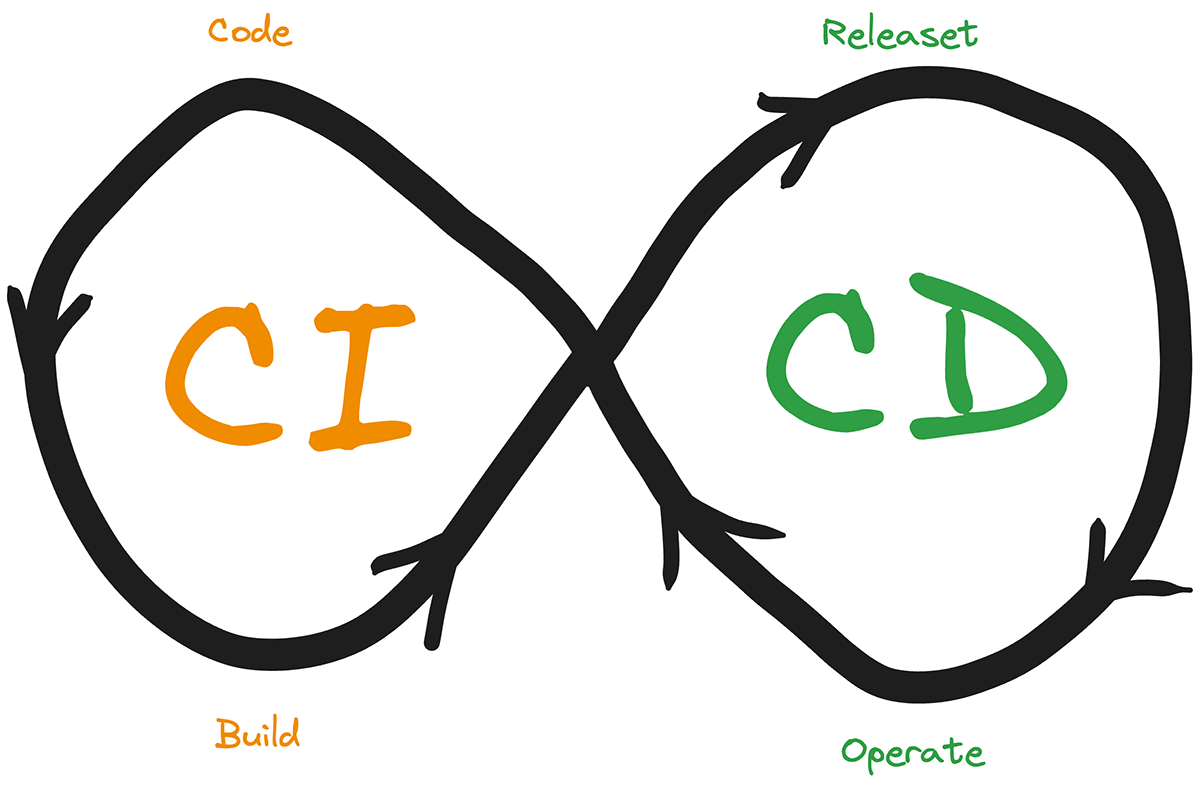
|
||||
|
||||
Continuous Integration and Continuous Deployment (CI/CD) form the backbone of a successful DevOps methodology. As a DevOps engineer, mastering CI/CD is non-negotiable.
|
||||
|
||||
### Understanding CI/CD
|
||||
|
||||
At its core, Continuous Integration (CI) is about automatically integrating code changes from multiple contributors into a shared repository as many times a day as needed (which can be one, zero, or hundreds; the number should be irrelevant).
|
||||
|
||||
The idea is to catch and fix integration bugs early and often, which is crucial for maintaining the health of your project.
|
||||
|
||||
On the other hand, Continuous Deployment (CD) takes this a step further by automatically deploying the integrated code to production environments once it passes all necessary tests. Together, both practices minimize manual intervention, reducing errors and allowing for rapid and reliable delivery of software.
|
||||
|
||||
### Key Tools for CI/CD
|
||||
|
||||
To effectively implement CI/CD pipelines, you'll need to be proficient with the tools that make it possible. There are tons of them out there; some of the most common (and arguably, best ones) are:
|
||||
|
||||
* **Jenkins**: An open-source automation server, Jenkins is highly customizable and supports a huge number of integration plugins.
|
||||
* **GitLab CI**: Part of the larger GitLab platform, GitLab CI is tightly integrated with GitLab's version control and issue-tracking features.
|
||||
* **CircleCI**: Known for its speed and simplicity, CircleCI is perfect for environments that prioritize cloud-native solutions. It provides a user-friendly interface and integrates well with popular tools like Docker, AWS, and Kubernetes.
|
||||
* **GitHub Actions**: GitHub Actions is a powerful CI/CD tool integrated directly into GitHub, allowing developers to automate, test, and deploy their code right from their repositories. It supports custom workflows, integration with other DevOps tools, and provides flexibility to run complex automation tasks across multiple environments.
|
||||
|
||||
### Best Practices for Setting Up and Managing CI/CD Pipelines
|
||||
|
||||
Setting up and managing CI/CD pipelines isn’t just about getting the tools to work; it’s about ensuring that they work well (whatever “well” means for your specific context).
|
||||
|
||||
Here are some best practices to follow:
|
||||
|
||||
1. **Start Small and Iterate**: Don’t try to automate everything at once. Start with the most critical parts of your workflow, then gradually expand the pipeline.
|
||||
2. **Ensure Fast Feedback**: The faster your CI/CD pipeline can provide feedback, the quicker your team can address issues.
|
||||
3. **Maintain a Stable Master Branch**: Always keep your master branch in a deployable state. Implement branch protection rules and require code reviews and automated tests to pass before any changes are merged.
|
||||
4. **Automate Everything Possible**: From testing to deployment, automate as many steps in your pipeline as possible.
|
||||
5. **Monitor and Optimize**: Continuously monitor your CI/CD pipelines for performance bottlenecks, failures, and inefficiencies. Use this data to refine your process.
|
||||
6. **Security Considerations**: Integrate security checks into your CI/CD pipelines to catch vulnerabilities early. Tools like static code analysis, dependency checking, and container scanning can help ensure that your code is secure before it reaches production.
|
||||
|
||||
## 3\. Containerization and Orchestration
|
||||
|
||||
These technologies are at the heart of modern DevOps practices, enabling scalability, portability, and efficiency.
|
||||
|
||||
### Basics of Containerization
|
||||
|
||||
Containerization is a method of packaging applications and their dependencies into isolated units called containers. Unlike traditional virtual machines, which require a full operating system, containers share the host OS’s kernel while running isolated user spaces.
|
||||
|
||||
This makes containers not only lightweight but also faster to start, and more resource-efficient.
|
||||
|
||||
There are many benefits to this technology, as you can probably glean by now, but the primary benefits include:
|
||||
|
||||
* **Portability**: Containers encapsulate everything an application needs to run, making it easy to move them across different environments. As long as there is a way to run containers in an OS, then your code can run on it.
|
||||
* **Scalability**: Containers can be easily scaled up or down based on demand. This flexibility is crucial when you need to handle dynamic workloads.
|
||||
* **Consistency**: By using containers, you can ensure that your applications run the same way across different environments, reducing the infamous "it works on my machine" problem.
|
||||
* **Isolation**: With container applications, don’t use resources outside of the ones defined for them. This means each application is isolated from others running on the same host server, avoiding interference.
|
||||
|
||||
### Key Containerization Tools
|
||||
|
||||
When it comes to containerization tools, Docker is the most popular and widely adopted alternative. However, other tools like Podman are also gaining traction, especially in environments that prioritize security and compatibility with Kubernetes.
|
||||
|
||||
Both tools offer robust features for managing containers, but the choice between them often comes down to specific use cases, security requirements, and integration with other tools in your DevOps toolkit.
|
||||
|
||||
### Orchestration Tools
|
||||
|
||||
While containerization simplifies application deployment, managing containers at scale requires something else: orchestration.
|
||||
|
||||
Orchestration tools like Kubernetes and Docker Swarm automate the deployment, scaling, and management of containerized applications, ensuring that they run efficiently and reliably across distributed environments.
|
||||
|
||||
* **Kubernetes**: Kubernetes is the de facto standard for container orchestration. Kubernetes provides a comprehensive platform for automating the deployment, scaling, and operation of containerized applications by managing clusters of containers.
|
||||
* **Docker Swarm**: Docker Swarm is Docker’s native clustering and orchestration tool. It’s simpler to set up and use compared to Kubernetes, making it a good choice for smaller teams or less complex projects.
|
||||
|
||||
## 4\. Infrastructure as Code (IaC)
|
||||
|
||||
Infrastructure as Code (IaC) has become a foundational practice for DevOps teams. IaC allows you to manage and provision your infrastructure through code, offering a level of automation and consistency that manual processes simply can’t match.
|
||||
|
||||
### Importance of IaC in Modern DevOps Practices
|
||||
|
||||
IaC is crucial in modern DevOps because it brings consistency, scalability, and speed to infrastructure.
|
||||
|
||||
IaC allows teams to define their infrastructure in code, which can be versioned, reviewed, and tested just like application code. If you think about it, IaC is the perfect example of what DevOps means: the merger of both worlds to achieve something that is greater than the sum of its parts.
|
||||
|
||||
Nowadays, IaC is not just a “best practice” but rather, an indispensable part of a DevOps engineer’s workflow, and here is why:
|
||||
|
||||
* **Consistency Across Environments**: As we’ve already mentioned, with IaC, you can ensure that your environments are all configured exactly the same way.
|
||||
* **Scalability**: Whether you need to add more servers, databases, or other resources, you can do it quickly and reliably by updating your code and reapplying it.
|
||||
* **Version Control and Collaboration**: By storing your infrastructure configurations in a version control system like Git, you enable better collaboration and control.
|
||||
* **Automation and Efficiency**: Once your infrastructure is defined in code, you can automate the provisioning, updating, and teardown of resources, allowing your team to focus on higher-value tasks.
|
||||
|
||||
### Key IaC Tools: Terraform, Ansible, Chef, Puppet
|
||||
|
||||
Several tools have become go-to solutions for IaC, each offering unique strengths.
|
||||
|
||||
Here are some of the most popular ones; however, feel free to pick others if they fit better in your particular use case/context:
|
||||
|
||||
* **Terraform**: Terraform is one of the most widely used IaC tools. It’s cloud-agnostic, meaning you can use it to manage infrastructure across different cloud providers like AWS, Azure, and Google Cloud.
|
||||
* **Ansible**: While Ansible’s main focus is automating configuration tasks across multiple servers, it is capable of also working as an IaC tool by providing support for infrastructure provisioning, application deployment, and orchestration.
|
||||
* **Chef**: Chef is another strong player in the configuration management space. It uses a Ruby-based language to create "recipes" that automate the deployment and management of infrastructure.
|
||||
* **Puppet**: Puppet offers a solid solution for configuration management, using its own declarative language to define the state of your infrastructure.
|
||||
|
||||
### Best Practices for Writing and Managing Infrastructure Code
|
||||
|
||||
Like with any coding project, writing clean and easy-to-read code will help a great deal in making the project itself a success. That’s no different in the case of IaC, the words “clean code” need to be engraved in every DevOp’s mind.
|
||||
|
||||
And this is what “clean” means in this context:
|
||||
|
||||
1. **Modularize Your Code**: Break down your infrastructure code into smaller, reusable modules. This approach is especially useful for larger projects where the infrastructure files grow in number; this way you can reuse sections and simplify maintenance.
|
||||
2. **Use Version Control**: Store all your infrastructure code in a version control system like Git. This practice enables you to track changes, collaborate with others, and roll back if something goes wrong.
|
||||
3. **Test Your Infrastructure Code**: Just like application code, infrastructure code should be tested. Tools like Terraform provide validation for configurations, and frameworks like Inspec or Testinfra can verify that your infrastructure is working as expected after deployment.
|
||||
4. **Follow the Principle of Least Privilege**: When defining infrastructure, ensure that each component has only the permissions it needs to perform its function. This practice reduces security risks by limiting the potential impact of a breach or misconfiguration.
|
||||
5. **Keep Secrets Secure**: Avoid the rooky mistake of hardcoding sensitive information, such as API keys or passwords, directly into your infrastructure code. Use tools like HashiCorp Vault, AWS Secrets Manager, or Azure Key Vault to manage secrets securely.
|
||||
6. **Document Your Code**: Just like application code, your infrastructure code should also be commented on and explained, not for you now, but for you next week or someone else next month. The easier it is to understand the code, the faster they’ll be able to work with it.
|
||||
7. **Integrate IaC into CI/CD Pipelines**: Automate as much as possible in the IaC workflow. That includes the validation, testing, and deployment of your infrastructure code by integrating it into your continuous integration and continuous deployment (CI/CD) pipelines. This ensures that your environments are always up-to-date and consistent with your codebase, reducing the risk of drift.
|
||||
|
||||
## 5\. Cloud Computing Expertise
|
||||
|
||||

|
||||
|
||||
In the DevOps ecosystem, cloud computing is more than just a trend companies are starting to follow—it's a fundamental element that defines modern software development and deployment practices.
|
||||
|
||||
And because of that, it’s one of the main DevOps skills you’ll want to develop.
|
||||
|
||||
### Importance of Cloud Platforms in DevOps
|
||||
|
||||
Cloud platforms have revolutionized the way software is developed, deployed, and managed. The cloud allows organizations to leverage vast computing resources on demand, scale their operations effortlessly, and reduce infrastructure costs.
|
||||
|
||||
Specifically for DevOps teams, cloud platforms offer several key benefits:
|
||||
|
||||
* **Scalability**: One of the most significant advantages of cloud computing is its ability to scale resources up or down based on demand. This elasticity is crucial for handling varying workloads, ensuring that applications remain responsive and, most importantly (as some would argue), cost-effective.
|
||||
* **Speed and Agility**: Provisioning of resources can be done with just a few clicks, allowing DevOps teams to spin up development, testing, and production environments in minutes. This speed accelerates the software development lifecycle, enabling faster releases and more frequent updates.
|
||||
* **Global Reach**: Cloud providers operate data centers around the world, making it easier for organizations to deploy applications closer to their users, reducing latency and improving performance.
|
||||
* **Cost Efficiency**: This is a recurring topic when discussing cloud platforms, as they help reduce the need for large upfront capital investments in hardware. Instead, organizations can pay for the resources they use, optimizing costs and reducing waste.
|
||||
* **Automation**: Cloud environments are highly automatable, allowing DevOps teams to automate infrastructure provisioning, scaling, and management.
|
||||
|
||||
### Key Cloud Providers: AWS, Azure, Google Cloud Platform (GCP)
|
||||
|
||||
When it comes to cloud providers, three providers dominate the market: Amazon Web Services (AWS), Microsoft Azure, and Google Cloud Platform (GCP). While they’re not the only ones, and in some regions of the world, they’re not even the top providers. In general, they own most of the cloud market.
|
||||
|
||||
Each of them offers a vast array of services and tools that cater to different needs, making them the go-to choices for DevOps professionals.
|
||||
|
||||
* **Amazon Web Services (AWS)**: AWS is the largest and most mature of the three, offering an extensive range of services, including computing power (EC2), storage (S3), databases (RDS), and more. AWS is known for its large number of features, including advanced networking, security, and analytics tools. For DevOps engineers, AWS provides powerful services like AWS Lambda (serverless computing), AWS CodePipeline (CI/CD), and CloudFormation (IaC), which are essential for building and managing cloud-native applications.
|
||||
* **Microsoft Azure**: Azure is a close competitor to AWS, particularly strong in enterprise environments where Microsoft technologies like Windows Server, SQL Server, and .NET are prevalent. Azure offers a very rich list of cloud services, including, like the other two, virtual machines, AI, and machine learning tools. Azure also offers DevOps-specific services like Azure DevOps, which integrates CI/CD, version control, and agile planning into a single platform. Azure's hybrid cloud capabilities also make it a popular choice for organizations that need to integrate on-premises infrastructure with cloud resources.
|
||||
* **Google Cloud Platform (GCP)**: GCP, while newer to the cloud market compared to AWS and Azure, has quickly gained a reputation for its data analytics, machine learning, and container orchestration services. Google’s Kubernetes Engine (GKE), for instance, is quite liked by the DevOps community for managing containerized applications at scale. GCP is also known for its strong support of open-source technologies, making it a favorite among developers who prioritize flexibility and innovation.
|
||||
|
||||
### Understanding Cloud-Native Tools, Services, and Architectural Patterns
|
||||
|
||||
Another key technical skill for DevOps engineers is to understand not only cloud-native tools and services but also the architectural patterns that define modern application development.
|
||||
|
||||
These patterns define how applications are structured and interact with cloud infrastructure, directly affecting areas such as scalability, resilience, and maintainability.
|
||||
|
||||
* **Microservices Architecture**: In a microservices architecture, applications are composed of small, independent services that communicate over APIs. Key tools to understand by DevOps engineers include **API gateways** (like AWS API Gateway), **service meshes** (such as Istio), and **message queues** (like Amazon SQS or Google Pub/Sub).
|
||||
* **Service-Oriented Architecture (SOA)**: SOA is a broader (and older) architectural style where services are designed to provide specific business functionalities and can communicate with each other over a network. Tools like **Enterprise Service Buses (ESBs)** and **message brokers** (such as RabbitMQ) are often used to facilitate SOA architectures.
|
||||
* **Serverless Architecture**: Serverless computing allows developers to build and deploy applications without managing the underlying infrastructure. In a serverless architecture, code is executed in response to events, such as HTTP requests or changes in data, using services like **AWS Lambda**, **Azure Functions**, or **Google Cloud Functions**.
|
||||
* **Event-Driven Architecture**: In an event-driven architecture, applications respond to events in real-time, often using tools like **event streams** (e.g., Apache Kafka) and **message queues**.
|
||||
|
||||
## 6\. Monitoring and Logging!
|
||||
|
||||
[monitoring logging servers][https://assets.roadmap.sh/guest/monitoring-logging-servers-ztf1a.png]
|
||||
|
||||
Monitoring and logging are vital components of a robust DevOps strategy. They provide visibility into the health and performance of your systems, allowing you to detect issues early, troubleshoot, and ensure the reliability of your applications.
|
||||
|
||||
### Importance of Monitoring and Logging for Maintaining System Health
|
||||
|
||||
No matter what type of application you’re running, maintaining the health and performance of your systems is crucial if your business depends on it.
|
||||
|
||||
Monitoring and logging has turned into one of the most relevant DevOps skills out there.
|
||||
|
||||
Through monitoring you can track the performance of your infrastructure and applications in real-time, alerting you to any potential problems such as resource bottlenecks, slowdowns, or outages.
|
||||
|
||||
Logging, on the other hand, captures detailed records of system events and user interactions, providing invaluable information for diagnosing problems and understanding system behavior.
|
||||
|
||||
The reasons why you want to have effective monitoring and logging, are:
|
||||
|
||||
* **Proactive Issue Detection**: By continuously monitoring system metrics, you can detect issues before they escalate into critical problems, reducing downtime and improving overall system reliability.
|
||||
* **Troubleshooting and Root Cause Analysis**: Logs provide detailed information about system events, making it easier to pinpoint the root cause of issues. This speeds up the resolution process and minimizes the impact on users.
|
||||
* **Performance Optimization**: Monitoring allows you to track key performance indicators (KPIs) and identify areas where your systems can be optimized, leading to better resource utilization and cost savings.
|
||||
* **Compliance and Auditing**: Logging is essential for maintaining compliance with regulatory requirements. Logs can be used to audit system access, track changes, and ensure that your systems meet security and operational standards.
|
||||
|
||||
### Key Tools for Monitoring: Prometheus, Grafana, Nagios
|
||||
|
||||
Several tools have become essential for monitoring systems in DevOps environments. Each offers unique features tailored to different needs, from real-time metrics collection to visual dashboards and alerting.
|
||||
|
||||
* **Prometheus**: Prometheus is an open-source monitoring tool designed for reliability and scalability. It collects real-time metrics from your systems and applications, stores them in a time-series database, and supports powerful query languages for analysis.
|
||||
* **Grafana**: Grafana is a popular open-source platform for visualizing monitoring data. It integrates with Prometheus and other data sources, allowing you to create interactive, customizable dashboards that provide insights into system performance at a glance.
|
||||
* **Nagios**: Nagios is one of the oldest and most widely used monitoring tools. It provides comprehensive monitoring of network services, host resources, and infrastructure components.
|
||||
|
||||
### Logging Tools: ELK Stack (Elasticsearch, Logstash, Kibana), Splunk
|
||||
|
||||
Effective logging requires tools that can collect, store, and analyze large volumes of log data efficiently, given how much information modern systems can generate.
|
||||
|
||||
The following tools are among the most widely used in the industry:
|
||||
|
||||
* **ELK Stack**: The ELK Stack is a powerful open-source solution for managing logs. It consists of **Elastic** for storing and searching logs, **Logstash** to act as a data processing/ingestion pipeline, and **Kibana** for data visualization.
|
||||
* **Splunk**: Splunk is a commercial tool that offers advanced log management and analysis capabilities. It can ingest data from a wide variety of sources, index it in real time, and provide powerful search and reporting features.
|
||||
|
||||
### Best Practices for Setting Up Effective Monitoring and Logging Systems
|
||||
|
||||
While both practices are crucial for a successful DevOps strategy, if you ignore best practices the results you’ll get will be subpar, at best.
|
||||
|
||||
Instead, try to follow these (or some of them) guidelines to ensure you get the most out of your monitoring and logging efforts.
|
||||
|
||||
1. **Define Clear Objectives**: Before setting up your monitoring and logging systems, define what you want to achieve. Identify the key metrics and logs that are most critical to your operations, such as CPU usage, memory consumption, application response times, and error rates.
|
||||
2. **Implement Comprehensive Monitoring**: Monitor all layers of your infrastructure, from hardware and networks to applications and services. Use a combination of tools to ensure that no aspect of your system goes unmonitored. If you ignore one area, you’ll end up having blindspots when debugging and trying to troubleshoot problems.
|
||||
3. **Centralize Log Management**: Centralizing your logs in a single platform like the ELK Stack or Splunk allows for easier management, search, and analysis. This centralization is particularly important in distributed systems where logs are generated across multiple servers and services.
|
||||
4. **Set Up Alerts and Notifications**: Monitoring without alerting is like watching a movie without any sound; if you constantly pay attention to the picture, you might figure out what’s happening on a general level, but you’ll miss the details. And with monitoring, it’s the same thing: set up alerts and notifications so when a threshold is exceeded (say, the number of error responses in the last 10 minutes), you’ll know, even if it’s in the middle of the night.
|
||||
5. **Ensure Scalability**: As your infrastructure grows, your monitoring and logging systems need to scale accordingly. Choose tools that can handle increasing volumes of data without compromising performance. In other words, don’t turn your logging/monitoring setup into a bottleneck for your platform.
|
||||
6. **Regularly Review and Tune**: Continuously review and adjust your monitoring and logging configurations. As your systems evolve, your monitoring and logging needs may change, requiring you to add new metrics, refine alert thresholds, or optimize data retention policies.
|
||||
7. **Secure Your Monitoring and Logging Infrastructure**: Protect your monitoring and logging data from unauthorized access. Ensure that logs containing sensitive information are encrypted and access to monitoring dashboards is restricted based on roles.
|
||||
|
||||
## 7\. Security Practices and Tools (DevSecOps)
|
||||
|
||||
As DevOps has transformed software development by integrating development and operations teams together into a seamless process, security can no longer be treated as an afterthought. The rise of DevSecOps emphasizes the need for DevOps engineers to develop their security skills.
|
||||
|
||||
### Integrating Security into the DevOps Pipeline
|
||||
|
||||
DevSecOps shifts the classical paradigm (having security reviews happen at the end of the development lifecycle) by integrating security into every phase of the DevOps pipeline—from code development to deployment and beyond. That, in turn, involves the following:
|
||||
|
||||
* **Shift-Left Security**: This principle involves moving security practices earlier in the SDLC, such as during the coding and design phases.
|
||||
* **Continuous Security**: Security checks should be continuous and automated throughout the pipeline. This ensures that each code change, build, and deployment is evaluated for security risks.
|
||||
* **Collaboration and Culture**: DevSecOps is as much about culture as it is about tools. Developers, operations, and security teams must collaborate closely, sharing responsibility for security.
|
||||
|
||||
### Key Security Practices
|
||||
|
||||
To effectively integrate security into the DevOps pipeline, certain practices are essential:
|
||||
|
||||
* **Automated Security Testing**: Automation is key to scaling security practices within a rapidly growing DevOps environment. Automated security testing involves integrating security checks into your CI/CD pipelines. This can include static application security testing (SAST) to analyze source code for security flaws, dynamic application security testing (DAST) to evaluate running applications, and interactive application security testing (IAST) that combines both approaches.
|
||||
* **Vulnerability Scanning**: Regular vulnerability scanning is crucial for identifying and mitigating risks across your infrastructure and applications. Scanning tools can detect known vulnerabilities in code, dependencies, container images, and cloud configurations.
|
||||
* **Security as Code**: Just as Infrastructure as Code (IaC) treats infrastructure configuration as code, Security as Code applies the same principles to security configurations. This involves automating the provisioning and management of security controls, policies, and compliance checks.
|
||||
|
||||
### Tools for DevSecOps
|
||||
|
||||
Several tools have emerged to support the integration of security into the DevOps practice. These tools help automate security tasks, identify vulnerabilities, and enforce security policies, making it easier for teams to adopt DevSecOps practices.
|
||||
|
||||
Some examples are:
|
||||
|
||||
* **Aqua Security**: Aqua Security specializes in securing cloud-native applications, particularly those that run in containers. Aqua provides a comprehensive platform for securing the entire container lifecycle, from development to runtime.
|
||||
* **Snyk**: Snyk is a developer-friendly security platform that helps identify and fix vulnerabilities in open-source libraries, container images, and infrastructure as code. Snyk integrates with CI/CD pipelines, providing automated security testing and real-time feedback.
|
||||
* **Trivy**: Trivy is an open-source vulnerability scanner that is particularly well-suited for container environments. It scans container images, file systems, and Git repositories for known vulnerabilities, misconfigurations, and secrets.
|
||||
|
||||
## 8\. Networking and System Administration
|
||||
|
||||

|
||||
|
||||
Networking and system administration are foundational DevOps skills. These disciplines ensure that the infrastructure supporting your applications is robust, secure, and efficient.
|
||||
|
||||
### Which networking concepts are most relevant to DevOps?
|
||||
|
||||
Networking is the backbone of any IT infrastructure, connecting systems, applications, and users. A solid understanding of networking concepts is crucial for DevOps engineers to design, deploy, and manage systems effectively.
|
||||
|
||||
Some of the most important concepts include:
|
||||
|
||||
* **TCP/IP Networking**: TCP/IP (Transmission Control Protocol/Internet Protocol) is the fundamental protocol suite for the Internet and most private networks. Understanding how TCP/IP works is essential.
|
||||
* **Network Topologies**: Network topology refers to the arrangement of different elements (links, nodes, etc.) in a computer network. Common topologies include star, mesh, and hybrid configurations.
|
||||
* **Load Balancing**: Load balancing is the process of distributing network or application traffic across multiple servers to ensure no single server becomes overwhelmed. DevOps engineers need to understand different load balancing algorithms (round-robin, least connections, IP hash) and how to implement load balancers (like NGINX, HAProxy, or cloud-native solutions).
|
||||
* **Firewalls and Security Groups**: Firewalls are essential for controlling incoming and outgoing network traffic based on predetermined security rules. In cloud environments, security groups serve a similar function by acting as virtual firewalls for instances.
|
||||
* **DNS (Domain Name System)**: DNS is the system that translates human-readable domain names (like [www.example.com](http://www.example.com)) into IP addresses that computers use to identify each other on the network.
|
||||
* **VPNs and Secure Communication**: Virtual Private Networks (VPNs) allow secure communication over public networks by encrypting data between remote devices and the network.
|
||||
|
||||
### System Administration Tasks and Best Practices
|
||||
|
||||
System administration involves the management of computer systems, including servers, networks, and applications. DevOps engineers often take on system administration tasks to ensure that infrastructure is stable, secure, and performing optimally.
|
||||
|
||||
Some of these tasks include:
|
||||
|
||||
* **User and Permission Management**: Managing user accounts, groups, and permissions is fundamental to system security.
|
||||
* **Server Configuration and Management**: Configuring servers to meet the needs of applications and ensuring they run efficiently is a core task.
|
||||
* **System Monitoring and Maintenance**: As we’ve already mentioned, regular monitoring of system performance metrics is essential for proactive maintenance.
|
||||
* **Backup and Recovery**: Regular backups of data and configurations are crucial for disaster recovery.
|
||||
* **Patch Management**: Keeping systems up to date with the latest security patches and software updates is critical for maintaining your infrastructure secure.
|
||||
* **Security Hardening**: Security hardening involves reducing the attack surface of a system by configuring systems securely, removing unnecessary services, and applying best practices.
|
||||
* **Script Automation**: Developing your automation skills is key, as you’ll be automating routine tasks with scripts every day. Common scripting languages include Bash for Linux and PowerShell for Windows.
|
||||
|
||||
### Best Practices for Networking and System Administration
|
||||
|
||||
1. **Automate Repetitive Tasks**: Use automation tools and scripts to handle routine tasks such as backups, patch management, and monitoring setup.
|
||||
2. **Implement Redundancy and Failover**: Design your network and systems with redundancy and failover mechanisms. This includes setting up redundant network paths, using load balancers, and configuring failover for critical services to minimize downtime.
|
||||
3. **Enforce Strong Security Practices**: Regularly audit user access, apply patches promptly, and follow security best practices for hardening systems.
|
||||
4. **Regularly Review and Update Documentation**: Keep detailed documentation of your network configurations, system setups, and processes.
|
||||
5. **Monitor Proactively**: Set up comprehensive monitoring for all critical systems and networks. Alerts should be used to catch issues early, and logs should be reviewed regularly to spot potential security or performance issues.
|
||||
6. **Test Disaster Recovery Plans**: Regularly test your backup and disaster recovery procedures to ensure they work as expected.
|
||||
|
||||
## 9\. Familiarity with Version Control Systems
|
||||
|
||||
Version control systems (VCS) are at the center of modern software development, enabling teams to collaborate, track changes, and manage their codebase.
|
||||
|
||||
In a DevOps environment, where continuous integration and continuous deployment (CI/CD) are central practices, mastering version control is not just beneficial—it's essential.
|
||||
|
||||
### Importance of Version Control in DevOps Workflows
|
||||
|
||||
Version control is crucial in DevOps for several reasons:
|
||||
|
||||
* **Collaboration**: Version control systems allow multiple developers to work on the same codebase simultaneously without overwriting each other's changes.
|
||||
* **Change Tracking**: Every change to the codebase is tracked, with a history of who made the change, when, and why.
|
||||
* **Branching and Merging**: Version control systems enable the creation of branches, allowing developers to work on new features, bug fixes, or experiments in isolation.
|
||||
* **Continuous Integration/Continuous Deployment (CI/CD)**: Version control is crucial to CI/CD pipelines, where code changes are automatically tested, integrated, and deployed.
|
||||
* **Disaster Recovery**: In case of errors or issues, version control allows you to revert to previous stable versions of the codebase, minimizing downtime and disruption.
|
||||
|
||||
### Mastering Git: Key Commands, Workflows, and Best Practices
|
||||
|
||||
Git is the most widely used version control system in the DevOps world, known for its flexibility, performance, and breadth of features. Having a deep understanding of Git is crucial for any DevOps engineer, as it is the foundation upon which most CI/CD workflows are built.
|
||||
|
||||
The key commands you should try to master first are `init`, `clone`, `commit`, `pull`/`push`, `branch`, `checkout`, `merge`, and one that is definitely useful in your context: `log`.
|
||||
|
||||
#### Git Workflows
|
||||
|
||||
Git can be used as the driving force for your development workflow. However, there are many ways to use it. Some of the most common ones are:
|
||||
|
||||
* **Feature Branch Workflow**: Developers create a new branch for each feature or bug fix. Once complete, the branch is merged back into the main branch, often through a pull request, where code reviews and automated tests are conducted.
|
||||
* **Gitflow Workflow**: A more structured workflow that uses feature branches, a develop branch for integration, and a master branch for production-ready code. It also includes hotfix branches for urgent bug fixes in production.
|
||||
* **Forking Workflow**: Common in open-source projects, this workflow involves forking a repository, making changes in the fork, and then submitting a pull request to the original repository for review and integration.
|
||||
|
||||
#### Best practices when using Git
|
||||
|
||||
* **Commit Often, Commit Early**: Make small, frequent commits with clear, descriptive messages. This practice makes it easier to track changes and revert specific parts of the codebase if needed.
|
||||
* **Use Meaningful Branch Names**: Name branches based on the work they are doing, such as `feature/user-authentication` or `bugfix/login-issue`.
|
||||
* **Perform Code Reviews**: Use pull requests and code reviews as part of the merge process.
|
||||
* **Keep a Clean Commit History**: Use tools like `git rebase` to clean up your commit history before merging branches. A clean commit history makes it easier to understand the evolution of the project and debug issues.
|
||||
* **Resolve Conflicts Early**: When working on shared branches, regularly pull changes from the remote repository to minimize and resolve merge conflicts as early as possible.
|
||||
|
||||
### Tools for Managing Version Control: GitHub, GitLab, Bitbucket
|
||||
|
||||
While Git itself is a command-line tool, various platforms provide user-friendly interfaces and additional features to manage Git repositories effectively.
|
||||
|
||||
* **GitHub**: GitHub is the most popular platform for hosting Git repositories. It offers many collaboration features and on top of them, GitHub Actions integrates CI/CD directly into the platform, automating workflows from development to deployment.
|
||||
* **GitLab**: GitLab is a complete DevOps platform that includes Git repository management, CI/CD, issue tracking, and more. GitLab can be hosted on-premises, which is a significant advantage for organizations with strict data security requirements.
|
||||
* **Bitbucket**: Bitbucket, developed by Atlassian, integrates tightly with other Atlassian tools like Jira and Confluence. It supports Git and Mercurial and offers features like pull requests, code reviews, and CI/CD pipelines through Bitbucket Pipelines.
|
||||
|
||||
As usual, the right set of DevOps tools will drastically depend on your specific context and needs.
|
||||
|
||||
## 10\. Knowledge of Configuration Management
|
||||
|
||||
Configuration management is a critical component of DevOps, enabling teams to automate the setup and maintenance of systems and applications across different environments.
|
||||
|
||||
### The Role of Configuration Management in DevOps
|
||||
|
||||
This practice involves maintaining the consistency of a system's performance and functionality by ensuring that its configurations are properly set up and managed.
|
||||
|
||||
In DevOps, where continuous integration and continuous deployment (CI/CD) are key practices, understanding how to manage your configurations ensures that environments are consistently configured, regardless of where they are deployed.
|
||||
|
||||
Configure once and deploy endless times; that’s the DevOps way.
|
||||
|
||||
The main reasons why this is such an important practice in DevOps are:
|
||||
|
||||
* **Automation tools**: These tools automate the process of setting up and maintaining infrastructure, reducing manual effort and minimizing the risk of human error.
|
||||
* **Consistency Across Environments**: By defining configurations as code, conf. management ensures that all environments are configured identically.
|
||||
* **Scalability**: As systems scale, manually managing configurations becomes impractical. Configuration management allows you to scale infrastructure and applications, ensuring that new instances are configured correctly from the start.
|
||||
* **Compliance and Auditing**: These tools provide a clear and auditable record of system configurations. This is essential for compliance with industry standards and regulations.
|
||||
* **Disaster Recovery**: In the event of a system failure, configuration management tools can quickly restore systems to their desired state, reducing downtime and minimizing the impact on business operations.
|
||||
|
||||
### DevOps Configuration Management Tools to Master
|
||||
|
||||
Several tools have become staples in this landscape, each offering unique features and strengths. For example:
|
||||
|
||||
* **Ansible**: Ansible, developed by Red Hat, is an open-source tool known for its simplicity and ease of use. It uses YAML for configuration files, known as playbooks, which are easy to read and write. Ansible is ideal for automating tasks like software installation, service management, and configuration updates across multiple servers.
|
||||
* **Puppet**: Puppet is a powerful tool that uses a declarative language to define system configurations. Puppet’s strength lies in its scalability and ability to manage large, complex environments.
|
||||
* **Chef**: Chef is another popular tool that uses a Ruby-based DSL (Domain-Specific Language) to write recipes and cookbooks, which define how systems should be configured and managed.
|
||||
|
||||
### Best Practices for Managing Configurations Across Environments
|
||||
|
||||
Effective configuration management requires you to follow best practices that ensure consistency, reliability, and security across all environments.
|
||||
|
||||
1. **Use Configuration as Code (CaC)**: Treat configurations as code by storing them in version control systems like Git.
|
||||
2. **Modularize Configurations**: Break down configurations into reusable modules or roles. This approach allows you to apply the same configuration logic across different environments.
|
||||
3. **Test Configurations in Multiple Environments**: Before deploying configurations to production, test them thoroughly in staging or testing environments.
|
||||
4. **Implement Idempotency**: Ensure that your processes are idempotent, meaning that applying the same configuration multiple times does not change the system after the first application.
|
||||
5. **Centralization**: Use a centralized tool to maintain a single source of truth for all configurations.
|
||||
6. **Encrypt Sensitive Data**: When managing configurations that include sensitive data (e.g., passwords, API keys), use encryption and secure storage solutions like HashiCorp Vault.
|
||||
7. **Document Configurations and Changes**: Maintain detailed documentation for your configurations and any changes made to them.
|
||||
8. **Monitor and Audit Configurations**: Continuously monitor configurations to detect and prevent drift (when configurations deviate from the desired state).
|
||||
|
||||
## Bonus: Collaboration and Communication Skills
|
||||
|
||||
While technical skills are critical to becoming a successful DevOps engineer, the importance of soft skills—particularly collaboration and communication—cannot be ignored.
|
||||
|
||||
In a DevOps environment, where cross-functional teams work closely together to deliver software, effective communication, and collaboration are essential for success.
|
||||
|
||||
### Importance of Soft Skills in a DevOps Environment
|
||||
|
||||
DevOps is not just about tools and processes; it's also about people and how they work together.
|
||||
|
||||
Key reasons why soft skills are crucial in a DevOps environment:
|
||||
|
||||
* **Cross-Functional Collaboration**: DevOps brings together diverse teams with different expertise—developers, operations, QA, security, and more.
|
||||
* **Problem Solving and Conflict Resolution**: In software development in general, issues and conflicts are inevitable. Strong communication skills help teams navigate these challenges, finding quick resolutions and keeping the focus on delivering value to the customer.
|
||||
* **Agility and Adaptability**: DevOps teams often need to adapt to changing requirements and priorities. Effective communication ensures that these changes are understood and implemented without issues.
|
||||
|
||||
### Tools for Effective Collaboration: Slack, Microsoft Teams, Jira
|
||||
|
||||
Several tools are essential for facilitating communication and collaboration in a DevOps environment.
|
||||
|
||||
Is there an absolute best one? The answer to that question is “no.”, the best option depends on your needs and preferences, so study the list and figure out yourself which software (or combination of) helps your specific teams.
|
||||
|
||||
* **Slack**: Slack is a popular communication platform designed for team collaboration. It offers integration with other DevOps tools like GitHub, Jenkins, and Jira.
|
||||
* **Microsoft Teams**: Microsoft Teams is another powerful collaboration tool, especially popular in organizations using the Microsoft ecosystem.
|
||||
* **Jira**: Jira, developed by Atlassian, is a robust project management tool that helps teams track work, manage backlogs, and plan sprints. It’s particularly useful in Agile and DevOps environments where transparency and continuous improvement are key.
|
||||
|
||||
### Best Practices for Fostering a Collaborative Culture
|
||||
|
||||
Building a collaborative culture in a DevOps environment requires effort and ongoing commitment.
|
||||
|
||||
Here are some general guidelines you can follow to help achieve that collaborative environment:
|
||||
|
||||
1. **Promote Open Communication**: Encourage team members to communicate openly about their work, challenges, and ideas.
|
||||
2. **Regular Stand-Ups and Check-Ins**: Implement daily stand-ups or regular check-ins to ensure that everyone is on the same page. Whether they’re in person, during a video call, or asynchronous, these check-ins help find blockers and solve them fast.
|
||||
3. **Use Collaborative Documentation**: Maintain shared documentation using tools like Confluence or Google Docs.
|
||||
4. **Encourage Cross-Functional Training**: Facilitate training sessions or workshops where team members from different disciplines can learn about each other's work.
|
||||
5. **Foster a Blameless Culture**: In a DevOps environment, mistakes and failures should be viewed as learning opportunities rather than reasons to assign blame. Encourage a blameless culture where issues are discussed openly, and the focus is on understanding the root cause.
|
||||
|
||||
## Conclusion
|
||||
|
||||
In the world of DevOps, mastering a diverse set of skills is not an option but rather an absolute must. From understanding the details of cloud computing and infrastructure as code to implementing monitoring and security practices, each skill plays a crucial role in fulfilling the main goal of any DevOps practice: enabling fast, reliable, and secure software delivery.
|
||||
|
||||
For those looking to deepen their understanding or get started on their DevOps journey, here are some valuable resources:
|
||||
|
||||
* [**Expanded DevOps Roadmap**](https://roadmap.sh/devops): A comprehensive guide that details the full range of DevOps skills, tools, and technologies you need to master as a DevOps engineer.
|
||||
* [**Simplified DevOps Roadmap**](https://roadmap.sh/devops?r=devops-beginner): A more streamlined version that highlights the core components of a DevOps career, making it easier for beginners to navigate the field.
|
||||
|
||||
Success in DevOps is about cultivating a well-rounded skill set that combines technical expertise with strong collaboration, communication, and problem-solving abilities.
|
||||
|
||||
As the industry continues to evolve, so too will the tools, practices, and challenges that DevOps engineers face. By committing to continuous learning and staying adaptable, you can ensure that you remain at the forefront of this dynamic field, driving innovation and delivering value in your organization.
|
||||
@@ -1,36 +0,0 @@
|
||||
---
|
||||
title: 'Github Actions Workflow'
|
||||
description: 'Write GitHub Actions workflow to deploy a simple GitHub Pages site.'
|
||||
isNew: true
|
||||
sort: 3
|
||||
difficulty: 'beginner'
|
||||
nature: 'CI/CD'
|
||||
skills:
|
||||
- 'devops'
|
||||
- 'github actions'
|
||||
- 'ci/cd'
|
||||
seo:
|
||||
title: 'Github Actions Workflow'
|
||||
description: 'Write GitHub Actions workflow to deploy a simple GitHub Pages site.'
|
||||
keywords:
|
||||
- 'basic ci/cd'
|
||||
- 'devops'
|
||||
- 'devops projects'
|
||||
roadmapIds:
|
||||
- 'git-github'
|
||||
- 'devops'
|
||||
---
|
||||
|
||||
In this project, you will write a basic HTML file and setup a GitHub Actions workflow to test, build & deploy it to GitHub Pages.
|
||||
|
||||
## Requirements
|
||||
|
||||
- Create a simple HTML file (the content is up to you)
|
||||
- Create a GitHub Actions workflow that will test, build & deploy the website to [GitHub Pages](https://pages.github.com/).
|
||||
- Failures in the workflow should be clearly indicated and failures will halt the workflow
|
||||
- The workflow should be in the `.github/workflows` directory
|
||||
- The workflow file should be named `main.yml`
|
||||
|
||||
<hr />
|
||||
|
||||
If you are looking to build a more advanced version of this project, you can either create a more advanced Astro website or you can build a more advanced GitHub Actions workflow.
|
||||
@@ -1,42 +0,0 @@
|
||||
---
|
||||
title: 'Basic Infrastructure as Code with Terraform'
|
||||
description: 'Provision a simple cloud infrastructure using Terraform'
|
||||
isNew: false
|
||||
sort: 4
|
||||
difficulty: 'beginner'
|
||||
nature: 'CLI'
|
||||
skills:
|
||||
- 'terraform'
|
||||
- 'devops'
|
||||
- 'iac'
|
||||
- 'cloud'
|
||||
seo:
|
||||
title: 'Basic Infrastructure as Code with Terraform'
|
||||
description: 'Learn to provision cloud resources using Terraform'
|
||||
keywords:
|
||||
- 'terraform'
|
||||
- 'infrastructure as code'
|
||||
- 'cloud provisioning'
|
||||
- 'devops'
|
||||
roadmapIds:
|
||||
- 'devops'
|
||||
- 'terraform'
|
||||
- 'aws'
|
||||
---
|
||||
|
||||
In this project, you will use Terraform to provision a virtual machine in AWS.
|
||||
|
||||
## Requirements
|
||||
|
||||
- Install Terraform on your local machine.
|
||||
- Set up an account with a AWS and obtain necessary credentials.
|
||||
- Create a `main.tf` file in the root directory of your project.
|
||||
- Write Terraform configuration to provision a basic resource (e.g., an EC2 instance on AWS or a VM on Azure).
|
||||
- Use Terraform commands to initialize, plan, apply, and destroy your infrastructure.
|
||||
- The provisioned resource should be accessible and verifiable in your cloud provider's console.
|
||||
|
||||
You can learn more about Terraform basics [here](https://learn.hashicorp.com/terraform).
|
||||
|
||||
<hr />
|
||||
|
||||
For a more advanced version of this project, consider adding multiple resources, using variables and outputs, or implementing a modular structure for your Terraform configuration.
|
||||
@@ -1,39 +0,0 @@
|
||||
---
|
||||
title: 'Docker Web Server'
|
||||
description: 'Create a Web Server using Docker & NGINX'
|
||||
isNew: false
|
||||
sort: 3
|
||||
difficulty: 'beginner'
|
||||
nature: 'CLI'
|
||||
skills:
|
||||
- 'docker'
|
||||
- 'devops'
|
||||
- 'nginx'
|
||||
- 'web'
|
||||
seo:
|
||||
title: 'Docker Web Server'
|
||||
description: 'Create a Web Server using Docker & NGINX'
|
||||
keywords:
|
||||
- 'docker web server'
|
||||
- 'docker'
|
||||
- 'system administration'
|
||||
- 'web server'
|
||||
roadmapIds:
|
||||
- 'devops'
|
||||
- 'docker'
|
||||
---
|
||||
|
||||
In this project, you will create an NGINX web server that will serve a simple HTML page using Docker.
|
||||
|
||||
## Requirements
|
||||
|
||||
- The Dockerfile should be named `Dockerfile`.
|
||||
- The Dockerfile should be in the root directory of the project.
|
||||
- The build process will add a local HTML file to the container, which will be accessible to NGINX.
|
||||
- The simple HTML page will be accessible to you from `localhost:8080`
|
||||
|
||||
You can learn more about writing a Dockerfile [here](https://docs.docker.com/engine/reference/builder/).
|
||||
|
||||
<hr />
|
||||
|
||||
If you are looking to build a more advanced version of this project, you can consider using the `alpine:latest` image and setting up NGINX yourself rather than using the official NGINX image.
|
||||
@@ -1,57 +0,0 @@
|
||||
---
|
||||
title: 'Local Monitoring System with Docker'
|
||||
description: 'Set up a local monitoring system using Docker with Grafana and Prometheus'
|
||||
isNew: false
|
||||
sort: 1
|
||||
difficulty: 'intermediate'
|
||||
nature: 'CLI'
|
||||
skills:
|
||||
- 'docker'
|
||||
- 'devops'
|
||||
- 'monitoring'
|
||||
- 'grafana'
|
||||
- 'prometheus'
|
||||
seo:
|
||||
title: 'Local Monitoring System with Docker, Grafana, and Prometheus'
|
||||
description: 'Learn to set up a local monitoring system using Docker with Grafana and Prometheus'
|
||||
keywords:
|
||||
- 'docker'
|
||||
- 'monitoring'
|
||||
- 'grafana'
|
||||
- 'prometheus'
|
||||
- 'devops'
|
||||
roadmapIds:
|
||||
- 'devops'
|
||||
- 'docker'
|
||||
---
|
||||
|
||||
In this project, you will set up a local monitoring system using Docker, Grafana, and Prometheus. This setup will allow you to collect metrics and visualize them in a dashboard.
|
||||
|
||||
## Requirements
|
||||
|
||||
- Docker and Docker Compose installed on your local machine.
|
||||
- Create a `docker-compose.yml` file in the root directory of your project.
|
||||
- Set up Prometheus as the metrics collection system.
|
||||
- Configure Grafana as the visualization tool.
|
||||
- Create a simple dashboard in Grafana to display system metrics.
|
||||
- Add a sample application to monitor, such as a simple web server.
|
||||
|
||||
Your `docker-compose.yml` file should define services for:
|
||||
1. Prometheus
|
||||
2. Grafana
|
||||
3. A sample application to monitor
|
||||
|
||||
## Steps
|
||||
|
||||
1. Create the `docker-compose.yml` file with services for Prometheus and Grafana.
|
||||
2. Configure Prometheus to scrape metrics (you'll need a `prometheus.yml` configuration file).
|
||||
3. Set up Grafana to use Prometheus as a data source.
|
||||
4. Create a simple dashboard in Grafana to display metrics.
|
||||
5. Use `docker-compose up` to start your monitoring stack.
|
||||
6. Access Grafana through your web browser and verify that metrics are being collected and displayed.
|
||||
|
||||
You can learn more about Prometheus [here](https://prometheus.io/docs/introduction/overview/) and Grafana [here](https://grafana.com/docs/grafana/latest/).
|
||||
|
||||
<hr />
|
||||
|
||||
For a more advanced version of this project, consider adding alerting rules in Prometheus, setting up additional exporters to collect more diverse metrics, or monitoring a multi-container application.
|
||||
@@ -1,23 +1,23 @@
|
||||
---
|
||||
title: 'Task Tracker'
|
||||
description: 'Create a task tracker with a to-do list using HTML, CSS, and JavaScript.'
|
||||
isNew: false
|
||||
sort: 22
|
||||
difficulty: 'intermediate'
|
||||
nature: 'JavaScript'
|
||||
skills:
|
||||
- 'HTML'
|
||||
- 'CSS'
|
||||
- 'JavaScript'
|
||||
- 'DOM Manipulation'
|
||||
seo:
|
||||
title: 'Build a Task Tracker with JavaScript'
|
||||
description: 'Learn how to create a dynamic task tracker that allows users to add, complete, and delete tasks with real-time updates.'
|
||||
keywords:
|
||||
title: 'Task Tracker'
|
||||
description: 'Create a task tracker with a to-do list using JavaScript.'
|
||||
isNew: false
|
||||
sort: 22
|
||||
difficulty: 'intermediate'
|
||||
nature: 'JavaScript'
|
||||
skills:
|
||||
- 'HTML'
|
||||
- 'CSS'
|
||||
- 'JavaScript'
|
||||
- 'DOM Manipulation'
|
||||
seo:
|
||||
title: 'Build a Task Tracker with JavaScript'
|
||||
description: 'Learn how to create a dynamic task tracker that allows users to add, complete, and delete tasks with real-time updates.'
|
||||
keywords:
|
||||
- 'task tracker'
|
||||
- 'to-do list'
|
||||
- 'javascript project'
|
||||
roadmapIds:
|
||||
- 'javascript project'
|
||||
roadmapIds:
|
||||
- 'frontend'
|
||||
---
|
||||
|
||||
@@ -31,4 +31,4 @@ Here is the mockup of the task tracker:
|
||||
|
||||
Store your tasks in an array of objects, where each object represents a task with properties like description and status (completed or not). Whenever a new task is added, updated, deleted, or marked as complete/uncomplete, update the tasks array. Write a function `renderTasks` which will remove all tasks from the DOM and re-render them based on the updated tasks array.
|
||||
|
||||
This project will help you practice array manipulation, event handling, and dynamic DOM updates using JavaScript.
|
||||
This project will help you practice array manipulation, event handling, and dynamic DOM updates using JavaScript.
|
||||
|
||||
@@ -0,0 +1,7 @@
|
||||
# Frame Layout
|
||||
|
||||
**FrameLayout** is a simple ViewGroup subclass in Android that is designed to hold a single child view or a stack of overlapping child views. It positions each child in the top-left corner by default and allows them to overlap on top of each other, which makes it useful for situations where you need to layer views on top of one another.
|
||||
|
||||
Visit the following resources to learn more:
|
||||
|
||||
- [@official@Android developers: Frame Layout](https://developer.android.com/reference/android/widget/FrameLayout)
|
||||
|
||||
@@ -0,0 +1,9 @@
|
||||
# LinearLayout
|
||||
|
||||
**LinearLayout** is a view group that aligns all children in a single directioni, vertically or horizontally. You can specify the layout direction with the `android:orientation` attribute.
|
||||
|
||||
**LinearLayout** was commonly used in earlier Android development, but with the introduction of ConstraintLayout, it’s less frequently used in modern apps.
|
||||
|
||||
Visit the following resources to learn more:
|
||||
|
||||
- [@official@Android developers: Linear Layout](https://developer.android.com/develop/ui/views/layout/linear)
|
||||
|
||||
@@ -0,0 +1,11 @@
|
||||
# MVI
|
||||
|
||||
The **MVI** `Model-View-Intent` pattern is a reactive architectural pattern, similar to **MVVM** and **MVP**, focusing on immutability and handling states in unidirectional cycles. The data flow is unidirectional: Intents update the Model's state through the `ViewModel`, and then the View reacts to the new state. This ensures a clear and predictable cycle between logic and the interface.
|
||||
|
||||
- Model: Represents the UI state. It is immutable and contains all the necessary information to represent a screen.
|
||||
- View: Displays the UI state and receives the user's intentions.
|
||||
- Intent: The user's intentions trigger state updates, managed by the `ViewModel`.
|
||||
|
||||
Visit the following resources to learn more:
|
||||
|
||||
- [@article@MVI with Kotlin](https://proandroiddev.com/mvi-architecture-with-kotlin-flows-and-channels-d36820b2028d)
|
||||
|
||||
@@ -6,5 +6,5 @@ Use pipes to transform strings, currency amounts, dates, and other data for disp
|
||||
|
||||
Visit the following resources to learn more:
|
||||
|
||||
- [@official@Understanding Pipes](https://angular.dev/guide/pipes)
|
||||
- [@official@Understanding Pipes](https://angular.dev/tutorials/learn-angular/22-pipes)
|
||||
- [@article@BuiltIn Pipes - examples](https://codecraft.tv/courses/angular/pipes/built-in-pipes/)
|
||||
|
||||
@@ -4,6 +4,7 @@ AWS (Amazon Web Services) offers a broad set of global cloud-based products incl
|
||||
|
||||
Learn more from the following links:
|
||||
|
||||
- [@article@How to create an AWS Account](https://grapplingdev.com/tutorials/how-to-create-aws-account)
|
||||
- [@article@AWS Documentation](https://docs.aws.amazon.com/)
|
||||
- [@article@Introduction of AWS](https://docs.aws.amazon.com/whitepapers/latest/aws-overview/introduction.html)
|
||||
- [@video@AWS Tutorial for Beginners](https://www.youtube.com/watch?v=zA8guDqfv40)
|
||||
- [@video@AWS Tutorial for Beginners](https://www.youtube.com/watch?v=zA8guDqfv40)
|
||||
|
||||
@@ -1,6 +1,6 @@
|
||||
# ACID
|
||||
|
||||
ACID are the four properties of relational database systems that help in making sure that we are able to perform the transactions in a reliable manner. It's an acronym which refers to the presence of four properties: atomicity, consistency, isolation and durability
|
||||
ACID is an acronym representing four key properties that guarantee reliable processing of database transactions. It stands for Atomicity, Consistency, Isolation, and Durability. Atomicity ensures that a transaction is treated as a single, indivisible unit that either completes entirely or fails completely. Consistency maintains the database in a valid state before and after the transaction. Isolation ensures that concurrent transactions do not interfere with each other, appearing to execute sequentially. Durability guarantees that once a transaction is committed, it remains so, even in the event of system failures. These properties are crucial in maintaining data integrity and reliability in database systems, particularly in scenarios involving multiple, simultaneous transactions or where data accuracy is critical, such as in financial systems or e-commerce platforms.
|
||||
|
||||
Visit the following resources to learn more:
|
||||
|
||||
|
||||
@@ -1,9 +1,10 @@
|
||||
# Apache
|
||||
|
||||
Apache is a free, open-source HTTP server, available on many operating systems, but mainly used on Linux distributions. It is one of the most popular options for web developers, as it accounts for over 30% of all the websites, as estimated by W3Techs.
|
||||
Apache, officially known as the Apache HTTP Server, is a free, open-source web server software developed and maintained by the Apache Software Foundation. It's one of the most popular web servers worldwide, known for its robustness, flexibility, and extensive feature set. Apache supports a wide range of operating systems and can handle various content types and programming languages through its modular architecture. It offers features like virtual hosting, SSL/TLS support, and URL rewriting. Apache's configuration files allow for detailed customization of server behavior. While it has faced competition from newer alternatives like Nginx, especially in high-concurrency scenarios, Apache remains widely used due to its stability, comprehensive documentation, and large community support. It's particularly favored for its ability to integrate with other open-source technologies in the LAMP (Linux, Apache, MySQL, PHP/Perl/Python) stack.
|
||||
|
||||
Visit the following resources to learn more:
|
||||
|
||||
- [@article@Apache Server Website](https://httpd.apache.org/)
|
||||
- [@official@Apache Server Website](https://httpd.apache.org/)
|
||||
- [@video@What is Apache Web Server?](https://www.youtube.com/watch?v=kaaenHXO4t4)
|
||||
- [@video@Apache vs NGINX](https://www.youtube.com/watch?v=9nyiY-psbMs)
|
||||
- [@feed@Explore top posts about Apache](https://app.daily.dev/tags/apache?ref=roadmapsh)
|
||||
|
||||
@@ -1,20 +1,9 @@
|
||||
# Authentication
|
||||
|
||||
The API authentication process validates the identity of the client attempting to make a connection by using an authentication protocol. The protocol sends the credentials from the remote client requesting the connection to the remote access server in either plain text or encrypted form. The server then knows whether it can grant access to that remote client or not.
|
||||
|
||||
Here is the list of common ways of authentication:
|
||||
|
||||
- JWT Authentication
|
||||
- Token based Authentication
|
||||
- Session based Authentication
|
||||
- Basic Authentication
|
||||
- OAuth - Open Authorization
|
||||
- SSO - Single Sign On
|
||||
API authentication is the process of verifying the identity of clients attempting to access an API, ensuring that only authorized users or applications can interact with the API's resources. Common methods include API keys, OAuth 2.0, JSON Web Tokens (JWT), basic authentication, and OpenID Connect. These techniques vary in complexity and security level, from simple token-based approaches to more sophisticated protocols that handle both authentication and authorization. API authentication protects sensitive data, prevents unauthorized access, enables usage tracking, and can provide granular control over resource access. The choice of authentication method depends on factors such as security requirements, types of clients, ease of implementation, and scalability needs. Implementing robust API authentication is crucial for maintaining the integrity, security, and controlled usage of web services and applications in modern, interconnected software ecosystems.
|
||||
|
||||
Visit the following resources to learn more:
|
||||
|
||||
- [@article@User Authentication: Understanding the Basics & Top Tips](https://swoopnow.com/user-authentication/)
|
||||
- [@article@An overview about authentication methods](https://betterprogramming.pub/how-do-you-authenticate-mate-f2b70904cc3a)
|
||||
- [@roadmap.sh@SSO - Single Sign On](https://roadmap.sh/guides/sso)
|
||||
- [@roadmap.sh@OAuth - Open Authorization](https://roadmap.sh/guides/oauth)
|
||||
- [@roadmap.sh@JWT Authentication](https://roadmap.sh/guides/jwt-authentication)
|
||||
|
||||
@@ -1,11 +1,9 @@
|
||||
# AWS Neptune
|
||||
|
||||
AWS Neptune is a fully managed graph database service designed for applications that require highly connected data.
|
||||
Amazon Neptune is a fully managed graph database service provided by Amazon Web Services (AWS). It's designed to store and navigate highly connected data, supporting both property graph and RDF (Resource Description Framework) models. Neptune uses graph query languages like Gremlin and SPARQL, making it suitable for applications involving complex relationships, such as social networks, recommendation engines, fraud detection systems, and knowledge graphs. It offers high availability, with replication across multiple Availability Zones, and supports up to 15 read replicas for improved performance. Neptune integrates with other AWS services, provides encryption at rest and in transit, and offers fast recovery from failures. Its scalability and performance make it valuable for handling large-scale, complex data relationships in enterprise-level applications.
|
||||
|
||||
It supports two popular graph models: Property Graph and RDF (Resource Description Framework), allowing you to build applications that traverse billions of relationships with millisecond latency.
|
||||
Learn more from the following resources:
|
||||
|
||||
Neptune is optimized for storing and querying graph data, making it ideal for use cases like social networks, recommendation engines, fraud detection, and knowledge graphs.
|
||||
|
||||
It offers high availability, automatic backups, and multi-AZ (Availability Zone) replication, ensuring data durability and fault tolerance.
|
||||
|
||||
Additionally, Neptune integrates seamlessly with other AWS services and supports open standards like Gremlin, SPARQL, and Apache TinkerPop, making it flexible and easy to integrate into existing applications.
|
||||
- [@official@AWS Neptune Website](https://aws.amazon.com/neptune/)
|
||||
- [@video@Getting Started with Neptune Serverless](https://www.youtube.com/watch?v=b04-jjM9t4g)
|
||||
- [@article@Setting Up Amazon Neptune Graph Database](https://cliffordedsouza.medium.com/setting-up-amazon-neptune-graph-database-2b73512a7388)
|
||||
@@ -1,15 +1,9 @@
|
||||
# Backpressure
|
||||
|
||||
Backpressure is a design pattern that is used to manage the flow of data through a system, particularly in situations where the rate of data production exceeds the rate of data consumption. It is commonly used in cloud computing environments to prevent overloading of resources and to ensure that data is processed in a timely and efficient manner.
|
||||
|
||||
There are several ways to implement backpressure in a cloud environment:
|
||||
|
||||
- Buffering: This involves storing incoming data in a buffer until it can be processed, allowing the system to continue receiving data even if it is temporarily unable to process it.
|
||||
- Batching: This involves grouping incoming data into batches and processing the batches in sequence, rather than processing each piece of data individually.
|
||||
- Flow control: This involves using mechanisms such as flow control signals or windowing to regulate the rate at which data is transmitted between systems.
|
||||
|
||||
Backpressure is an important aspect of cloud design, as it helps to ensure that data is processed efficiently and that the system remains stable and available. It is often used in conjunction with other design patterns, such as auto-scaling and load balancing, to provide a scalable and resilient cloud environment.
|
||||
Back pressure is a flow control mechanism in systems processing asynchronous data streams, where the receiving component signals its capacity to handle incoming data to the sending component. This feedback loop prevents overwhelming the receiver with more data than it can process, ensuring system stability and optimal performance. In software systems, particularly those dealing with high-volume data or event-driven architectures, back pressure helps manage resource allocation, prevent memory overflows, and maintain responsiveness. It's commonly implemented in reactive programming, message queues, and streaming data processing systems. By allowing the receiver to control the flow of data, back pressure helps create more resilient, efficient systems that can gracefully handle varying loads and prevent cascading failures in distributed systems.
|
||||
|
||||
Visit the following resources to learn more:
|
||||
|
||||
- [@article@Awesome Architecture: Backpressure](https://awesome-architecture.com/back-pressure/)
|
||||
- [@article@Backpressure explained — the resisted flow of data through software](https://medium.com/@jayphelps/backpressure-explained-the-flow-of-data-through-software-2350b3e77ce7)
|
||||
- [@video@What is Back Pressure](https://www.youtube.com/watch?v=viTGm_cV7lE)
|
||||
|
||||
@@ -1 +1,7 @@
|
||||
# Base
|
||||
# Base
|
||||
|
||||
Oracle Base Database Service enables you to maintain absolute control over your data while using the combined capabilities of Oracle Database and Oracle Cloud Infrastructure. Oracle Base Database Service offers database systems (DB systems) on virtual machines. They are available as single-node DB systems and multi-node RAC DB systems on Oracle Cloud Infrastructure (OCI). You can manage these DB systems by using the OCI Console, the OCI API, the OCI CLI, the Database CLI (DBCLI), Enterprise Manager, or SQL Developer.
|
||||
|
||||
Learn more from the following resources:
|
||||
|
||||
- [@official@Base Database Website](https://docs.oracle.com/en-us/iaas/base-database/index.html)
|
||||
@@ -1,11 +1,10 @@
|
||||
# Basic authentication
|
||||
|
||||
Given the name "Basic Authentication", you should not confuse Basic Authentication with the standard username and password authentication. Basic authentication is a part of the HTTP specification, and the details can be [found in the RFC7617](https://www.rfc-editor.org/rfc/rfc7617.html).
|
||||
|
||||
Because it is a part of the HTTP specifications, all the browsers have native support for "HTTP Basic Authentication".
|
||||
Basic Authentication is a simple HTTP authentication scheme built into the HTTP protocol. It works by sending a user's credentials (username and password) encoded in base64 format within the HTTP header. When a client makes a request to a server requiring authentication, the server responds with a 401 status code and a "WWW-Authenticate" header. The client then resends the request with the Authorization header containing the word "Basic" followed by the base64-encoded string of "username:password". While easy to implement, Basic Authentication has significant security limitations: credentials are essentially sent in plain text (base64 is easily decoded), and it doesn't provide any encryption. Therefore, it should only be used over HTTPS connections to ensure the credentials are protected during transmission. Due to its simplicity and lack of advanced security features, Basic Authentication is generally recommended only for simple, low-risk scenarios or as a fallback mechanism.
|
||||
|
||||
Visit the following resources to learn more:
|
||||
|
||||
- [@roadmap.sh@HTTP Basic Authentication](https://roadmap.sh/guides/http-basic-authentication)
|
||||
- [@video@Basic Authentication in 5 minutes](https://www.youtube.com/watch?v=rhi1eIjSbvk)
|
||||
- [@video@Illustrated HTTP Basic Authentication](https://www.youtube.com/watch?v=mwccHwUn7Gc)
|
||||
- [@feed@Explore top posts about Authentication](https://app.daily.dev/tags/authentication?ref=roadmapsh)
|
||||
|
||||
@@ -1,9 +1,9 @@
|
||||
# Bcrypt
|
||||
|
||||
bcrypt is a password hashing function, that has been proven reliable and secure since it's release in 1999. It has been implemented into most commonly-used programming languages.
|
||||
Bcrypt is a password-hashing function designed to securely hash passwords for storage in databases. Created by Niels Provos and David Mazières, it's based on the Blowfish cipher and incorporates a salt to protect against rainbow table attacks. Bcrypt's key feature is its adaptive nature, allowing for the adjustment of its cost factor to make it slower as computational power increases, thus maintaining resistance against brute-force attacks over time. It produces a fixed-size hash output, typically 60 characters long, which includes the salt and cost factor. Bcrypt is widely used in many programming languages and frameworks due to its security strength and relative ease of implementation. Its deliberate slowness in processing makes it particularly effective for password storage, where speed is not a priority but security is paramount.
|
||||
|
||||
Visit the following resources to learn more:
|
||||
|
||||
- [@article@bcrypts npm package](https://www.npmjs.com/package/bcrypt)
|
||||
- [@article@Understanding bcrypt](https://auth0.com/blog/hashing-in-action-understanding-bcrypt/)
|
||||
- [@video@bcrypt explained](https://www.youtube.com/watch?v=O6cmuiTBZVs)
|
||||
- [@video@bcrypt explained](https://www.youtube.com/watch?v=AzA_LTDoFqY)
|
||||
|
||||
@@ -1,15 +1,10 @@
|
||||
# Bitbucket
|
||||
|
||||
Bitbucket is a Git based hosting and source code repository service that is Atlassian's alternative to other products like GitHub, GitLab etc
|
||||
|
||||
Bitbucket offers hosting options via Bitbucket Cloud (Atlassian's servers), Bitbucket Server (customer's on-premise) or Bitbucket Data Centre (number of servers in customers on-premise or cloud environment)
|
||||
Bitbucket is a web-based version control repository hosting service owned by Atlassian. It primarily uses Git version control systems, offering both cloud-hosted and self-hosted options. Bitbucket provides features such as pull requests for code review, branch permissions, and inline commenting on code. It integrates seamlessly with other Atlassian products like Jira and Trello, making it popular among teams already using Atlassian tools. Bitbucket supports continuous integration and deployment through Bitbucket Pipelines. It offers unlimited private repositories for small teams, making it cost-effective for smaller organizations. While similar to GitHub in many aspects, Bitbucket's integration with Atlassian's ecosystem and its pricing model for private repositories are key differentiators. It's widely used for collaborative software development, particularly in enterprise environments already invested in Atlassian's suite of products.
|
||||
|
||||
Visit the following resources to learn more:
|
||||
|
||||
- [@official@Bitbucket Website](https://bitbucket.org/product)
|
||||
- [@official@Getting started with Bitbucket](https://bitbucket.org/product/guides/basics/bitbucket-interface)
|
||||
- [@article@Using Git with Bitbucket Cloud](https://www.atlassian.com/git/tutorials/learn-git-with-bitbucket-cloud)
|
||||
- [@official@A brief overview of Bitbucket](https://bitbucket.org/product/guides/getting-started/overview#a-brief-overview-of-bitbucket)
|
||||
- [@video@Bitbucket tutorial | How to use Bitbucket Cloud](https://www.youtube.com/watch?v=M44nEyd_5To)
|
||||
- [@video@Bitbucket Tutorial | Bitbucket for Beginners](https://www.youtube.com/watch?v=i5T-DB8tb4A)
|
||||
- [@feed@Explore top posts about Bitbucket](https://app.daily.dev/tags/bitbucket?ref=roadmapsh)
|
||||
|
||||
@@ -1,10 +1,10 @@
|
||||
# Browsers
|
||||
|
||||
A web browser is a software application that enables a user to access and display web pages or other online content through its graphical user interface.
|
||||
Web browsers are software applications that enable users to access, retrieve, and navigate information on the World Wide Web. They interpret and display HTML, CSS, and JavaScript to render web pages. Modern browsers like Google Chrome, Mozilla Firefox, Apple Safari, and Microsoft Edge offer features such as tabbed browsing, bookmarks, extensions, and synchronization across devices. They incorporate rendering engines (e.g., Blink, Gecko, WebKit) to process web content, and JavaScript engines for executing code. Browsers also manage security through features like sandboxing, HTTPS enforcement, and pop-up blocking. They support various web standards and technologies, including HTML5, CSS3, and Web APIs, enabling rich, interactive web experiences. With the increasing complexity of web applications, browsers have evolved to become powerful platforms, balancing performance, security, and user experience in the ever-changing landscape of the internet.
|
||||
|
||||
Visit the following resources to learn more:
|
||||
|
||||
- [@article@How Browsers Work](https://www.html5rocks.com/en/tutorials/internals/howbrowserswork/)
|
||||
- [@article@Role of Rendering Engine in Browsers](https://www.browserstack.com/guide/browser-rendering-engine)
|
||||
- [@article@How Browsers Work](https://www.ramotion.com/blog/what-is-web-browser/)
|
||||
- [@article@Populating the Page: How Browsers Work](https://developer.mozilla.org/en-US/docs/Web/Performance/How_browsers_work)
|
||||
- [@video@How Do Web Browsers Work?](https://www.youtube.com/watch?v=5rLFYtXHo9s)
|
||||
- [@feed@Explore top posts about Browsers](https://app.daily.dev/tags/browsers?ref=roadmapsh)
|
||||
@@ -1,19 +1,8 @@
|
||||
# Building for Scale
|
||||
|
||||
Speaking in general terms, scalability is the ability of a system to handle a growing amount of work by adding resources to it.
|
||||
Speaking in general terms, scalability is the ability of a system to handle a growing amount of work by adding resources to it. A software that was conceived with a scalable architecture in mind, is a system that will support higher workloads without any fundamental changes to it, but don't be fooled, this isn't magic. You'll only get so far with smart thinking without adding more sources to it. When you think about the infrastructure of a scalable system, you have two main ways of building it: using on-premises resources or leveraging all the tools a cloud provider can give you.
|
||||
|
||||
A software that was conceived with a scalable architecture in mind, is a system that will support higher workloads without any fundamental changes to it, but don't be fooled, this isn't magic. You'll only get so far with smart thinking without adding more sources to it.
|
||||
|
||||
For a system to be scalable, there are certain things you must pay attention to, like:
|
||||
|
||||
- Coupling
|
||||
- Observability
|
||||
- Evolvability
|
||||
- Infrastructure
|
||||
|
||||
When you think about the infrastructure of a scalable system, you have two main ways of building it: using on-premises resources or leveraging all the tools a cloud provider can give you.
|
||||
|
||||
The main difference between on-premises and cloud resources will be FLEXIBILITY, on cloud providers you don't really need to plan ahead, you can upgrade your infrastructure with a couple of clicks, while with on-premises resources you will need a certain level of planning.
|
||||
The main difference between on-premises and cloud resources will be **flexibility**, on cloud providers you don't really need to plan ahead, you can upgrade your infrastructure with a couple of clicks, while with on-premises resources you will need a certain level of planning.
|
||||
|
||||
Visit the following resources to learn more:
|
||||
|
||||
|
||||
@@ -1,11 +1,10 @@
|
||||
# C\#
|
||||
|
||||
C# (pronounced "C sharp") is a general purpose programming language made by Microsoft. It is used to perform different tasks and can be used to create web apps, games, mobile apps, etc.
|
||||
C# (pronounced C-sharp) is a modern, object-oriented programming language developed by Microsoft as part of its .NET framework. It combines the power and efficiency of C++ with the simplicity of Visual Basic, featuring strong typing, lexical scoping, and support for functional, generic, and component-oriented programming paradigms. C# is widely used for developing Windows desktop applications, web applications with ASP.NET, games with Unity, and cross-platform mobile apps using Xamarin. It offers features like garbage collection, type safety, and extensive library support. C# continues to evolve, with regular updates introducing new capabilities such as asynchronous programming, nullable reference types, and pattern matching. Its integration with the .NET ecosystem and Microsoft's development tools makes it a popular choice for enterprise software development and large-scale applications.
|
||||
|
||||
Visit the following resources to learn more:
|
||||
|
||||
- [@article@C# Learning Path](https://docs.microsoft.com/en-us/learn/paths/csharp-first-steps/?WT.mc_id=dotnet-35129-website)
|
||||
- [@course@C# Learning Path](https://docs.microsoft.com/en-us/learn/paths/csharp-first-steps/?WT.mc_id=dotnet-35129-website)
|
||||
- [@article@C# on W3 schools](https://www.w3schools.com/cs/index.php)
|
||||
- [@article@Introduction to C#](https://docs.microsoft.com/en-us/shows/CSharp-101/?WT.mc_id=Educationalcsharp-c9-scottha)
|
||||
- [@video@C# tutorials](https://www.youtube.com/watch?v=gfkTfcpWqAY\&list=PLTjRvDozrdlz3_FPXwb6lX_HoGXa09Yef)
|
||||
- [@video@Learn C# Programming – Full Course with Mini-Projects](https://www.youtube.com/watch?v=YrtFtdTTfv0)
|
||||
- [@feed@Explore top posts about C#](https://app.daily.dev/tags/c#?ref=roadmapsh)
|
||||
|
||||
@@ -1,5 +1,3 @@
|
||||
# Caching
|
||||
|
||||
Caching is a technique of storing frequently used data or results of complex computations in a local memory, for a certain period. So, next time, when the client requests the same information, instead of retrieving the information from the database, it will give the information from the local memory. The main advantage of caching is that it improves performance by reducing the processing burden.
|
||||
|
||||
NB! Caching is a complicated topic that has obvious benefits but can lead to pitfalls like stale data, cache invalidation, distributed caching etc
|
||||
Caching is a technique used in computing to store and retrieve frequently accessed data quickly, reducing the need to fetch it from the original, slower source repeatedly. It involves keeping a copy of data in a location that's faster to access than its primary storage. Caching can occur at various levels, including browser caching, application-level caching, and database caching. It significantly improves performance by reducing latency, decreasing network traffic, and lowering the load on servers or databases. Common caching strategies include time-based expiration, least recently used (LRU) algorithms, and write-through or write-back policies. While caching enhances speed and efficiency, it also introduces challenges in maintaining data consistency and freshness. Effective cache management is crucial in balancing performance gains with the need for up-to-date information in dynamic systems.
|
||||
|
||||
@@ -1,8 +1,9 @@
|
||||
# Caddy
|
||||
|
||||
The Caddy web server is an extensible, cross-platform, open-source web server written in Go. It has some really nice features like automatic SSL/HTTPs and a really easy configuration file.
|
||||
Caddy is a modern, open-source web server written in Go. It's known for its simplicity, automatic HTTPS encryption, and HTTP/2 support out of the box. Caddy stands out for its ease of use, with a simple configuration syntax and the ability to serve static files with zero configuration. It automatically obtains and renews SSL/TLS certificates from Let's Encrypt, making secure deployments straightforward. Caddy supports various plugins and modules for extended functionality, including reverse proxying, load balancing, and dynamic virtual hosting. It's designed with security in mind, implementing modern web standards by default. While it may not match the raw performance of servers like Nginx in extremely high-load scenarios, Caddy's simplicity, built-in security features, and low resource usage make it an attractive choice for many web hosting needs, particularly for smaller to medium-sized projects or developers seeking a hassle-free server setup.
|
||||
|
||||
Visit the following resources to learn more:
|
||||
|
||||
- [@article@Official Website](https://caddyserver.com/)
|
||||
- [@video@Getting started with Caddy the HTTPS Web Server from scratch](https://www.youtube.com/watch?v=t4naLFSlBpQ)
|
||||
- [@official@Official Website](https://caddyserver.com/)
|
||||
- [@opensource@caddyserver/caddy](https://github.com/caddyserver/caddy)
|
||||
- [@video@How to Make a Simple Caddy 2 Website](https://www.youtube.com/watch?v=WgUV_BlHvj0)
|
||||
|
||||
Some files were not shown because too many files have changed in this diff Show More
Reference in New Issue
Block a user